
Pricing
Overview
In Self-Managed Commerce, product and SKU prices are stored in price lists. In the case where both a product and a SKU of that product have a price defined in a price list, the SKU price takes precedence over the product price. Each price list has a single currency, and is assigned to a catalog through a price list assignment. For a product to have a price, it needs a price list assigned to the store's catalog in the shopper's currency.
Product and SKU prices in Self-Managed Commerce are represented by implementations of the Price interface. The Price interface is designed to support multiple price tiers in which the price of an item depends on the quantity in which it is purchased. The interface also supports clients that require only one price for any quantity and do not provide quantity parameters. A price is specific to a particular currency.
How pricing is applied
When a shopper accesses a storefront, the system must determine that shopper's selling context. The selling context is determined by evaluating the conditions in each price list assignment against the shopper's tag set, which contains:
- The current time
- The store that the shopper is accessing
- Various information that has been collected about the shopper, such as the referring URL, the landing page, or geolocation
The price lists whose assignments match the shopper's selling context are placed in an ordered stack. This is referred to as the shopper's price list stack. The order of price lists within the stack is determined by a priority value, which is set by the person who assigned the price list to the selling context.
As the shopper browses the store's catalog, the system looks up each product's price in the price list stack, beginning with the topmost price list in the stack. If a product's price is not found in that price list, the system will look in the next price list, and so on, until a price is found.
Catalog promotions are then applied to the price found. When items are added to the shopping cart, cart promotions are applied as required.
Selling context re-evaluation
During the course of a shopping session, the shopper's tag set may change. For example, if the shopper was browsing anonymously and then decided to sign in to their account. When this occurs, the price list stack is rebuilt from the updated tag set.
Base Price Finder extension point
Prices are looked up through the BASE_PRICE_FINDER extension point. Its BasePriceFinder interface uses base price sources (XPFBasePriceSource), where each source is a list of prices. In the default implementation, each base price source is a price list. The interface defines three methods:
findShopperBasePriceSources- returns the ordered base price sources for a specific shopper. Invoked by Cortex.findAllBasePriceSources- returns all base price sources for a catalog and optional currency. Invoked by the Search Server when indexing prices, and by Commerce Manager.findBasePrices- returns the price tiers for a product SKU from the given base price sources.
Self-Managed Commerce provides an embedded extension, ElasticPathBasePriceFinder, with priority 1000. It works as follows:
findShopperBasePriceSourcesreturns the shopper's price list stack, built byPriceListLookupService.getPriceListStack()findAllBasePriceSourcesreturns the price lists assigned to the catalog, in the given currency if one is specifiedfindBasePricesreturns the SKU and product base amounts from the given price lists
To replace how prices are determined, for example to retrieve prices from an external pricing system, create an extension for this extension point with a higher priority. For more information, see Extension Point: Base Price Finder.
Customizing the price list stack lookup strategy
If you use ElasticPathBasePriceFinder but need to change which price lists apply to a shopper, you can customize how the price list stack is built instead.
The PriceListLookupService's getPriceListStack method delegates the building of the stack to a strategy. Out of the box, Self-Managed Commerce provides one strategy implementation, the PLAStackLookupStrategy. The business logic of this strategy can be summarized as follows:
- Get all price list assignments for the specified catalog and currency that are active at the shopper's shopping start time
- If the shopper's tag set is not empty, remove the assignments whose selling context conditions do not match the tag set
- Sort them by priority
To customize how price list stacks are created, create a class that implements the PriceListStackLookupStrategy interface (in the com.elasticpath.common.pricing.service package). This interface defines a single method, which you must implement to return the shopper's price list stack:
PriceListStack getPriceListStack(String catalogCode, Currency currency, TagSet tagSet);
catalogCodeis the code of the catalog the shopper is currently browsingcurrencyis the currencytagSetis the shopper's tag set
Next, in your ext-core module, add a bean definition for your custom strategy, and override the priceListLookupService bean to use it. The default definition is in the spring/service/service.xml file in ep-core.
<bean id="customPLStackLookupStrategy" class="org.example.CustomPriceListStackLookupStrategy">
...
</bean>

<bean id="priceListLookupService" class="com.elasticpath.common.pricing.service.impl.PriceListLookupServiceImpl">
      <property name="plStackLookupStrategy" ref="customPLStackLookupStrategy"/>
</bean>
Agreements and recurring pricing
A price list can be associated with an agreement, which defines the terms of a recurring charge, such as the billing interval and agreement length. Base amounts in these price lists can include a recurring list price and a recurring sale price, in addition to the up-front prices.
Each base price source carries the agreement code of its price list. When prices are looked up for an agreement, only the base price sources with a matching agreement code are used. When prices are looked up without an agreement, only the base price sources without an agreement are used.
For more information, see Recurring Pricing.
Managing pricing
Getting Prices for a Shopper
The PriceLookupFacade service is used to retrieve prices for a shopper, with catalog promotions applied. For example:
Price price = priceLookupFacade.getPromotedPriceForSku(productSku, store, shopper);
Other methods retrieve prices for a product, a shopping item, or a specific agreement. The facade gets the shopper's base price sources from the Base Price Finder extension point.
Getting Prices in Commerce Manager
The PriceListService is used in Commerce Manager to retrieve price list descriptors and prices. Note that this service uses DTOs to minimize overhead of working with domain objects, which contain additional data and persistence methods that are not required on the client.
PriceListService priceListService = BeanLocator.getSingletonBean(ContextIdNames.PRICE_LIST_CLIENT_SERVICE, PriceListService.class);
BaseAmountDTO baseAmount = priceListService.getBaseAmount(baseAmountGuid);
Price classes and interfaces
The price domain objects are located in the com.elasticpath.domain.catalog package of the core library:
Price- contains the tiered prices for a product or SKU in a specific currency, including the list price, sale price, and computed price after promotions are appliedPriceTier- contains the price of an item when purchased in a given quantity
The price list domain objects are located in the com.elasticpath.domain.pricing package of the core library, including:
BaseAmount- information about a price list item for a quantity (tier), including list price, sale price, and recurring pricesPriceListDescriptor- metadata about a price list (its name, currency, agreement code, etc.)PriceListAssignment- assigns a price list to a catalog with a priority and selling contextPriceListStack- the ordered set of price lists assigned to the shopper
Price related services are in the com.elasticpath.common.pricing.service package of the core library:
PriceLookupFacade- Main interface used to retrieve the promoted prices for products and SKUs for a shopperPriceLookupService- contains methods that take products, SKUs, and base price sources as parameters and return the appropriate pricesPriceListLookupService- Used to return the price list stack for a specific shopperThe building of the stack is delegated to a price list stack lookup strategy
PriceListServiceandPriceListAssignmentHelperService- Used when working with price lists in Commerce ManagerThese services use lightweight versions of the price list domain objects (DTOs) to reduce the overhead of working with the standard domain objects
Additional price list services are in the com.elasticpath.service.pricing package of the core library:
BaseAmountService- contains methods for finding and managing base amountsPriceListAssignmentService- contains methods for finding and persisting price list assignmentsPriceListDescriptorService- contains methods for persisting price list descriptor objects
Price database schema
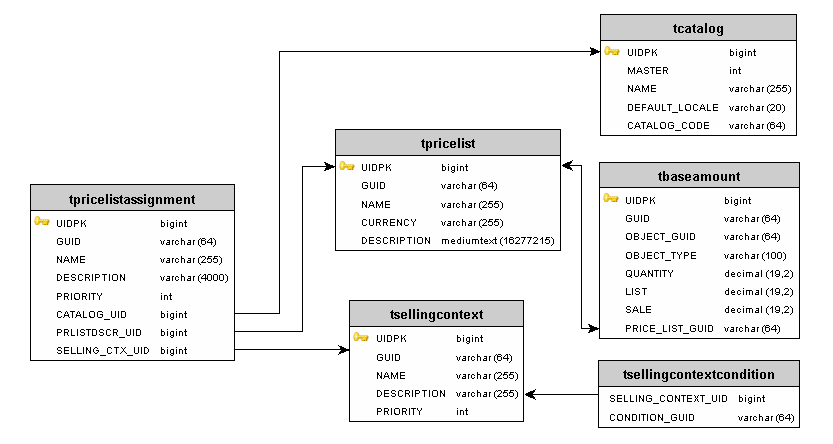
The following database tables are used to store Pricing:
TPRICELIST: Contains the price lists descriptors (metadata about price lists), including the agreement codeTBASEAMOUNT: Contains the list, sale, and recurring prices and price tiersTPRICELISTASSIGNMENT: Contains the prioritized associations between price lists, selling context, and catalogsTSELLINGCONTEXT: Contains the selling contextsTSELLINGCONTEXTCONDITION: Associates the selling context with the conditions that define it. For more information on conditions, see the Tagging Framework sectionTPRICEADJUSTMENT: Contains the price adjustments for bundle constituentsTCMUSERPRICELIST: Contains the price lists that each Commerce Manager user can access