Overview
CyberSource, a Visa solution, is a leading payment provider used by merchants to enable global payment processing and management. CyberSource users can add the CyberSource plugin to the Elastic Path Payments framework to handle credit card payment processing and tokenization.
Cardholder data is sent directly to the CyberSource payment gateway and is returned as a vault (payment) token to the Payments framework. A vault token is a generated number which represents the cardholder data in the Payments framework. Cardholder data such as card number or Card Verification Value (CVV) code is never transmitted to Cortex or stored by Cortex. The token can be used for subsequent pre-authorization requests in place of the actual cardholder data.
CyberSource supports the following methods for credit card token acquisition. Select the method that suits your needs:
Microform: The store front-end keeps its own payment form. CyberSource fields replace only the card number and security code inputs.
Unified Checkout: The store front-end shows a card form that CyberSource builds, inline on its own page.
Direct Post (deprecated): The store front-end hosts all cardholder data fields on the site and the browser posts the details directly to CyberSource.
Hosted Page (deprecated): The store front-end redirects the shopper to the CyberSource page to collect the cardholder data.
warning
CyberSource is retiring Secure Acceptance, which Direct Post and Hosted Page depend on. See KA-11531. CyberSource sends each merchant its own sunset date, after which shoppers cannot add a new card with Direct Post or Hosted Page. Move to Microform or Unified Checkout before your sunset date. For more information, see Migrating from Secure Acceptance.
Microform CyberSource Plugin
With the Microform method, the store front-end keeps its own payment form. CyberSource fields, loaded in iframes, replace the card number and security code inputs, and can be styled to match the rest of the form. The shopper enters the expiry date in fields that the store front-end hosts. The name on the card is taken from the billing address. The card number and security code never reach the store front-end or Cortex.
The Microform workflow when a shopper adds a card at checkout or in their profile:
- The storefront submits the Cortex
requestinstructionsform. The shopper's email must already be set. - The plugin creates a Microform session with CyberSource and returns the
client-library,client-library-integrityandcapture-contextvalues. - The storefront loads the CyberSource JavaScript library and shows the card number and security code fields in its form.
- When the shopper submits the form, the library returns a transient token that expires after 15 minutes.
- The storefront posts the transient token to the Cortex
paymentinstrumentformastransient-token, with the billing address inbilling-address. - The plugin runs a zero dollar authorization on the card and converts the transient token into a Token Management Service customer token, which Cortex saves as the payment instrument. If CyberSource returns no customer token, the plugin saves the third-party token instead.
For more information, see Frontend Integration.
Unified Checkout CyberSource Plugin
With the Unified Checkout method, the store front-end shows a card form that CyberSource builds inline on the storefront page, so the shopper does not leave the site. Unified Checkout is also the path to digital wallets in a later release.
The Unified Checkout workflow when a shopper adds a card at checkout or in their profile:
- The storefront submits the Cortex
requestinstructionsformwith the shopper's country incountry. The shopper's email must already be set. - The plugin creates a Unified Checkout session with CyberSource and returns the
client-library,client-library-integrityandcapture-contextvalues. - The storefront loads the CyberSource JavaScript library and mounts the card form on its page. The card form asks the shopper for the billing address.
- When the shopper submits the card form, the library returns a transient token that expires after 15 minutes.
- The storefront posts the transient token to the Cortex
paymentinstrumentformastransient-token. - The plugin runs a zero dollar authorization on the card and converts the transient token into a Token Management Service customer token, which Cortex saves as the payment instrument. If CyberSource returns no customer token, the plugin saves the third-party token instead.
For more information, see Frontend Integration.
Direct Post CyberSource Plugin (deprecated)
The store front-end hosts all cardholder data fields and the browser posts the details of the fields directly to CyberSource. The cardholder data is collected on either a shopper’s profile or during the checkout process. After collection, Direct Post sends the form to CyberSource, which in return sends a token value to Cortex. The token value is posted to Cortex to create a payment instrument.
Client developers can build a payment form to collect the cardholder data. The page calls Cortex to retrieve the payment instructions. The results of the payment instructions contain values, including a signature,and are required for making calls to CyberSource. These values are posted to CyberSource which tokenizes the cardholder data.
CyberSource provides Cortex with instructions about how to create the payment instrument. There are two sections of data that return, the control data and the payload data. For more information, see Frontend Integration.
The Direct Post workflow when a shopper initiates the checkout process:
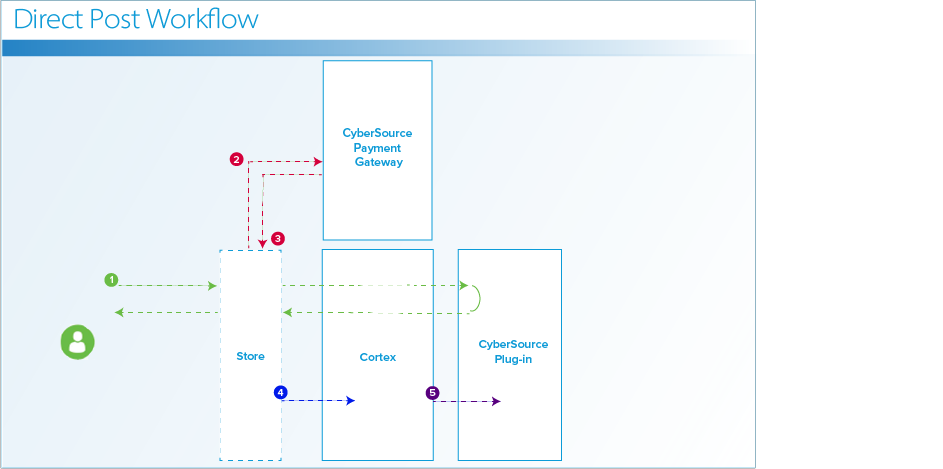
The storefront sends a message to Cortex to retrieve the billing address form resource and the email address form resource.
The storefront sends a message to CyberSource to retrieve the following:
- CyberSource Request Signer, to obtain the signature.
- CyberSource Secure Acceptance Checkout API, to obtain the vault token.
CyberSource sends the vault token to the storefront.
The storefront posts the vault token to Cortex.
Cortex sends the purchase form resource to trigger the purchase and receipt page to CyberSource.
Hosted Page CyberSource Plugin (deprecated)
You can use Hosted Page method of the CyberSource plugin to redirect shoppers to the CyberSource-hosted payment page to enter credit card details.
Before the shopper gets the payment page, the page calls Cortex to retrieve payment instructions. The payment instructions result contains several values including a signature that must be posted to CyberSource when the shopper is redirected to the payment page.
Cardholder details can either be collected for association with the shopper’s profile for subsequent uses or during checkout. Any fields returned by payment instructions results must be posted directly to CyberSource, which renders a payment page. When the shopper enters the details, a token value posts back to the customer endpoint on the site. The token value is posted to Cortex to create the payment instrument.
The Hosted Page workflow when a shopper initiates the checkout process:
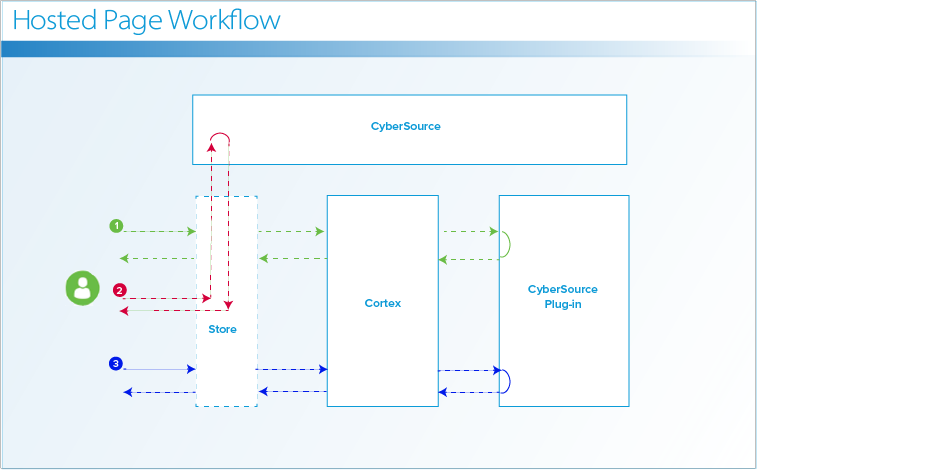
- The storefront sends a message to the CyberSource Request Signer to get a signature.
- The storefront sends a message to CyberSource Secure Acceptance Hosted Checkout API to display the CyberSource billing and payment details for the shopper.
- CyberSource sends a message to Cortex with the vault token to Cortex payment token form resource.