
Checkout and Order Processing
This section contains information about the technical design of checkout and order processing.
Checkout process refers to the sequence of steps taken by the user to provide information required to complete the purchase of products. The user steps typically include supplying billing and shipping addresses, selecting delivery options, and providing payment information.
Order processing includes the synchronous processing of the order carried out by the CheckoutService, as well as subsequent asynchronous actions that complete and update the order.
Checkout Processing
Checkout runs in two phases:
- Pre-capture checkout runs synchronously in
CheckoutService.checkout(). It creates the order, allocates inventory, authorizes payments, and evaluates order hold strategies. - Post-capture checkout runs asynchronously in
PostCaptureCheckoutService.completeCheckout()after the order is accepted. It commits taxes, initiates fulfillment, captures payments, and creates gift certificates.
Pre-capture Checkout
CheckoutService.checkout(ShoppingCart, ShoppingCartTaxSnapshot, CustomerSession, boolean throwExceptions) processes the shopping cart and returns a CheckoutResults object containing the order. The ShoppingCart represents the products, customer, and shipping information. The ShoppingCartTaxSnapshot contains the calculated prices and taxes.
If throwExceptions is true, checkout errors are thrown as InvalidBusinessStateException, for errors to display to the shopper, or EpServiceException. If throwExceptions is false and an order was created, the error is returned in CheckoutResults and the order is marked as failed. Payment errors are reported as PaymentsException. For more information, see Payments.
The main responsibility of the checkout operation is to authorize the payment and persist the order. It is assumed that customer and product information can be changed at any time; therefore, all information about the order, product, customer, and payment must be stored as copies in separate database tables.
Post-capture Checkout
The evaluateOrderHoldStrategiesCheckoutAction action determines whether the order must be held:
- If no hold is required, the action calls
OrderService.triggerPostCaptureCheckout(), which publishes anORDER_ACCEPTEDevent. - If a hold is required, the order is placed on hold. When all holds are resolved, the
ep-order-hold-resolution-message-consumermodule callsOrderService.triggerPostCaptureCheckout().
The ep-order-accepted-message-consumer module consumes the ORDER_ACCEPTED event and calls PostCaptureCheckoutService.completeCheckout(), which executes the post-capture checkout actions. When the actions complete, an ORDER_READY event is published. If an action fails, the executed actions are rolled back and an ORDER_FAILED event is published.
For more information on holding orders, see Order Hold Strategies.
Checkout Actions
Checkout is performed by checkout action classes, which are executed in four groups:
| Group | Interface | Methods | Phase |
|---|---|---|---|
| Setup actions | CheckoutAction | execute() | Pre-capture |
| Reversible actions | ReversibleCheckoutAction | execute() and rollback() | Pre-capture |
| Finalize actions | FinalizeCheckoutAction | execute() | Pre-capture |
| Post-capture actions | ReversiblePostCaptureCheckoutAction | execute() and rollback() | Post-capture |
If a reversible action fails, the executed reversible actions in the same phase are rolled back in reverse order.
The checkout actions are defined as extensible lists in the checkout.xml file in ep-core:
<extensibleList:create id="setupActionsParent"
                       overridableId="setupActions"
                       valueType="com.elasticpath.service.shoppingcart.actions.CheckoutAction">
   <ref bean="preCheckoutCheckoutAction" />
   <ref bean="validationCheckoutAction" />
   <ref bean="updateCustomerCheckoutAction" />
</extensibleList:create>

<extensibleList:create id="reversibleActionsParent"
                       overridableId="reversibleActions"
                       valueType="com.elasticpath.service.shoppingcart.actions.ReversibleCheckoutAction">
   <ref bean="createNewOrderCheckoutAction" />
   <ref bean="setOrderEventOriginatorCheckoutAction"/>
   <ref bean="populateOrderDataCheckoutAction" />
   <ref bean="updateLimitedUsageNumbersCheckoutAction" />
   <ref bean="updateOrderCheckoutAction" />
   <ref bean="allocateInventoryCheckoutAction" />
   <ref bean="createOrderPaymentInstrumentsCheckoutAction"/>
   <ref bean="authorizePaymentsCheckoutAction" />
   <ref bean="evaluateOrderHoldStrategiesCheckoutAction"/>
   <ref bean="createNewOrderEventCheckoutAction" />
</extensibleList:create>

<extensibleList:create id="finalizeActionsParent"
                       overridableId="finalizeActions"
                       valueType="com.elasticpath.service.shoppingcart.actions.FinalizeCheckoutAction">
   <ref bean="clearShoppingCartCheckoutAction" />
   <ref bean="postCheckoutCheckoutAction" />
   <ref bean="logContextOverrideDateSetAction" />
</extensibleList:create>

<extensibleList:create id="reversiblePostHoldResolvedCaptureActionsParent"
                       overridableId="reversiblePostHoldResolvedCaptureActions"
                       valueType="com.elasticpath.service.shoppingcart.actions.ReversiblePostCaptureCheckoutAction">
   <ref bean="processCouponCustomerAssignmentsCheckoutAction"/>
   <ref bean="commitOrderTaxCheckoutAction" />
   <ref bean="initiateFulfilmentCheckoutAction" />
   <ref bean="capturePaymentsCheckoutAction" />
   <ref bean="createGiftCertificatesCheckoutAction" />
</extensibleList:create>
To add or remove checkout actions, use the extensibleList:modify element in your extensions project. For more information, see Extensible Spring Lists.
preCheckoutCheckoutAction, updateOrderCheckoutAction, and postCheckoutCheckoutAction notify the registered checkout event handlers, as described in Implementing Checkout Event Handlers.
Key classes and files
CheckoutService- Service that executes pre-capture checkoutPostCaptureCheckoutService- Service that executes post-capture checkoutCheckoutEventHandler- Interface implemented by a class wired via Spring to theCheckoutServiceso that it can be notified of events during the checkout execution. This is useful for extending or modifying checkout functionalityShoppingCart- The shopping cart contains items to be purchased during a checkoutPaymentProvider- Interface implemented by payment provider plugins that handle financial transactions. For more information, see Payments.Order- Represents a completed order for productsOrderSku- A snapshot of information about a purchased SKU at the time of checkoutOrderShipment- Contains shipping information for an orderInventory- Contains inventory information for a particular product SKUOrderAddress- A snapshot of the customer's address (billing and shipping) at the time of checkout
Implementing Checkout Event Handlers
One way to extend the checkout process is to create a class that implements the CheckoutEventHandler interface, add it to the checkoutEventHandlers list in checkout.xml, and implement one or more of the following methods:
preCheckout- called bypreCheckoutCheckoutAction, before any other checkout action is executedpreCheckoutOrderPersist- called byupdateOrderCheckoutAction, just before the populated order is savedpostCheckout- called bypostCheckoutCheckoutAction, after the pre-capture checkout actions have completed
postCheckout is called before the post-capture checkout actions run, so payments are not yet captured and fulfillment is not yet initiated. To act on an order after post-capture checkout, consume the ORDER_READY event.
For example, to call a web service every time a checkout is completed, write a class that implements CheckoutEventHandler and implement the web service call in the postCheckout() method.
Important concepts
Transaction boundaries
The checkout service is configured in Spring so that the checkout method does not run as a transaction. This is required to persist audit trails for checkout actions.
For example, if a payment authorization fails, we want to record this in the database. If the checkout method was transactional, the database operation would be rolled back automatically.
However, the service methods invoked by checkout actions need to execute within transactions if they update the database.
Creating an Order
The createNewOrderCheckoutAction action uses the OrderFactory to create and persist an empty Order, then populates it from the shopping cart.
Every order has a unique order number. The order number is generated from the TORDERNUMBERGENERATOR table when the empty order is first persisted, so it is available to all subsequent checkout actions.
The OrderService provides services to query on Orders and persist Orders, but not to generate Orders. Order generation is performed by the checkout actions.
There are methods to search for orders by various basic criteria, or you can pass in an OrderSearchCriteria object. The search methods translate the given criteria into a query for the persistence engine using the OrderCriterion class.
Data replication
At order time a snapshot of various objects must be created and stored in separate tables to insulate the Order details from any future changes in prices, inventory, addresses, etc. Objects are copied as follows:
ProductSkutoOrderSku- Billing address to
OrderAddress, for theOrder - Shipping address to
OrderAddress, for theOrderShipment
Attributes such as shipping cost, quantity, taxes, etc. are calculated at Order time and frozen in the appropriate object (Order, OrderShipment, OrderSku, etc).
Failed Orders
If checkout fails after the order is created, the order is saved to the database (TORDER table) with the order's STATUS set to FAILED, and an ORDER_FAILED event is published. The Quartz job, cleanupFailedOrdersJob, will eventually remove the failed order from your system.
Asynchronous Order Processing and States
Checkout generates asynchronous order events. These events trigger post-capture checkout and subsequent processing of the order by internal handlers, such as email, and external systems, such as fulfillment. See Asynchronous Event Messaging for more information on creating and consuming events.
The diagram below shows the order STATES in the boxes and the [EVENTS] that are sent when transitioning to a new state.
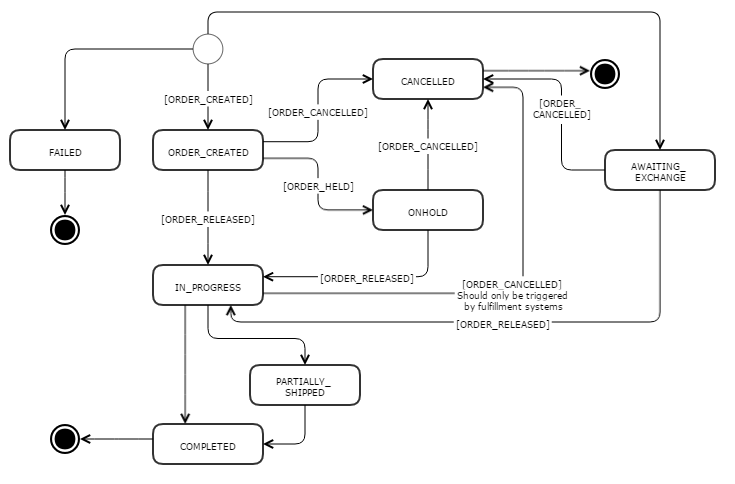
The order states are defined in the OrderStatus extensible enum. The values are:
CREATEDONHOLDIN_PROGRESSPARTIALLY_SHIPPEDCOMPLETEDAWAITING_EXCHANGECANCELLEDFAILED
Order events are defined in the OrderEventType extensible enum. The values include:
ORDER_CREATEDORDER_HELDORDER_ACCEPTEDORDER_READYORDER_RELEASEDORDER_COMPLETEDORDER_CANCELLEDORDER_FAILED
Shipment state transitions and events can be triggered by order state transitions, or conversely can initiate order state transitions.
Shipment states are defined in the OrderShipmentStatus extensible enum. The values are:
AWAITING_INVENTORYINVENTORY_ASSIGNEDRELEASEDSHIPPEDONHOLDCANCELLEDFAILED_ORDER
Shipment events are defined in the OrderEventType extensible enum. The values are:
ORDER_SHIPMENT_CREATEDORDER_SHIPMENT_SHIPPEDORDER_SHIPMENT_RELEASE_FAILED
A common project requirement is to review orders, such as for fraud, before payments are captured and fulfillment is initiated. To do this, implement an order hold strategy. The order is held after payment authorization, and post-capture checkout runs only after all holds are resolved. For more information, see Order Hold Strategies.
Payments
Payments are processed by payment provider plugins. For information on the payment architecture and on implementing a payment provider plugin, see Payments and Payments Plugin.
Shipping and Billing Addresses
A customer can have many addresses, which are managed by the AddressService. The addresses are used for shipping as well as for billing, and are not distinguished between them. A customer can have a single preferred shipping address and a single preferred billing address.
During the checkout process, the front end is responsible for prompting the customer to create and/or select the address to use for the checkout in progress. The shopping cart maintains references to the selected shipping and billing addresses to be used in the order.
Key classes and files
AddressInterface implemented by all address classes.
AddressServiceService for finding and saving a customer's addresses.
CustomerMaintains references to the preferred shipping and billing addresses.
ShoppingCartMaintains a reference to the billing and shipping addresses a customer has selected for a particular checkout.
AbstractAddressImplAbstract implementation of the Address interface.
CustomerAddressImplSubclass of
AbstractAddressImplused to represent a customer's addresses. It is required to enable the persistence engine to store these addresses in a separate table from order addresses.OrderAddressImplSubclass of
AbstractAddressImplused to represent addresses associated with orders. It is required to enable the persistence engine to store these addresses in a separate table from customer addresses.
Implementation details
Any address can be selected as a shipping or billing address. The shipping options available for a shipping address are determined by the shipping calculation plugin.
During the final checkout, a copy of the customer's address is made and associated with the order. This prevents the loss of the address information if the customer modifies or deletes the address.
Shipping Options
During the checkout process, customers select a shipping option. After the shipping address has been selected, CheckoutService.retrieveShippingOption() calls ShippingOptionService.getShippingOptions() to get the shipping options available for the shopping cart. If the selected shipping option is not valid, the default shipping option is selected.
Shipping options and costs are provided by the shipping calculation plugin. The default plugin uses the shipping regions and shipping service levels configured in Commerce Manager. For more information, see Shipping Calculation.