Import Conflict Resolution
When importing data into an Elastic Path deployment, there is the possibility of conflicts. If an object being imported has the same ID as an object in the target deployment, you need to indicate which one you want to keep. You can configure how the Import-Export tool resolves conflicts by specifying import strategies. You can also configure how dependencies of those objects are handled in the event of conflicts.
Import Strategies
You can configure different import strategies for each type of object being imported. Supported import strategies are:
-
Insert
This option only imports new objects. If the ID of an object being imported matches the ID of an existing object, the object is not imported.
-
Update
This option only imports objects whose IDs match existing object. The existing object is overwritten with the object being imported.
-
Insert or Update
Combines the Insert and Update options. This option imports new objects and overwrites existing objects when objects being imported have the same IDs as existing objects
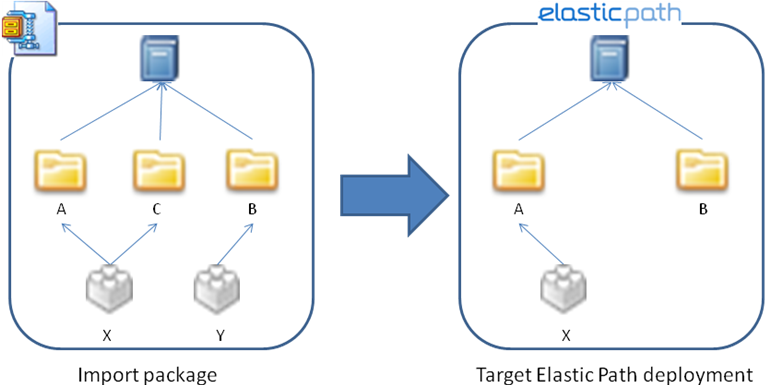
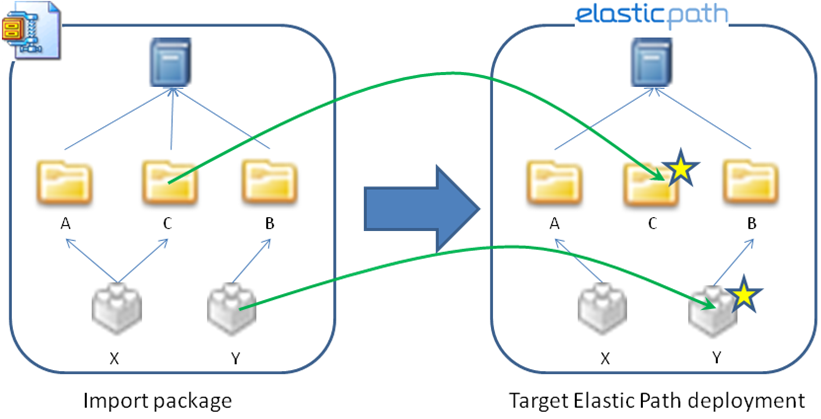
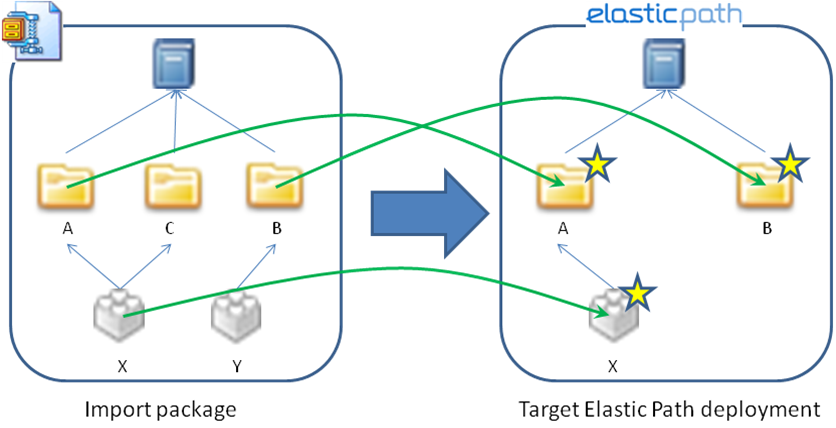
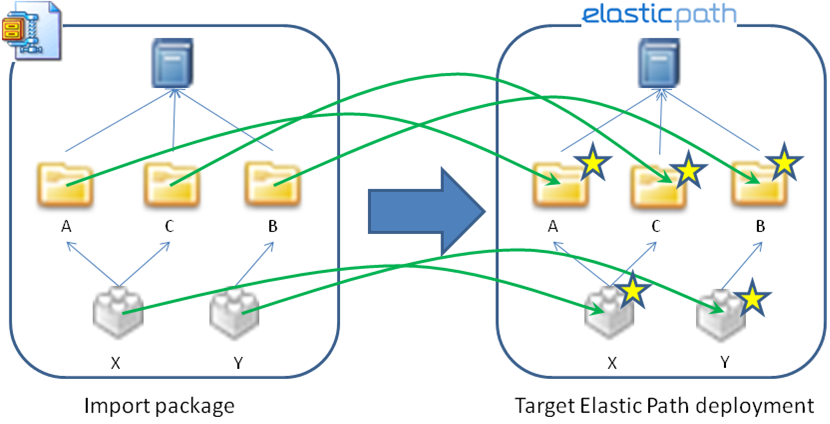
For example, the following diagram shows an Elastic Path deployment that contains two categories, A and B. Category A contains one product, product X.
The package being imported contains categories A and B, and a new category named C. It also contains a new product, product Y, which is associated with category B.
Insert
If the Insert import strategy is selected, category C and product Y are imported into Elastic Path. Category A, Category B, and Product X remain unchanged. (The stars indicate objects that have been updated after the import.)
Update
If the Update import strategy is selected, categories A and B are imported into Elastic Path. The imported versions replace the existing categories A and B. Category C and product Y are not imported.
Insert or Update
If the Insert or Update strategy is used, all the objects are imported. The existing objects are overwritten with the versions in the import package.
Combining Import Strategies
You can select different import strategies for products, categories, and catalogs. For example, you can select the Insert or Update strategy for categories and catalogs, and Update for products.
This flexibility can be useful in some situations, but it can also cause problems. As an example, assume that catalogs are set to use Update and products are set to use Insert or Update. If the import package contains a new catalog and new products associated with that catalog, the following will occur when you import the package:
- The new catalog will not be imported because the Update strategy is selected.
- The products will fail to import because their catalog was not imported.
To prevent problems like this, do not use Update for catalog or category object types if any object types below them in the hierarchy are using Update or Insert or Update.
Dependency Conflicts
In addition to specifying conflict resolution, you can configure how to handle dependencies of those objects when there are conflicts. A dependency conflict occurs when an object exists in both the import package and the target system and each version has different dependencies.
There are two options for handling dependency conflicts:
-
Clear collection
This option removes all existing dependencies of the specified type from the target object and adds any new dependencies.
-
Retain collection
This option keeps existing dependencies and adds any new dependencies to the target object.
If the import package contains updates to existing dependencies the updates are applied. (Note that this option is not available for Product Bundles. Product Bundles must use Clear collection. This ensures that the ordering of bundle constituents is maintained.)
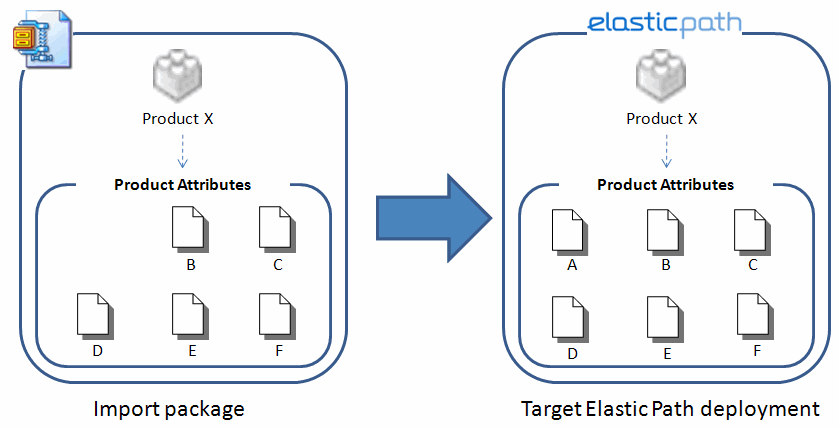
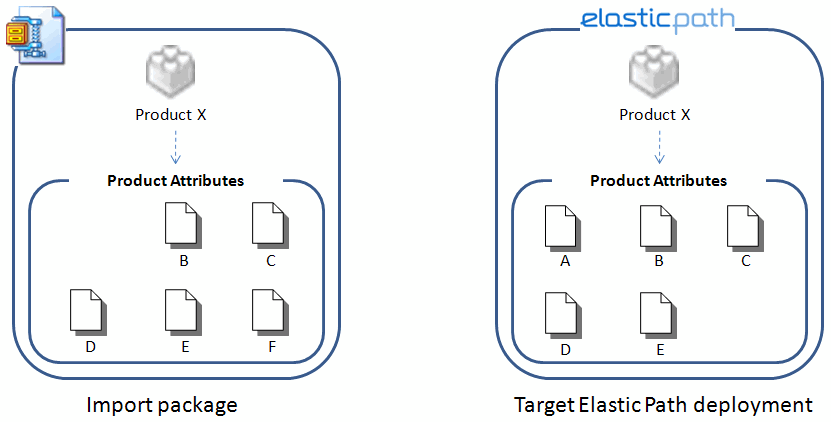
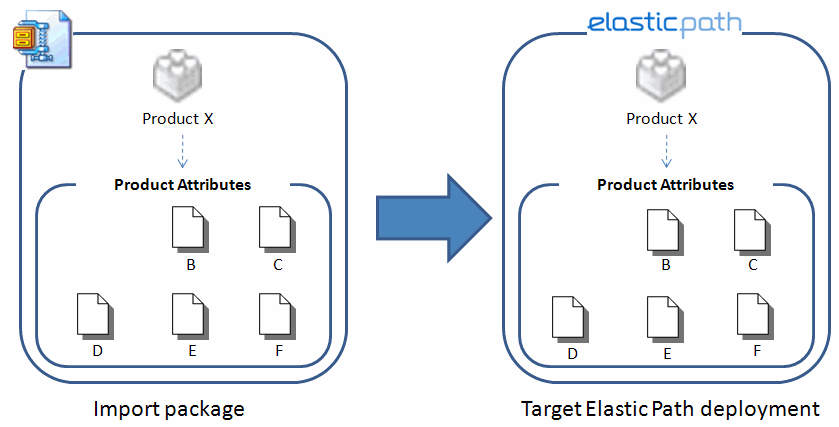
For example an Elastic Path deployment contains product X containing attributes A, B, C, D, and E. The package being imported contains product X as well, but has a slightly different set of product attributes; it does not have A and it has a new product attribute, F.
Clear Collection
If the Clear collection option is selected, the existing dependencies are removed. The net effect of this is that product attribute A is removed, F is added, and any changes made to the other product attributes are applied.
Retain Collection
If the Retain collection option is selected, the existing product attributes remain the same and F is added. If the import package contains updates to existing product attributes, the updates are applied.