Search for Items
This topic provides instructions to perform offer search and keyword search.
Reduce the number of calls required for searching by using ?followlocation. For more information on this feature, see FollowLocation.
The examples in this section follows the standard search work flow, which does not use ?followlocation.
Offer Search Workflow
-
GETsearches. -
GEToffersearchform.For example,
https://www.onlinestore.com/searches/<scope>/offer/form. -
Populate the form and link to
offersearchaction. -
GETthe search results link returned by Cortex. -
To view the item details,
GETa search result element.
Keyword Search Workflow
-
GETsearches. -
GETkeywordsearchform.For example,
https://www.onlinestore.com/searches/<scope>/keywords/form. -
Populate the form and link to
itemkeywordsearchaction. -
GETthe search results link returned by Cortex . -
To view the item details,
GETa search result element.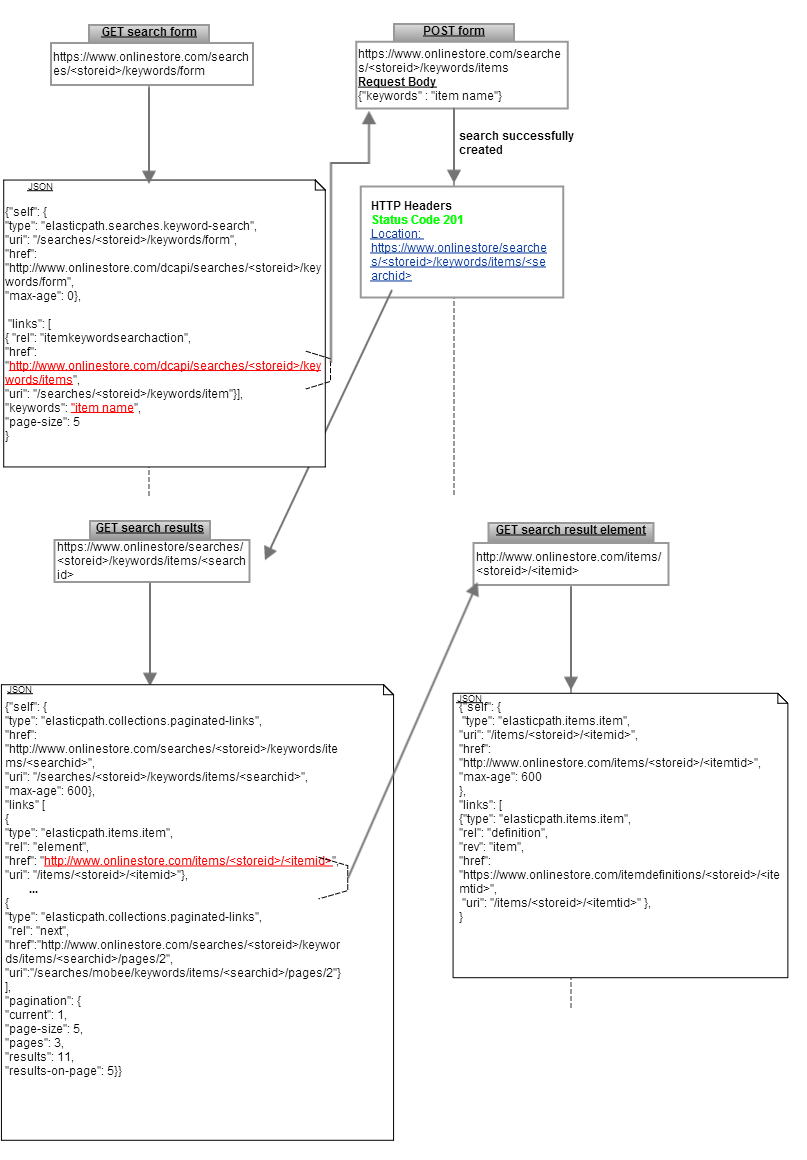
Use the "rel":"next" and "rel":"previous" links to navigate through the search results.