Shipping Calculation
Overview
The Shipping Calculation SPI (Service Provider Interface) enables the integration of third-party shipping provider APIs, such as FedEx or UPS (United Parcel Service), with Self-Managed Commerce. With this integration, customers can view the available shipping options and cost associated with each shipping option during the checkout flow.
The default Elastic Path shipping calculation plugin calculates shipping cost based on the shipping region and shipping service level information available in the database. The customer service representatives can access and configure this plug-in in Self-Managed Commerce Manager.
The custom shipping options are integrated using SPIs. Self-Managed Commerce invokes this plug-in through an API and the shipping option service is integrated with Self-Managed Commerce through SPI.
The shipping calculation API provides the following capabilities:
- Unpriced Shipping Option lookup: Provides shipping options without a shipping cost
- Priced Shipping Option lookup: Provides shipping options with a shipping cost
- Default Shipping Option lookup for Store: Provides default Elastic Path shipping option
Caching Service
The caching service in the shipping calculation API implementation reduces the requests Cortex makes to the third-party shipping calculation APIs. The caching service caches the responses from third-party services and passes only new requests to the third-party services. This service reduces third-party calls that Cortex makes. For more information, see Cortex Caching.
Shipping Calculation Options
Elastic Path provides two shipping options to the user, priced shipping options and unpriced shipping options. The implementations of ShippingOptionService and PricingSnapshotService call the ShippingCalculationService classes. Both services return a ShippingOptionResult object, which contains a list of ShippingOption objects. Each ShippingOption object represents a shipping provider such as FedEx, which is available for the order. The following diagram illustrates the workflow for unpriced shipping options and priced shipping options:
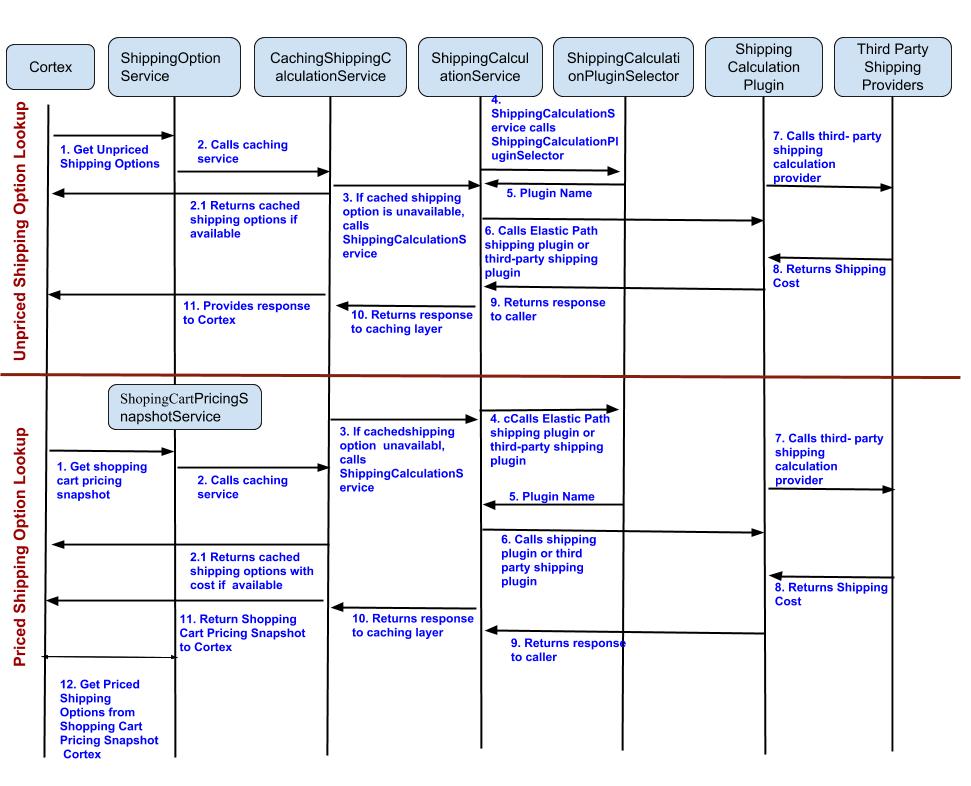
Unpriced Shipping Options
Unpriced shipping options provide the details of the available shipping options. Unpriced shipping options are returned when a user does not provide an address to ship the order, or if the shipping prices cannot be calculated before placing an order. For example, an unregistered user or incomplete purchase workflow.
Workflow
-
Cortex calls the
ShippingOptionServiceclass.The
ShippingOptionServiceclass is the high-level API that takes Commerce Engine domain objects, such as ShoppingCart and Address. -
The
ShippingOptionServiceclass calls one of the following:-
CachingShippingCalculationServiceIf
ShippingOptionServicecall is already made for the same shopping cart with the same details,CachingShippingCalculationServicereturns the cached shipping cost,ShippingOptionResult. -
ShippingCalculationServiceFor a new cart, the request is passed to this service to get the shipping cost. The
ShippingCalculationServiceuses Data Transfer Objects (DTO) to decouple the underlying calculation from the Commerce Engine
-
-
ShippingCalculationServicecallsUnpricedShippingCalculationPluginSelector. -
UnpricedShippingCalculationPluginSelectorselects the default Elastic Path shipping calculation plug-in or a third-party shipping calculation plug-in as required and returnsShippingOptionResult.This request returns the available shipping options even if the shipping address and cart details are not provided.
-
The shipping calculation plug-in returns the shipping cost to Cortex.
Priced Shipping Options
Priced shipping options are provided to a user before completing payment for an order to calculate total price of the order. Priced shipping options are available only if the customer provides the shipping address when completing the order. The PricingSnapshotService examines the shopping cart and returns the pricing details of the shopping cart.
ShoppingCartPricingSnapshot getPricingSnapshotForCart(ShoppingCart shoppingCart);
Workflow
-
Cortex calls the
ShippingCalculationService, which calls thePricingSnapshotService.This service returns the
ShoppingCartPricingSnapshotwith the cart details. -
PricingSnapshotServicecalls one of the following:-
ShippingCalculationServiceFor a new cart, the request is passed to this service to get the shipping cost.
final ShoppingCartPricingSnapshot shoppingCartPricingSnapshot = pricingSnapshotService.getPricingSnapshotForCart(shoppingCart);final PricedShippableItemContainer<PricedShippableItem> pricedShippableItemContainer =pricedShippableItemContainerTransformer.apply(shoppingCart, shoppingCartPricingSnapshot);ShippingCalculationResult pricedShippingOptions = cachingShippingCalculationService.getPricedShippingOptions(pricedShippableItemContainer); -
CachingShippingCalculationServiceIf
ShippingOptionservice call is already made for the same shopping cart with the same details,CachingShippingCalculationServicereturns the cached shipping cost
-
-
ShippingCalculationServicecallsShippingCalculationPluginSelector. -
ShippingCalculationPluginSelectorselects the default Elastic Path shipping calculation plug-in or a third-party shipping calculation plug-in as required. -
The shipping cost is returned to Cortex.
Shipping Calculator Implementation
You can implement a shipping calculation plug-in by creating a class that extends AbstractShippingCalculationPlugin and implements the following ShippingCalculationCapability interfaces:
-
ShippingCostCalculationCapabilityNo methods are defined. A marker interface to designate which capability interfaces are shipping calculation ones.
-
ShippingOptionListCapabilitygetUnpricedShippingOptions(ShippableItemContainer<?> unpricedShippableItemContainer);Returns a
List<ShippingOption>object that lists all shipping options for an unpriced lookup. -
ShippingOptionListAllCapabilitygetAllShippingOptions(String storeCode, Locale locale);Returns a
List<ShippingOption>object that lists all shipping options for the specific store. -
ShippingOptionListPerDestinationCapabilitygetUnpricedShippingOptions(ShippingAddress destinationAddress, String storeCode, Locale locale);Returns a
List<ShippingOption>object that lists all shipping options for the given store and destination address
Caching Implementation
Caching is implemented in the com.elasticpath.shipping.connectivity.service.cache package. The caching service consists of the following:
-
The
CachingShippingCalculationServiceImplclass, which implementsShippingCalculationServiceThe
ShippingCalculationServiceimplementation provides cached shipping options to the user through theShippingOptionService. -
The
ShippingCalculationResultCacheKeyinterface and a default implementation ofShippingCalculationResultCacheKeyImplinterfaceThe
ShippingCalculationResultCacheKeyImplimplementation defines information as a key to retrieve the cached shipping option. -
The
ShippingCalculationResultCacheKeyBuilderinterface and default implementation ofShippingCalculationResultCacheKeyBuilderinterfaceUse this class to create cache keys for shipping options
Selection of a Shipping Calculation Plugin
The selection of a shipping calculation plugin is defined in the PricedShippingCalculationPluginSelector and UnpricedShippingCalculationPluginSelector interfaces in the com.elasticpath.shipping.connectivity.service.selector package. The default implementation of these interfaces returns the default Elastic Path shipping calculator plugin.
A selector might choose different plugins based on the Elastic Path store being serviced for store-specific shipping plugins. A selector can also choose a different plugin depending on what is being shipped. For example, if you want high value goods to be shipped by a particular shipping provider such as FedEx rather than USPS (United States Postal Service), you can implement that functionality in the selector class.
When implementing a new shipping calculation plugin, you must override the default implementation of the following methods to return the shipping calculator plugin implementation:
PricedShippingCalculationPluginSelector.getPricedShippingCalculationPlugin()UnpricedShippingCalculationPluginSelector.getUnpricedShippingCalculationPlugin()
These implementations must provide logic to select your shipping calculation plugin, however the default setting must be to select Elastic Path’s default shipping calculator plugin.
Creating an Implementation of Shipping Calculation API
Elastic Path provides new plugins, such as shipping-calculation-connectivity-api and shipping-calculation-plugin-epcommerce, to support shipping calculation API framework. The shipping-calculation-connectivity-api bundle defines the interfaces that a new plugin needs to implement. The custom plugin replaces the shipping-calculation-plugin-epcommerce bundle.
To implement a new plugin, you must replace the following dependency with the new dependencies in the cortex and cm-libs module’s POM.xml:
<dependency>
    <groupId>com.elasticpath</groupId>
    <artifactId>shipping-calculation-plugin-epcommerce</artifactId>
</dependency>
<dependency>
    <groupId>com.elasticpath</groupId>
    <artifactId>shipping-calculation-epcommerce</artifactId>
</dependency>
-
Create a new module in the extensions module for your shipping calculation API called Shipping Calculation Plugins.
<?xml version="1.0" encoding="UTF-8"?><project xmlns="http://maven.apache.org/POM/4.0.0"xmlns:xsi="http://www.w3.org/2001/XMLSchema-instance"xsi:schemaLocation="http://maven.apache.org/POM/4.0.0 http://maven.apache.org/xsd/maven-4.0.0.xsd"><parent><groupId>com.elasticpath.extensions</groupId><artifactId>ext-commerce-engine-parent</artifactId><version>0-SNAPSHOT</version></parent><modelVersion>4.0.0</modelVersion><name>Shipping Calculation Plugins</name><artifactId>ext-shipping-calculation-plugins-parent</artifactId><packaging>pom</packaging><modules><module>Name of the custom plugin folder</module></modules></project> -
Add Shipping Calculation Plugins as a module in the
extensions/pom.xmlfile. -
Create a directory within the Shipping Calculation Plugins directory for your specific plugin such as
custom_shipping_calculation_plugin. -
Add the following
POMfile to the plugin:<project xmlns="http://maven.apache.org/POM/4.0.0" xmlns:xsi="http://www.w3.org/2001/XMLSchema-instance"xsi:schemaLocation="http://maven.apache.org/POM/4.0.0 http://maven.apache.org/xsd/maven-4.0.0.xsd"><modelVersion>4.0.0</modelVersion><parent><artifactId>core</artifactId><groupId>com.elasticpath</groupId><version>0-SNAPSHOT</version></parent><name>EP Shipping Calculation Plugin</name><dependencies><dependency><groupId>com.elasticpath</groupId><artifactId>ep-money</artifactId></dependency><dependency><groupId>com.elasticpath</groupId><artifactId>shipping-calculation-connectivity-api</artifactId></dependency><dependency><groupId>com.elasticpath</groupId><artifactId>shipping-calculation-epcommerce</artifactId></dependency><dependency><groupId>commons-collections</groupId><artifactId>commons-collections</artifactId></dependency><dependency><groupId>log4j</groupId><artifactId>log4j</artifactId></dependency><dependency><groupId>com.elasticpath</groupId><artifactId>ep-test-utils</artifactId></dependency><dependency><groupId>junit</groupId><artifactId>junit</artifactId></dependency><dependency><groupId>org.assertj</groupId><artifactId>assertj-core</artifactId></dependency><dependency><groupId>org.mockito</groupId><artifactId>mockito-core</artifactId></dependency></dependencies><build><plugins><plugin><artifactId>maven-checkstyle-plugin</artifactId></plugin><plugin><artifactId>maven-pmd-plugin</artifactId></plugin><plugin><groupId>org.apache.felix</groupId><artifactId>maven-bundle-plugin</artifactId><extensions>true</extensions></plugin></plugins></build></project> -
Create standard Maven directories in the following structure in this module:
src/main/java/resources/test/java/resources/ -
Create a class to extend
AbstractShippingCalculationPlugin./*package com.elasticpath.shipping.connectivity.spi;import java.io.Serializable;import com.elasticpath.shipping.connectivity.spi.capability.ShippingCalculationCapability;/*** Service Provider Interface for extension classes implementing shipping calculation plugins.*/public abstract class AbstractShippingCalculationPlugin implements ShippingCalculationPlugin, Serializable {/*** Serial Version UID.*/private static final long serialVersionUID = 1L;@Overridepublic <T extends ShippingCalculationCapability> T getCapability(final Class<T> capability) {if (hasCapability(capability)) {return capability.cast(this);}return null;}@Overridepublic <T extends ShippingCalculationCapability> boolean hasCapability(final Class<T> capability) {return capability.isAssignableFrom(this.getClass());}} -
Implement
ShippingCostCalculationCapability,ShippingOptionListCapability,ShippingOptionListAllCapability, andShippingOptionListPerDestinationCapability.Implement shipping calculation capability as in the following example:
public Money calculateShippingCost(final ShippingServiceLevel shippingServiceLevel,final Collection<? extends ShippableItem> shippableItems,final Money shippableItemsSubtotal,final Currency currency) {return shippingServiceLevel.getShippingCostCalculationMethod().calculateShippingCost(shippableItems, shippableItemsSubtotal, currency, productSkuLookup);} -
Add the plugin into the Cortex and Commerce Manager modules.