Legacy Implementation Strategies
With Elastic Path 7.4 release, the dispatch model or the legacy Cortex programming model is being deprecated and will not be supported in the future. For more information about the deprecation plan, see Dispatcher Deprecation Notice.
This section explains the patterns for use to implement and customize Cortex. Most resources use a combination of these patterns, which:
- Take the guesswork of when/why/where/how to create new resources
- Pair the business needs to an established pattern
- Get building implementations using existing patterns rather than spending time designing/discovering your own patterns
- Understand how the JSON representations and URIs connect to the pattern
Cortex Implementation Patterns
- Resource Lookup - Retrieves a related set of data from your backend system through Cortex
- Read From Other - Reads data from another resource
- Link Strategy - Adds a link to a resource on another resource representation
- Resource Update - Updates a resource status with data from a client application
- Form - Provides customers with the ability to create something from information entered into a form. For example, creating an address for a profile, adding a cart to an order, adding an order to a purchase, or searching for items
- Selector - Provides customers with the ability to make selections, such as selecting a billing address to use for an order, the options for an item, the payment means to use for an order, and so on
Resource Lookup
Problem: How do I surface up a single set of related data through Cortex API?
You have a set of related data you want to surface up to client applications through Cortex. For example, you have in-store promotions that alternate each day. Your store marketers change the promotions in their backend system and client developers need to display these promotions through their client applications.
If you were customizing another API, you would likely modify an existing resource that is related to promotions in order to surface up this data. However, this is a bad way to go about customizing a product. Elastic Path is continually updating the Cortex, so if you modify the default source code your Cortex will break when you upgrade. Also—and this is the main reason—modifying the default code to add some additional functionality to a resource defeats the purpose of Cortex design. Cortex is designed as a set of small independent resources to promote design qualities like cohesion (single responsibility) and to promote extension by composition. These designs help to maintain a clean/clear/consistent design over time as well as minimize the need to make breaking changes to the default code.
Solution: Create a new resource with the Resource Lookup (GET) pattern to retrieve a set of related data from your backend system and surface it through a single resource in Cortex.
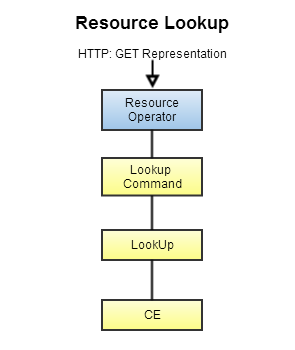
Resource URI

Resource JSON Representation
Below is a JSON representation for a resource that uses the Resource Lookup (GET) pattern. The data is sparse in this example, but the idea is that this type of pattern returns a single set of related data. For example, the cart resource uses the Resource Lookup (GET) pattern to surface up cart data in a JSON representation.
When to Use
You want to surface a related set of data to a client application through a single resource.
Cortex Resources using this Pattern
Nearly every resource uses this pattern
Read From Other
The Problem: How to reuse an existing resource’s functionality in s new resource?
- You want to reuse another resource’s functionality in your resource
- You want a resource to depend on another resource
- You want to keep your resource’s functionality granular
Cortex extension design methodology is to create new resources that augments existing behavior, not modify the default source code to get the required behavior.
Another problem you may experience is that you’re creating a resource that needs to depend on another resource. Take for instance, the totals resource. This resource depends on other resources to function. For example, totals uses an RFO to read lineitems in a cart, then calculates the total cost of the items in the cart.
The Solution: Read From Other(RFO) - Create a new resource with the RFO pattern to read data from another resource.
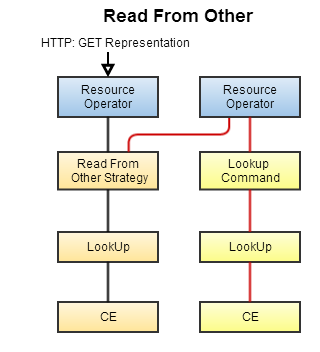
With a RFO, you don’t need to reinvent the wheel with your resources. The RFO can retrieve data from another resource, so you don’t have to build out that functionality.
The RFO pattern can also help keep your resource functionality granular. Take for instance the availabilities and items resources. The availabilities resource uses an RFO to read an item, get its ID and scope, then uses those details to retrieve the item availability from the back end system. This is opposed to having one resource that does these two separate responsibilities. With granularity like this you can replace the availabilities resource with a custom resource that interacts with another back end system without it affecting the items resource.

The resource URI, identified at the end of the URI, gets the profiles representation. The extensionprofile resource consumes the profiles representation and then surfaces its representation.
Resource JSON Representation
Below is the JSON representation for the extensionprofile, which uses the RFO pattern. The extensionprofile resource reads the profiles resource’s representation and then creates its own representation from the data. In the example below, the family-name and given-name have been read from the profiles resource, added to the extensionprofile’s representation, and then surfaced up to the client application along with the profileId. In this way, the profile’s resources functionality has been extending without changing the default code for profiles.
{
    "self": {
         "type": "application/vnd.mycompany.extensionprofile",
         "href": "https://localhost:8443/cortex/extensionprofile/profiles/mobee/gy3ukmrygbaugljxiu4dmljtgjatgljvhfbdeljwgeyemrrsinatgoceiq",
         "uri": "/extensionprofile/profiles/mobee/gy3ukmrygbaugljxiu4dmljtgjatgljvhfbdeljwgeyemrrsinatgoceiq"
    },
    "familyName": "Harris",
    "name": "Oliver",
    "profileId": "gy3ukmrygbaugljxiu4dmljtgjatgljvhfbdeljwgeyemrrsinatgoceiq",
    "links": [
        {
            "type": "elasticpath.profiles.profile",
            "rel": "profile",
            "rev": "extensionprofile",
            "href": "https://localhost:8443/cortex/profiles/mobee/gy3ukmrygbaugljxiu4dmljtgjatgljvhfbdeljwgeyemrrsinatgoceiq",
            "uri": "/profiles/mobee/gy3ukmrygbaugljxiu4dmljtgjatgljvhfbdeljwgeyemrrsinatgoceiq"
        }
    ]
}
When to use
Reuse an existing resource’s data in your resource - For example, the rates resource uses an RFO to read the items resource’s ID and scope to retrieve in order to retrieve the item’s cost and billing frequency.
Cortex Resources using this Pattern
availabilities- Uses an RFO to read a cart’slineitemsand then surface up the lineitem’s availabilityprices- Uses an RFO to read a cart’s line items and then retrieve the promoted prices for the itemtotals- Uses an RFO to read the items in a cart line items and then surfaces up the total cost of the items in the cart
Link Strategy
The Problem: How to link the resources that is being built to related default resources or other customized resources?
You want to connect the resource that you build with another resource, but cannot use RFO.
The Solution: Create a resource that adds a link to itself on another resource’s representation.
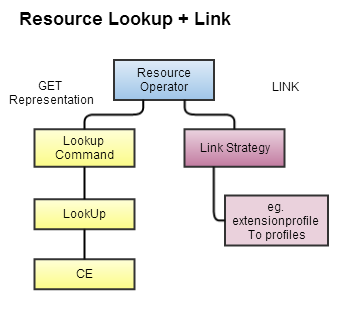
Cortex recommendations resource is a crosscutting resource that provides functionality to the items and navigations resources. The recommendations resource uses a Link Strategy to attach links to the items and navigation resources. Using these links, client applications can follow them to see recommended products for specific items and navigations.
When you use link strategy, you need not modify the resource you’re linking to. The links are attached dynamically so the resource being linked to doesn’t even know it has a link. This is Cortex’s secret admirer rule. This way you can build out relationships without having to worry about code upgrade paths.

Resource JSON Representation
Below is the JSON representation for the profiles representation.
{
    "self": {
        "type": "elasticpath.profiles.profile",
        "href": "https://localhost:8443/cortex/profiles/mobee/gy3ukmrygbaugljxiu4dmljtgjatgljvhfbdeljwgeyemrrsinatgoceiq",
        "uri": "/profiles/mobee/gy3ukmrygbaugljxiu4dmljtgjatgljvhfbdeljwgeyemrrsinatgoceiq"
    },
    "family-name": "Harris",
    "given-name": "Oliver",
    "links": [
        {
            "type": "elasticpath.collections.links",
            "rel": "addresses",
            "rev": "profile",
            "href": "https://localhost:8443/cortex/profiles/mobee/gy3ukmrygbaugljxiu4dmljtgjatgljvhfbdeljwgeyemrrsinatgoceiq/addresses",
            "uri": "/profiles/mobee/gy3ukmrygbaugljxiu4dmljtgjatgljvhfbdeljwgeyemrrsinatgoceiq/addresses"
        },
        {
            "type": "elasticpath.collections.links",
            "rel": "paymentmethods",
            "rev": "profile",
            "href": "https://localhost:8443/cortex/paymentmethods/mobee",
            "uri": "/paymentmethods/mobee"
        },
        {
            "type": "application/vnd.mycompany.extensionprofile",
            "rel": "extensionprofile",
            "rev": "profile",
            "href": "https://localhost:8443/cortex/extensionprofile/profiles/mobee/gy3ukmrygbaugljxiu4dmljtgjatgljvhfbdeljwgeyemrrsinatgoceiq",
            "uri": "/extensionprofile/profiles/mobee/gy3ukmrygbaugljxiu4dmljtgjatgljvhfbdeljwgeyemrrsinatgoceiq"
        },
        {
            "type": "elasticpath.collections.links",
            "rel": "purchases",
            "href": "https://localhost:8443/cortex/purchases/mobee",
            "uri": "/purchases/mobee"
        }
    ]
}
Cortex Resources using this Pattern
lineitems- Creates a link to the cart’s representationorders- Creates links to the purchase, carts, deliveries, and billinginfo representationsrecommendations- Adds links to items and navigationsaddresses- Adds a link to a profilesearch- Adds links to keyword search and offer search
When to Use
Link resources to other related resources.
Resource Update
The Problem: How do I update a resource with data from a client application?
You need to update a resource with data from a client application.
Often, client applications need to update a resource data based on information provided by the client application. Changing an address, password, profile, and so on, are all examples of updating data.
The Solution: Resource Update - Create a resource that updates its state with data from a client application.
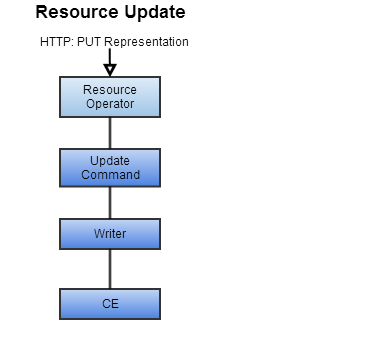
Resources can accept PUT requests from client applications and execute write requests to update the data in the backend system.

Resource JSON Representation
Below is the address JSON object that will be sent to the addresses resource.
{
    "address": {
        "country-name": "CA",
        "locality": "Richmond",
        "postal-code": "V6qE4s",
        "region": "BC",
        "street-address": "14300 Riverport",
        "street-address-2": "",
        "street-address-3": ""
    },
    "name": {
        "family-name": "Tiger",
        "given-name": "Tom"
    }
}
Cortex Resources using this Pattern
lineitems- Accepts aPUTrequest to update the quantity of items in the lineitemprofiles- Accepts aPUTrequest to update the customer profile dataaddresses- Accepts aPUTrequest to update address details
When to Use
You want to update a resources state with data from the client application.
Reference Example
Look at lineitems, profiles, and the addresses resources.
Form
The Problem: How do I create data in the Cortex API?
You need a way for client applications to create data in Cortex.
A common problem is enabling client applications to create data in Cortex. For example, creating a new customer, a new address or a new payment method.
The Solution: Create a resource with a form to provide customers with the ability to create something in the Cortex from the data they’ve entered in a form.

Cortex uses forms to create data. For example, creating an address for a profile, creating a new customer, adding a cart to an order, or adding an order to a purchase. Client Applications GET the form, fill out the form’s details based of customer input, and then POST the filled out form to the form’s actionlink to create the data.

The form identifier is a Cortex standard used to indicate a form returns from the request.
Resource JSON Representation
Below is the addresses form JSON representation, containing the action link to POST the form to.
{
    "self": {
        "type": "elasticpath.addresses.address",
        "uri": "/profiles/<scope>/<profileid>/addresses/form",
        "href": "http://www.onlinestore.com/profiles/<scope>/<profileid>/addresses/form"
    },
    "links": [
        {
            "rel": "createddressaction",
            "href": "http://www.onlinestore.com/profiles/<scope>/<profileid>/addresses",
            "uri": "/profiles/<scope>/<profileid>/addresses"
        }
    ],
    "address": {
        "country-name": "",
        "locality": "",
        "postal-code": "",
        "region": "",
        "street-address": "",
        "street-address-2": "",
        "street-address-3": ""
    },
    "name": {
        "family-name": "",
        "given-name": ""
    }
}
Cortex Resources using this Pattern
address- Returns a form to create a new address for a customerorders- Returns a form to submit the order to a purchasesearch- Returns a keyword search form and an offer search form to submit the search keyword to the search resourceregistration- Returns a form to submit to the registration resource to create a new customerprofiles- Returns an email form allowing customers to create emails for their profile
When to Use
You need a customer’s input to perform an action, such as creating a new customer or billing address, making a purchase, adding a credit card to their payment, or performing a search.
Reference Example
orders - Uses a form as well as needinfos to ensure a customer has selected their billing address, payment method, and if necessary their shipping address and options.
Selector
The Problem: How do I allow customers to make choices through the Cortex API?
You need to provide a way for customers to make selections in the Cortex. For example:
- Selecting a color for an item in the store that is available in red, blue, or green
- Selecting a shipping options, such as FedEx, Canada Post, or Purolator
The Solution: Create a resource with a selector to provide customers with the ability to make selections, such as choosing a billing address, shipping option, a payment method, or item options.
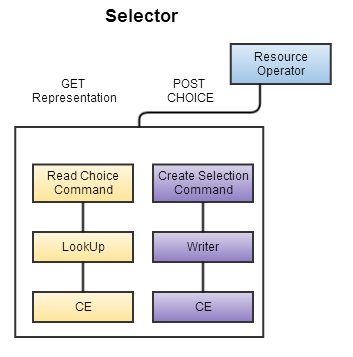
Cortex uses selectors

The selector identifier is a Cortex standard used to indicate a selector returns from the request.
Resource JSON Representation
Below is the JSON destinationinfo selector. Customers GET their choice, then post to the select action rel of the choice to make the selection.
{
    "self": {
        "type": "elasticpath.controls.selector",
        "uri": "/orders/<scope>/<orderID>/deliveries/<deliveryID>/destinationinfo/selector",
        "href": "www.onlinstore.com/orders/<scope>/<orderID>/deliveries/<deliveryID>/destinationinfo/selector"
    },
	"links": [
        {
            "type": "elasticpath.collections.links",
            "rel": "chosen",
            "rev": "selector",
            "href": "www.onlinstore.com/orders/<scope>/<orderID>/deliveries/<deliveryID>/destinationinfo/selector/profiles/<scope>/<profileID>/addresses/<addresseID>",
            "uri": "/orders/<scope>/<orderID>/deliveries/<deliveryID>/destinationinfo/selector/profiles/<scope>/<profileID>/addresses/<addresseID>"
        },
        {
            "type": "elasticpath.collections.links",
            "rel": "choice",
            "rev": "selector",
            "href": "www.onlinstore.com/orders/<scope>/<orderID>/deliveries/<deliveryID>/destinationinfo/selector/profiles/<scope>/<profileID>/addresses/<addresseID>",
            "uri": "/orders/<scope>/<orderID>/deliveries/<deliveryID>/destinationinfo/selector/profiles/<scope>/<profileID>/addresses/<addresseID>"
        },
        {
            "type": "elasticpath.controls.info",
            "rel": "destinationinfo",
            "rev": "selector",
                "href": "www.onlinstore.com/orders/<scope>/<orderID>/deliveries/<deliveryID>/destinationinfo",
                "uri": "/orders/<scope>/<orderID>/deliveries/<deliveryID>/destinationinfo"
        }
    ],
    "name": "destination-selector",
    "selection-rule": "1"
}
Cortex Resources using this Pattern
itemselections- Provides a selector to select item optionsshipmentdetails- Provides a selector to select the orders shipping option, such as Canada Post or FedEx, and a selector to select the destination addressorders- provides a selector to select the billing address of the orderpaymentmethods- Provides a selector to select the payment method to use for the purchase
When to Use
You want to provide customers with the ability to make selections, such as select an options of an item, the billing addresses for the order, shipping addresses, and payment means.
Reference Example
shipmentdetails resource - provides selectors to select the order’s shipping option and destination address.