Operational Insights API
Endpoint Details
The following endpoint returns a JSON document that contains the environment configuration and runtime details:
GET integration/api/insights/request
All Integration Server endpoints, including these APIs, require authentication. For more information, see Integration Server API Security.
The request supports the following query parameters:
zoom
This parameter can be set to a comma-separated list of values that control which sections of the response are returned. You can use the following values:
configurationruntimedata-shaperevenuecommerce-ticker
If not specified, the default value is configuration,runtime,data-shape.
serviceResponseWaitTime
This parameter controls the maximum amount of time that the API should wait for responses from each of the services for their runtime and configuration details. The value is set in milliseconds.
If not specified, the default value is 10,000 milliseconds (10 seconds).
JSON Response
The response from the Operational Insights API is structured as a JSON object that can be parsed by the Operational Insights front-end, or by a custom process. The response contains configuration and runtime data from each of the Self-Managed Commerce services, and data shape and revenue data.
The following code block provides an example for an Operational Insights API response:
{
  "epc-version": "8.4.0",
  "report-date-time": "2021-11-09T22:48:51",
  "report-section-time-ms": 208,
  "revenue-algorithm": "completed-orders",
  "configuration": {
    "ep-services": {
      "fb33ab26-1658-4078-935f-2955c35cf849": {
        "report-section-time-ms": 1062,
        "identification": {
          "instance-guid": "fb33ab26-1658-4078-935f-2955c35cf849",
          "service-type": "Integration Web Application",
          "hostname": "EP-ML-10087",
          "ipv4-addresses": "192.168.86.248",
          "ipv6-addresses": "fe80:0:0:0:9811:e8ff:fe72:b07a, fe80:0:0:0:9811:e8ff:fe72:b07a, fe80:0:0:0:aede:48ff:fe00:1122, fe80:0:0:0:88b:7f4c:7623:e943"
        },
        "hardware": {
          "system-manufacturer": "Apple Inc.",
          "system-model": "MacBookPro15,1",
          "processors-logical": 12,
          "processors-physical": 6,
          "processor-mhz": 2479,
          "memory-total-mb": 16384
        },
        "operating-system": {
          "os-manufacturer": "Apple",
          "os-family": "macOS",
          "os-version": "12.0.1",
          "os-bitness": 64,
          "os-max-files": 10240,
          "os-lang": "en_US.UTF-8"
        },
        "jvm": {
          "jvm-name": "OpenJDK 64-Bit Server VM",
          "jvm-vendor": "Azul Systems, Inc.",
          "jvm-version": "1.8.0_275",
          "jvm-vm-version": "25.275-b01",
          "jvm-charset": "UTF-8",
          "jvm-arguments": "-Xmx2548m, -Dsun.lang.ClassLoader.allowArraySyntax=true, -ea, -Dfile.encoding=UTF-8, -Dclassworlds.conf=/Users/gdenning/apache-maven-3.6.2/bin/m2.conf, -Dmaven.home=/Users/gdenning/apache-maven-3.6.2, -Dlibrary.jansi.path=/Users/gdenning/apache-maven-3.6.2/lib/jansi-native, -Dmaven.multiModuleProjectDirectory=/Users/gdenning",
          "heap-max-size-mb": 2265
        },
        "application-server": {
          "server-name": "Tomcat",
          "server-version": "9.0.85",
          "tomcat-max-connections": 8192,
          "tomcat-max-threads": 200,
          "tomcat-min-spare-threads": 10,
          "tomcat-accept-count": 100,
          "tomcat-port": 8080
        },
        "db-client": {
          "driver-name": "MySQL Connector/J",
          "driver-version": "mysql-connector-java-8.0.25 (Revision: 08be9e9b4cba6aa115f9b27b215887af40b159e0)",
          "connection-url": "jdbc:mysql://127.0.0.1:3306/HIVEDB?characterEncoding=UTF-8&useLocalSessionState=true",
          "connection-properties": "",
          "pool-max-active": 100,
          "pool-min-idle": 10,
          "pool-max-idle": 30,
          "pool-max-wait-ms": 10000,
          "pool-jdbc-interceptors": "",
          "pool-remove-abandoned": true,
          "pool-remove-abandoned-timeout-sec": 60,
          "pool-log-abandoned": false,
          "pool-test-while-idle": true,
          "pool-validation-interval-ms": 60000,
          "pool-validation-query": "/* ping */",
          "pool-validation-query-timeout-sec": -1,
          "pool-login-timeout-sec": 10
        },
        "jms-client": {
          "connection-url": "failover:(tcp://localhost:61616)?maxReconnectAttempts=2",
          "pool-max-connections": "1",
          "pool-max-threads": "1000",
          "pool-max-active-sessions-per-connection": "200",
          "pool-idle-timeout-ms": 10000,
          "pool-expiry-timeout-ms": 0,
          "pool-connection-timeout-ms": 30000,
          "prefetch-policy-queues": "20",
          "redelivery-policy-max-redeliveries": "6",
          "redelivery-policy-redelivery-delay": "1000",
          "redelivery-policy-initial-redelivery-delay": "1000"
        },
        "caching": {
          "attribute-by-key": {
            "max-entries-local-heap": 10000,
            "time-to-live-sec": 600,
            "time-to-idle-sec": 600
          },
          "attribute-by-usage": {
            "max-entries-local-heap": 10000,
            "time-to-live-sec": 600,
            "time-to-idle-sec": 600
          },
          "attribute-value": {
            "max-entries-local-heap": 10000,
            "time-to-live-sec": 600,
            "time-to-idle-sec": 600
          },
          "base-amount": {
            "max-entries-local-heap": 10000,
            "time-to-live-sec": 300,
            "time-to-idle-sec": 300
          },
          "category": {
            "max-entries-local-heap": 10000,
            "time-to-live-sec": 300,
            "time-to-idle-sec": 300
          },
          "groovy-script": {
            "max-entries-local-heap": 10000,
            "time-to-live-sec": 300,
            "time-to-idle-sec": 300
          },
          "price-list-assignment": {
            "max-entries-local-heap": 10000,
            "time-to-live-sec": 300,
            "time-to-idle-sec": 300
          },
          "product": {
            "max-entries-local-heap": 10000,
            "time-to-live-sec": 300,
            "time-to-idle-sec": 300
          },
          "rule": {
            "max-entries-local-heap": 10000,
            "time-to-live-sec": 300,
            "time-to-idle-sec": 300
          },
          "rule-condition": {
            "max-entries-local-heap": 10000,
            "time-to-live-sec": 300,
            "time-to-idle-sec": 300
          },
          "sku-option": {
            "max-entries-local-heap": 10000,
            "time-to-live-sec": 300,
            "time-to-idle-sec": 300
          },
          "store": {
            "max-entries-local-heap": 10000,
            "time-to-live-sec": 300,
            "time-to-idle-sec": 300
          },
          "tag-definition": {
            "max-entries-local-heap": 10000,
            "time-to-live-sec": 300,
            "time-to-idle-sec": 300
          },
          "tax-document": {
            "max-entries-local-heap": 10000,
            "time-to-live-sec": 300,
            "time-to-idle-sec": 300
          }
        },
        "search-indexing": {
          "cm-user-document-creator-max-pool-size": 100,
          "sku-document-creator-max-pool-size": 100,
          "category-document-creator-max-pool-size": 100,
          "product-document-creator-max-pool-size": 100,
          "rule-document-creator-max-pool-size": 100,
          "cm-user-entity-loader-max-pool-size": 100,
          "sku-entity-loader-max-pool-size": 100,
          "category-entity-loader-max-pool-size": 100,
          "product-entity-loader-max-pool-size": 100,
          "rule-entity-loader-max-pool-size": 100
        }
      }
    },
    "message-broker": {},
    "database": {
      "db-name": "MySQL",
      "db-version": "5.7.35",
      "isolation-level": "READ_COMMITTED",
      "hds-enabled": false,
      "max-connections": 151,
      "adaptive-hash-index": "ON",
      "innodb-buffer-pool-size-mb": 128,
      "global-timezone": "+00:00",
      "session-timezone": "+00:00",
      "schema-size-kb": 17008
    },
    "settings": {
      "commerce-manager-admin-user-enabled": true,
      "mobee-data-present": true,
      "changesets-enabled": false
    }
  },
  "runtime": {
    "ep-services": {
      "fb33ab26-1658-4078-935f-2955c35cf849": {
        "report-section-time-ms": 1074,
        "identification": {
          "instance-guid": "fb33ab26-1658-4078-935f-2955c35cf849",
          "service-type": "Integration Web Application",
          "hostname": "EP-ML-10087",
          "ipv4-addresses": "192.168.86.248",
          "ipv6-addresses": "fe80:0:0:0:9811:e8ff:fe72:b07a, fe80:0:0:0:9811:e8ff:fe72:b07a, fe80:0:0:0:aede:48ff:fe00:1122, fe80:0:0:0:88b:7f4c:7623:e943"
        },
        "hardware": {
          "memory-available-mb": 5434,
          "load-average-1-minute": 8.576171875,
          "load-average-5-minutes": 5.41259765625,
          "load-average-15-minutes": 4.6552734375
        },
        "operating-system": {
          "os-uptime-mins": 11399,
          "os-thread-count": 827,
          "os-process-count": 453,
          "os-open-files": 627,
          "process-id": 8637,
          "process-uptime-mins": 65,
          "process-thread-count": 86
        },
        "jvm": {
          "heap-current-size-mb": 1059,
          "heap-free-size-mb": 558,
          "uptime-mins": 200
        },
        "gc": {
          "ps-marksweep": {
            "name": "PS MarkSweep",
            "total-collections-count": 4,
            "total-collection-time-sec": 0
          },
          "ps-scavenge": {
            "name": "PS Scavenge",
            "total-collections-count": 51,
            "total-collection-time-sec": 1
          }
        },
        "application-server": {
          "tomcat-current-thread-count": 10,
          "tomcat-current-threads-busy": 1
        },
        "db-client": {
          "pool-active": 1,
          "pool-idle": 9,
          "remove-abandoned-count": 0,
          "reconnected-count": 0
        },
        "jms-client": {
          "pool-current-connections": 1
        },
        "caching": {
          "attribute-by-key": {
            "hit-ratio": 0,
            "object-count": 0,
            "expired-count": 0,
            "average-element-heap-use-bytes": 0,
            "current-heap-use-mb": 0,
            "max-expected-heap-use-mb": 0
          },
          "attribute-by-usage": {
            "hit-ratio": 0,
            "object-count": 0,
            "expired-count": 0,
            "average-element-heap-use-bytes": 0,
            "current-heap-use-mb": 0,
            "max-expected-heap-use-mb": 0
          },
          "attribute-value": {
            "hit-ratio": 0,
            "object-count": 0,
            "expired-count": 0,
            "average-element-heap-use-bytes": 0,
            "current-heap-use-mb": 0,
            "max-expected-heap-use-mb": 0
          },
          "base-amount": {
            "hit-ratio": 0,
            "object-count": 0,
            "expired-count": 0,
            "average-element-heap-use-bytes": 0,
            "current-heap-use-mb": 0,
            "max-expected-heap-use-mb": 0
          },
          "category": {
            "hit-ratio": 0,
            "object-count": 0,
            "expired-count": 0,
            "average-element-heap-use-bytes": 0,
            "current-heap-use-mb": 0,
            "max-expected-heap-use-mb": 0
          },
          "groovy-script": {
            "hit-ratio": 0,
            "object-count": 0,
            "expired-count": 0,
            "average-element-heap-use-bytes": 0,
            "current-heap-use-mb": 0,
            "max-expected-heap-use-mb": 0
          },
          "price-list-assignment": {
            "hit-ratio": 0,
            "object-count": 0,
            "expired-count": 0,
            "average-element-heap-use-bytes": 0,
            "current-heap-use-mb": 0,
            "max-expected-heap-use-mb": 0
          },
          "product": {
            "hit-ratio": 0,
            "object-count": 0,
            "expired-count": 0,
            "average-element-heap-use-bytes": 0,
            "current-heap-use-mb": 0,
            "max-expected-heap-use-mb": 0
          },
          "rule": {
            "hit-ratio": 0,
            "object-count": 0,
            "expired-count": 0,
            "average-element-heap-use-bytes": 0,
            "current-heap-use-mb": 0,
            "max-expected-heap-use-mb": 0
          },
          "rule-condition": {
            "hit-ratio": 0,
            "object-count": 0,
            "expired-count": 0,
            "average-element-heap-use-bytes": 0,
            "current-heap-use-mb": 0,
            "max-expected-heap-use-mb": 0
          },
          "sku-option": {
            "hit-ratio": 0,
            "object-count": 38,
            "expired-count": 0,
            "average-element-heap-use-bytes": 0,
            "current-heap-use-mb": 0,
            "max-expected-heap-use-mb": 0
          },
          "store": {
            "hit-ratio": 0,
            "object-count": 0,
            "expired-count": 0,
            "average-element-heap-use-bytes": 0,
            "current-heap-use-mb": 0,
            "max-expected-heap-use-mb": 0
          },
          "tag-definition": {
            "hit-ratio": 0,
            "object-count": 0,
            "expired-count": 0,
            "average-element-heap-use-bytes": 0,
            "current-heap-use-mb": 0,
            "max-expected-heap-use-mb": 0
          },
          "tax-document": {
            "hit-ratio": 0,
            "object-count": 0,
            "expired-count": 0,
            "average-element-heap-use-bytes": 0,
            "current-heap-use-mb": 0,
            "max-expected-heap-use-mb": 0
          }
        },
        "search-indexing": {
          "cm-user-document-creator-pool-size": 10,
          "sku-document-creator-pool-size": 10,
          "category-document-creator-pool-size": 10,
          "product-document-creator-pool-size": 10,
          "rule-document-creator-pool-size": 10,
          "cm-user-entity-loader-pool-size": 10,
          "sku-entity-loader-pool-size": 10,
          "category-entity-loader-pool-size": 10,
          "product-entity-loader-pool-size": 10,
          "rule-entity-loader-pool-size": 10,
          "index-build-status": "category=COMPLETE, cmuser=COMPLETE, product=COMPLETE, promotion=COMPLETE, sku=COMPLETE"
        }
      }
    },
    "message-broker": {},
    "database": {}
  },
  "data-shape": {
    "counts": {
      "account-profile-attributes": 8,
      "accounts": 25,
      "audit-records": 0,
      "base-amounts": 342,
      "cart-promotions": 39,
      "cart-promotions-active": 38,
      "carts": 4,
      "catalog-promotions": 6,
      "catalog-promotions-active": 6,
      "categories": 72,
      "category-attributes": 12,
      "changeset-objects": 0,
      "changesets": 1,
      "coupon-usages": 3,
      "coupons": 11,
      "customer-groups": 5,
      "data-policy-consents": 4,
      "data-policy-points": 8,
      "import-job-status": 0,
      "inventory-journal": 17,
      "master-catalogs": 6,
      "modifier-fields": 26,
      "oauth-tokens": 4,
      "order-holds": 0,
      "order-locks": 0,
      "orders": 0,
      "outbox-messages": 0,
      "price-list-assignments": 18,
      "price-list-assignments-active": 10,
      "price-lists": 18,
      "product-associations": 50,
      "product-attributes": 9,
      "product-types": 26,
      "products": 239,
      "shipping-service-levels": 11,
      "sku-attributes": 27,
      "sku-options": 15,
      "skus": 282,
      "stores": 14,
      "user-profile-attributes": 16,
      "users-registered": 67,
      "users-single-session": 4,
      "virtual-catalogs": 6
    },
    "sizes": {
      "catalog-projections-history-storage-kb": 16,
      "catalog-projections-storage-kb": 6016,
      "compiled-rule-storage-kb": 400
    }
  },
  "revenue": [
    {
      "store-code": "MOBEE",
      "currency-code": "CAD",
      "date": "2023-06-05",
      "booked-revenue": 12345.57,
      "order-count": 1
    },
    {
      "store-code": "MOBEE",
      "currency-code": "EUR",
      "date": "2023-06-05",
      "booked-revenue": 53221.57,
      "order-count": 4
    }
  ],
  "commerce-ticker": {
    "since-midnight": [
      {
        "store-code": "MOBEE",
        "currency-code": "CAD",
        "booked-revenue": 174.1,
        "order-count": 3
      },
      {
        "store-code": "KOBEE",
        "currency-code": "CAD",
        "booked-revenue": 12.16,
        "order-count": 1
      }
    ],
    "last-minute": [
      {
        "store-code": "MOBEE",
        "currency-code": "CAD",
        "booked-revenue": 23.44,
        "order-count": 1
      }
    ]
  }
}
Response Fields
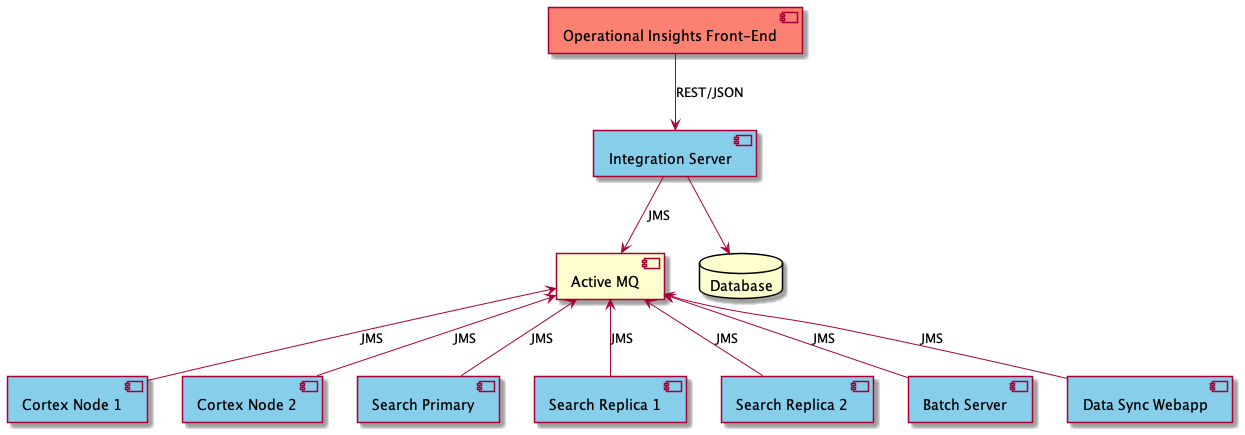
The following tables describe each field in the response along with the path to the parameter in the architecture diagram:
| Field | Description | Example |
|---|---|---|
epc-version | The current version of Self-Managed Commerce. | 8.3.0 |
report-date-time | The date and time that the report was generated, in ISO8601 format. | 2021-09-07T15:30:58 |
report-section-time-ms | The time taken to generate the section that contains this field, in milliseconds. This field is present at the top level of the report and in each ep-services entry. | 208 |
revenue-algorithm | The method used to calculate the revenue and commerce-ticker figures. Orders are counted on the date that they reached the COMPLETED status. | completed-orders |
configuration | The configuration section. | See below. |
runtime | The runtime section. | See below. |
data-shape | The data shape section. | See below. |
revenue | The revenue section. | See below. |
commerce-ticker | The commerce ticker section. | See below. |
configuration ➡️ ep-services ➡️ [instance-guid] ➡️ identification
| Field | Description | Example |
|---|---|---|
hostname | The hostname of the machine on which the service runs. | EP-ML-10087 |
instance-guid | A GUID that is automatically generated at service startup. This GUID is to enables correlating separate API requests to the same running instance. This GUID changes when the service restarts. | fb33ab26-1658-4078-935f-2955c35cf849 |
ipv4-addresses | A comma-separated list of IPV4 addresses that are assigned to the host machine. | 192.168.86.248 |
ipv6-addresses | A comma-separated list of IPV6 addresses that are assigned to the host machine. | fe80:0:0:0:9811:e8ff:fe72:b07a |
service-type | The type of Self-Managed Commerce service that responds to the request. | Integration Web Application |
configuration ➡️ ep-services ➡️ [instance-guid] ➡️ hardware
| Field | Description | Example |
|---|---|---|
memory-total-mb | The total memory on the machine, on which the service runs, in megabytes. | 16384 |
system-manufacturer | The manufacturer of the machine on which the service runs. | Apple Inc. |
system-model | The model of the machine on which the service runs. | MacBookPro15,1 |
processors-physical | The number of physical processors in the machine on which the service runs. | 6 |
processor-mhz | The processing speed of the processors in the machine on which the service runs. | 2479 |
processors-logical | The number of logical processors in the machine on which the service runs. | 12 |
configuration ➡️ ep-services ➡️ [instance-guid] ➡️ operating-system
| Field | Description | Example |
|---|---|---|
os-bitness | The operating system bitness, such as 32 bit or 64 bit, of the machine on which the service runs. | 64 |
os-family | The operating system family of the machine on which the service runs. | macOS |
os-lang | The value of the LANG environment variable used for determining the default operating system character set. | en_US.UTF-8 |
os-manufacturer | The operating system manufacturer of the machine on which the service runs. | Apple |
os-max-files | The maximum number of open files permitted by the operating system on the machine where the service runs. | 10240 |
os-version | The operating system version of the machine on which the service runs. | 12.0.1 |
configuration ➡️ ep-services ➡️ [instance-guid] ➡️ jvm
| Field | Description | Example |
|---|---|---|
heap-max-size-mb | The maximum amount of heap space permitted by the JVM parameters, in megabytes. | 2265 |
jvm-arguments | A comma-separated list of the Java virtual machine arguments that are passed when JVM starts. Note that some JVM arguments are considered sensitive (such as passwords) so these will be replaced with the value **MASKED**. To modify the list of JVM arguments that are masked, see the sensitiveJvmArgKeyWordList bean in Spring. | -Xmx2548m |
jvm-charset | The default character set configured in the Java virtual machine. | UTF-8 |
jvm-name | The Java virtual machine name that the service runs on. | OpenJDK 64-Bit Server VM |
jvm-vendor | The Java virtual machine vendor that the service runs on. | Azul Systems, Inc. |
jvm-version | The Java virtual machine version that the service runs on. | 1.8.0_275 |
jvm-vm-version | The Java virtual machine VM version that the service runs. | 25.275-b01 |
configuration ➡️ ep-services ➡️ [instance-guid] ➡️ application-server
| Field | Description | Example |
|---|---|---|
server-name | The name of the application server that the service runs on. | Tomcat |
server-version | The version of the application server that the service is running on. | 9.0.85 |
tomcat-accept-count | The acceptCount parameter of the Tomcat HTTP Connector. | 100 |
tomcat-max-connections | The maxConnections parameter of the Tomcat HTTP Connector. | 8192 |
tomcat-max-threads | The maxThreads parameter of the Tomcat HTTP Connector. | 200 |
tomcat-min-spare-threads | The minSpareThreads parameter of the Tomcat HTTP Connector. | 10 |
tomcat-port | The port parameter of the Tomcat HTTP Connector. | 8080 |
configuration ➡️ ep-services ➡️ [instance-guid] ➡️ db-client
| Field | Description | Example |
|---|---|---|
connection-properties | The connection properties that is used to connect to the database. Note: Some connection properties may be passed in the connection URL. | |
connection-url | The connection URL that is used to connect to the database. | jdbc:mysql://127.0.0.1:3306/HIVEDB?characterEncoding=UTF-8&useLocalSessionState=true |
driver-name | The name of the JDBC driver that is used to connect to the database. | MySQL Connector/J |
driver-version | The version of the JDBC driver that is used to connect to the database. | mysql-connector-java-8.0.25 |
pool-jdbc-interceptors | The jdbcInterceptors parameter of the Tomcat JDBC Connection Pool. | |
pool-log-abandoned | The logAbandoned parameter of the Tomcat JDBC Connection Pool. | false |
pool-login-timeout-sec | The loginTimeout parameter of the Tomcat JDBC Connection Pool. | 10 |
pool-max-active | The maxActive parameter of the Tomcat JDBC Connection Pool. | 100 |
pool-max-idle | The maxIdle parameter of the Tomcat JDBC Connection Pool. | 30 |
pool-max-wait-ms | The maxWait parameter of the Tomcat JDBC Connection Pool. | 10000 |
pool-min-idle | The minIdle parameter of the Tomcat JDBC Connection Pool. | 10 |
pool-remove-abandoned | The removeAbandoned parameter of the Tomcat JDBC Connection Pool. | true |
pool-remove-abandoned-timeout-sec | The removeAbandonedTimeout parameter of the Tomcat JDBC Connection Pool. | 60 |
pool-test-while-idle | The testWhileIdle parameter of the Tomcat JDBC Connection Pool. | true |
pool-validation-interval-ms | The validationInterval parameter of the Tomcat JDBC Connection Pool. | 60000 |
pool-validation-query | The validationQuery parameter of the Tomcat JDBC Connection Pool. | /* ping */ |
pool-validation-query-timeout-sec | The validationQueryTimeout parameter of the Tomcat JDBC Connection Pool. | -1 |
configuration ➡️ ep-services ➡️ [instance-guid] ➡️ jms-client
| Field | Description | Example |
|---|---|---|
connection-url | The connection URL used to connect to the JMS broker. | failover:(tcp://localhost:61616)?maxReconnectAttempts=2 |
pool-connection-timeout-ms | The maximum wait time, in milliseconds, to get a connection from the pool. | 30000 |
pool-expiry-timeout-ms | The expiryTimeout parameter of the ActiveMQ PooledConnectionFactory. | 0 |
pool-idle-timeout-ms | The idleTimeout parameter of the ActiveMQ PooledConnectionFactory. | 10000 |
pool-max-active-sessions-per-connection | The maximumActiveSessionPerConnection parameter of the ActiveMQ PooledConnectionFactory. | 200 |
pool-max-connections | The maxConnections parameter of the ActiveMQ PooledConnectionFactory. | 1 |
pool-max-threads | The maxThreadPoolSize parameter of How to deal with large number of threads in clients. | 1000 |
prefetch-policy-queues | The queuePrefetch parameter of What is the Prefetch Limit for. | 20 |
redelivery-policy-initial-redelivery-delay | The initialRedeliveryDelay parameter of ActiveMQ Redelivery Policy. | 1000 |
redelivery-policy-max-redeliveries | The maximumRedeliveries parameter of the ActiveMQ Redelivery Policy. | 6 |
redelivery-policy-redelivery-delay | The redeliveryDelay parameter of ActiveMQ Redelivery Policy. | 1000 |
configuration ➡️ ep-services ➡️ [instance-guid] ➡️ caching ➡️ [cache-name]
| Field | Description | Example |
|---|---|---|
max-entries-local-heap | The maxEntriesLocalHeap parameter of ehCache Setting Expiration. | 10000 |
time-to-idle-sec | The timeToIdleSeconds parameter of ehCache Setting Expiration. | 300 |
time-to-live-sec | The timeToLiveSeconds parameter of ehCache Setting Expiration. | 300 |
configuration ➡️ ep-services ➡️ [instance-guid] ➡️ search-indexing
| Field | Description | Example |
|---|---|---|
category-document-creator-max-pool-size | The maximum size of the thread pool that is used to create category documents in the search index. | 100 |
cm-user-document-creator-max-pool-size | The maximum size of the thread pool that is used to create Commerce Manager user documents in the search index. | 100 |
product-document-creator-max-pool-size | The maximum size of the thread pool that is used to create product documents in the search index. | 100 |
rule-document-creator-max-pool-size | The maximum size of the thread pool that is used to create promotion rule documents in the search index. | 100 |
sku-document-creator-max-pool-size | The maximum size of the thread pool that is used to create SKU documents in the search index. | 100 |
category-entity-loader-max-pool-size | The maximum size of the thread pool that is used to load categories from the database for population of the search index. | 100 |
cm-user-entity-loader-max-pool-size | The maximum size of the thread pool that is used to load Commerce Manager users from the database for population of the search index. | 100 |
product-entity-loader-max-pool-size | The maximum size of the thread pool that is used to load products from the database for population of the search index. | 100 |
rule-entity-loader-max-pool-size | The maximum size of the thread pool that is used to load promotion rules from the database for population of the search index. | 100 |
sku-entity-loader-max-pool-size | The maximum size of the thread pool that is used to load SKUs from the database for population of the search index. | 100 |
configuration ➡️ database
| Field | Description | Example |
|---|---|---|
adaptive-hash-index | Indicates whether MySQL Adaptive Hash Index is enabled. | ON |
db-name | Specifies the name of the database engine that is used to store commerce data. | MySQL |
db-version | Specifies the version of the database engine that is used to store commerce data. | 5.7.35 |
global-timezone | Specifies the global timezone setting in the database. | +00:00 |
hds-enabled | Indicates whether Self-Managed Commerce Horizontal Database Scaling is enabled. | false |
innodb-buffer-pool-size-mb | Specifies the configured size of the InnoDB buffer pool in megabytes. | 128 |
isolation-level | Specifies the isolation level of the open connection to the database. | READ_COMMITTED |
max-connections | Specifies the maximum number of concurrent connections that the database will accept. | 151 |
schema-size-kb | Specifies the total size of the current schema, in kilobytes. | 17008 |
session-timezone | Specifies the session timezone setting in the database. | +00:00 |
configuration ➡️ message-broker
This section is reserved for message broker configuration and currently returns an empty object.
configuration ➡️ settings
| Field | Description | Example |
|---|---|---|
changesets-enabled | Indicates if changesets are enabled. | true |
commerce-manager-admin-user-enabled | Indicates whether the Commerce Manager admin user is enabled. | true |
mobee-data-present | Indicates whether the current schema contains mobee test data. | true |
runtime ➡️ ep-services ➡️ [instance-guid] ➡️ identification
| Field | Description | Example |
|---|---|---|
hostname | The hostname of the machine on which the service runs. | EP-ML-10087 |
instance-guid | A GUID that is automatically generated at service startup. This GUID is to enables correlating separate API requests to the same running instance. This GUID changes when the service restarts. | fb33ab26-1658-4078-935f-2955c35cf849 |
ipv4-addresses | A comma-separated list of IPV4 addresses that are assigned to the host machine. | 192.168.86.248 |
ipv6-addresses | A comma-separated list of IPV6 addresses that are assigned to the host machine. | fe80:0:0:0:9811:e8ff:fe72:b07a |
service-type | The type of Self-Managed Commerce service that responds to the request. | Integration Web Application |
runtime ➡️ ep-services ➡️ [instance-guid] ➡️ hardware
| Field | Description | Example |
|---|---|---|
load-average-1-minute | The sum of the number of runnable entities queued to the available processors and the number of runnable entities running on the available processors averaged over a period of one minute. | 4.6552734375 |
load-average-5-minutes | The sum of the number of runnable entities queued to the available processors and the number of runnable entities running on the available processors averaged over a period of five minutes. | 8.576171875 |
load-average-15-minutes | The sum of the number of runnable entities queued to the available processors and the number of runnable entities running on the available processors averaged over a period of fifteen minutes. | 5.41259765625 |
memory-available-mb | The free available memory, in megabytes, on the machine on which the service runs. | 5434 |
runtime ➡️ ep-services ➡️ [instance-guid] ➡️ operating-system
| Field | Description | Example |
|---|---|---|
os-open-files | The number of files that are currently open on the operating system. | 551 |
os-process-count | The total number of processes currently running on the operating system. | 711 |
os-thread-count | The total number of threads currently running on the operating system. | 1794 |
os-uptime-mins | The duration between the current time and the time when the operating system was booted in minutes. | 4771 |
process-id | The process ID of the service. | 97251 |
process-thread-count | The total number of threads running in the current process. | 89 |
process-uptime-mins | The duration between the current time and the starting time of the current process in minutes. | 200 |
runtime ➡️ ep-services ➡️ [instance-guid] ➡️ jvm
| Field | Description | Example |
|---|---|---|
heap-current-size-mb | The current size of the Java heap in megabytes. | 1059 |
heap-free-size-mb | The available space in the Java heap in megabytes. | 558 |
uptime-mins | The duration between the current time and the starting time of the Java Virtual Machine in minutes. | 200 |
runtime ➡️ ep-services ➡️ [instance-guid] ➡️ gc ➡️ [gc-type]
| Field | Description | Example |
|---|---|---|
name | The name of the garbage collector. | PS MarkSweep |
total-collections-count | The number of garbage collections that are completed after starting Java Virtual Machine. | 51 |
total-collection-time-sec | The total time, after starting Java Virtual Machine, that is spent for garbage collections, in seconds. | 1 |
runtime ➡️ ep-services ➡️ [instance-guid] ➡️ application-server
| Field | Description | Example |
|---|---|---|
tomcat-current-thread-count | The total number of threads allocated to the Tomcat thread pool. | 10 |
tomcat-current-threads-busy | The total number of busy threads in the Tomcat thread pool. | 1 |
runtime ➡️ ep-services ➡️ [instance-guid] ➡️ db-client
| Field | Description | Example |
|---|---|---|
pool-active | The number of active connections in the Tomcat JDBC Connection Pool. | 1 |
pool-idle | The number of idle connections in the Tomcat JDBC Connection Pool. | 9 |
remove-abandoned-count | The number of database connections that are removed from the pool for exceeding the abandoned timeout. | 0 |
reconnected-count | The number of times that the database is reconnected. | 0 |
runtime ➡️ ep-services ➡️ [instance-guid] ➡️ jms-client
| Field | Description | Example |
|---|---|---|
pool-current-connections | The current number of connections in the JMS connection pool. | 1 |
runtime ➡️ ep-services ➡️ [instance-guid] ➡️ caching ➡️ [cache-name]
| Field | Description | Example |
|---|---|---|
average-element-heap-use-bytes | The estimated average amount of heap space that each element of the cache uses, calculated by determining the size of random samples of the cache, in bytes. | 1058 |
current-heap-use-mb | The estimated amount of heap space in use by this cache, calculated by determining the size of random samples of the cache, in megabytes. | 15 |
expired-count | The number of elements expired from the cache. | 1548 |
hit-ratio | The ratio of hits to misses for this cache. | 0.75 |
max-expected-heap-use-mb | The estimated amount of heap space that this cache will use, if the maximum number of elements are populated, calculated by determining the size of random samples of the cache, in megabytes. | 175 |
object-count | The current number of elements in the cache. | 185 |
runtime ➡️ ep-services ➡️ [instance-guid] ➡️ search-indexing
| Field | Description | Example |
|---|---|---|
category-document-creator-pool-size | The current size of the thread pool that is used to create category documents in the search index. | 10 |
cm-user-document-creator-pool-size | The current size of the thread pool that is used to create Commerce Manager user documents in the search index. | 10 |
product-document-creator-pool-size | The current size of the thread pool that is used to create product documents in the search index. | 10 |
rule-document-creator-pool-size | The current size of the thread pool that is used to create promotion rule documents in the search index. | 10 |
sku-document-creator-pool-size | The current size of the thread pool that is used to create SKU documents in the search index. | 10 |
category-entity-loader-pool-size | The current size of the thread pool that is used to load categories from the database for population of the search index. | 10 |
cm-user-entity-loader-pool-size | The current size of the thread pool that is used to load Commerce Manager users from the database for population of the search index. | 10 |
product-entity-loader-pool-size | The current size of the thread pool that is used to load products from the database for population of the search index. | 10 |
rule-entity-loader-pool-size | The current size of the thread pool that is used to load promotion rules from the database for population of the search index. | 10 |
sku-entity-loader-pool-size | The current size of the thread pool that is used to load SKUs from the database for population of the search index. | 10 |
index-build-status | The current build status of each search index. | PRODUCT: COMPLETED |
runtime ➡️ database
This section is reserved for database runtime metrics and currently returns an empty object.
runtime ➡️ message-broker
This section is reserved for message broker runtime metrics and currently returns an empty object.
data-shape ➡️ sizes
| Field | Description | Example |
|---|---|---|
catalog-projections-history-storage-kb | The space used in the database for the catalog syndication projection history, in kilobytes. | 16 |
catalog-projections-storage-kb | The space used in the database for the catalog syndication projections, in kilobytes. | 6016 |
compiled-rule-storage-kb | The space used in the database for the compiled promotion rules, in kilobytes. | 400 |
data-shape ➡️ counts
This section contains a fixed set of record counts, one field per entity type. The field name identifies the entity, not the underlying database table.
| Field | Description | Example |
|---|---|---|
[entity-name] | The number of records of the specified entity type, such as products, orders, or price-lists. | 1000 |
revenue
This array contains a list of records, grouped by date, store code, and currency code, representing the number of orders and total sales for the date/store code/currency combination.
Only orders in the COMPLETED status are counted, and each order is attributed to the date that it was last modified, which is the date that it reached the COMPLETED status. See the revenue-algorithm field.
| Field | Description | Example |
|---|---|---|
date | The date that the metrics in this section are being reported for. | 2023-01-01 |
store-code | The store code that the metrics in this section are being reported for. | mobee |
currency-code | The currency code that the metrics in this section are being reported for. | USD |
order-count | The number of orders that were completed on the specified date for this store and currency. | 10 |
booked-revenue | The total value of all orders that were completed on the specified date for this store and currency. | 1000.00 |
commerce-ticker ➡️ last-minute
| Field | Description | Example |
|---|---|---|
store-code | The store code that the metrics in this section are being reported for. | mobee |
currency-code | The currency code that the metrics in this section are being reported for. | USD |
order-count | The number of orders that have been completed in the past minute for this store and currency. | 10 |
booked-revenue | The total value of all orders that have been completed in the past minute for this store and currency. | 1000.00 |
commerce-ticker ➡️ since-midnight
| Field | Description | Example |
|---|---|---|
store-code | The store code that the metrics in this section are being reported for. | mobee |
currency-code | The currency code that the metrics in this section are being reported for. | USD |
order-count | The number of orders that have been completed since midnight for this store and currency. | 10 |
booked-revenue | The total value of all orders that have been completed since midnight for this store and currency. | 1000.00 |
Architecture
When you make an Operational Insights request, a reportId GUID is generated and sent in a JMS message to each of the following topics:
-
jms:topic:ep.insights.configurationnoteThe message is only sent if the request has the zoom query parameter,
configuration. -
jms:topic:ep.insights.runtimenoteThe message is only sent if the request has the zoom query parameter,
runtime.
All Self-Managed Commerce services, which are currently running, are assigned to these topics. When these topics receive a JMS message, a JSON response is generate and sent back to the service using the following JMS queues:
jms:queue:ep.insights.configuration.replyjms:queue:ep.insights.runtime.reply
The Integration Server REST request thread waits up to 2000ms to collect responses and filters the responses so that all responses contain the correct reportId. The responses with incorrect reportId are ignored. If the Operational Insights request consists of the zoom query parameters, data-shape and revenue, the Integration Server REST request thread collects information from the database to populate the data-shape and revenue sections of the report.