Configuring Event Message Channels
By default, Self-Managed Commerce publishes event messages to ActiveMQ virtual destinations, which is also called Virtual Topics, with separate consumer queues for each function that wants to get the message. This method supports competing consumers, does not lose messages if subscribers are offline, and does not require configuration on ActiveMQ for both development and production.
The recommended approaches to configure event message channels are:
-
Use ActiveMQ virtual destinations
This is the default method and Elastic Path recommends this method when using ActiveMQ.
-
Implement a recipient list consumer to forward messages to multiple queues
Elastic Path recommends this method when virtual destinations are unavailable
Virtual Destinations
The advantages of virtual destinations are decoupled publisher/subscriber architecture and reliable load-balancing of message processors.
The following example demonstrates a cluster of two identical integration servers, integration server1 and integration server 2, where each contains two JMS (Java Messaging Service) consumers A and B that subscribe to the order message channel:
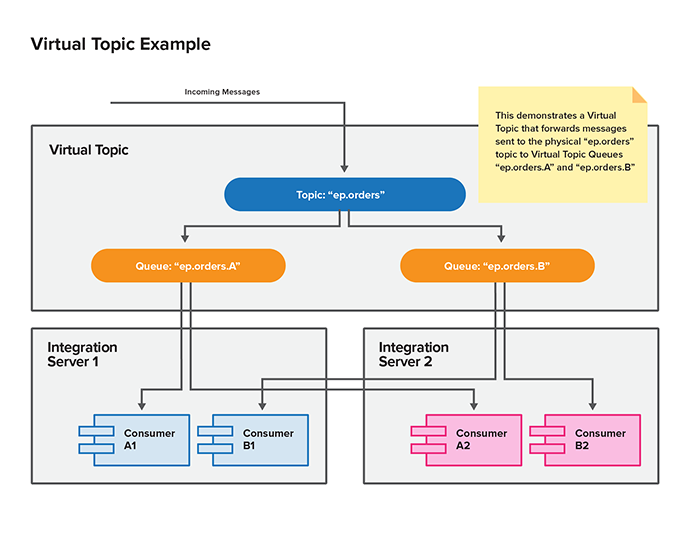
To utilize virtual destinations, register each subscriber component within the Commerce Engine as an individual output queue within the virtual topic.
For example, to accommodate the message consumer that creates order confirmation emails and the message consumer that creates order shipment confirmation emails, the order message channel is configured with the following:
- A producer topic of
VirtualTopic.ep.orders. - Multiple consumer queues including
Consumer.orderconfirmationEmailHandler.VirtualTopic.ep.ordersandConsumer.orderShipmentShippedEmailHandler.VirtualTopic.ep.orders.
Each of the consumers exist as a JMS queue. All messages on the VirtualTopic.ep.orders topic are published to the JMS queue.
By default, Elastic Path uses ActiveMQ default naming conventions to enable virtual destinations. For other messaging brokers, virtual destinations might need different configuration. For more information, see the documentation for the specific messaging broker.
Configuration of Virtual Destination Queues
The following sections provides the default Elastic Path configuration settings of the event message channels to enable ActiveMQ Virtual Destinations:
COMMERCE/SYSTEM/MESSAGING/CATALOG/channelUri
This destination queue is available as of version 7.5.1.
Producer: Catalog Event Messages
Producer URI (Default Value): jms:topic:VirtualTopic.ep.catalog
COMMERCE/SYSTEM/MESSAGING/CHANGESETS/channelUri
Producer: Change Set Event Messages
Producer URI (Default Value): jms:topic:VirtualTopic.ep.changesets
Subscriber:
-
N/A
Context:
ChangeSetPublisher- Consumer URL(Context Value):
Consumer.ChangeSetPublisher.VirtualTopic.ep.changesets
Context:
DataSyncSplitter- Consumer URL(Context Value):
Consumer.DataSyncSplitter.VirtualTopic.ep.changesets
- Consumer URL(Context Value):
COMMERCE/SYSTEM/MESSAGING/CMUSERS/channelUri
Producer: Commerce Manager User Event Messages
Producer URI (Default Value): jms:topic:VirtualTopic.ep.cmusers
Subscriber:
-
CM User Created Email handler
Context:
cmUserCreatedEmailHandlerConsumer URL (Context Value):
jms:queue:Consumer.cmUserCreatedEmailHandler.VirtualTopic.ep.cmusers -
CM User Password Changed Email handler
Context:
cmUserPasswordChangedEmailHandlerConsumer URL (Context Value):
jms:queue:Consumer.cmUserPasswordChangedEmailHandler.VirtualTopic.ep.cmusers -
CM User Password Reset Email handler
Context:
cmUserPasswordResetEmailHandlerConsumer URL (Context Value):
jms:queue:Consumer.cmUserPasswordResetEmailHandler.VirtualTopic.ep.cmusers
COMMERCE/SYSTEM/MESSAGING/CUSTOMERS/channelUri
Producer: Customer Event Messages
Producer URI (Default Value): jms:topic:VirtualTopic.ep.customers
Subscriber:
-
Anonymous Customer Registration Email handler
Context:
anonymousCustomerRegisteredEmailHandlerConsumer URL (Context Value):
jms:queue:Consumer.anonymousCustomerRegisteredEmailHandler.VirtualTopic.ep.customers -
Customer Registration Email handler
Context:
customerRegistrationEmailHandlerConsumer URL (Context Value):
jms:queue:Consumer.customerRegistrationEmailHandler.VirtualTopic.ep.customers -
CM User Password Changed Email handler
Context:
passwordChangedEmailHandlerConsumer URL (Context Value):
jms:queue:Consumer.passwordChangedEmailHandler.VirtualTopic.ep.customers -
Customer Password Forgotten Email handler
Context:
passwordForgottenEmailHandlerConsumer URL (Context Value):
jms:queue:Consumer.passwordForgottenEmailHandler.VirtualTopic.ep.customers -
Shared Wish List Email handler
Context:
wishListSharedEmailHandlerConsumer URL (Context Value):
jms:queue:Consumer.wishListSharedEmailHandler.VirtualTopic.ep.customers
COMMERCE/SYSTEM/MESSAGING/DATAIMPORT/channelUri
Producer: Data Import Event Messages
Producer URI (Default Value): jms:topic:VirtualTopic.ep.dataimport
Subscriber:
-
CSV (Comma Separated Values) Import Job Completed Email handler
Context:
importJobCompletedEmailHandlerContext URL (Consumer Value):
jms:queue:Consumer.importJobCompletedEmailHandler.VirtualTopic.ep.dataimport
COMMERCE/SYSTEM/MESSAGING/DOMAIN/BULK/channelUri
This destination queue is available as of version 7.5.1.
Producer: Domain Bulk Messages
Producer URI (Default Value): jms:topic:VirtualTopic.ep.domain.bulk
Subscriber:
-
Domain Bulk Message Handler
Context:
projectionBulkChangeHandlerContext URL (Consumer Value):
jms:queue:Consumer.projectionBulkChangeHandler.VirtualTopic.ep.domain.bulk
COMMERCE/SYSTEM/MESSAGING/DOMAIN/channelUri
This destination queue is available as of version 7.5.1.
Producer: Domain Projection Builder Handler
Producer URI (Default Value): jms:topic:VirtualTopic.ep.domain
Subscriber:
-
Domain Bulk Message Handler
Context:
domainProjectionBuilderHandlerContext URL (Consumer Value):
jms:queue:Consumer.domainProjectionBuilderHandler.VirtualTopic.ep.domain
COMMERCE/SYSTEM/MESSAGING/GIFTCERTIFICATES/channelUri
Producer: Gift Certificate Event Messages
Producer URI (Default Value): jms:topic:VirtualTopic.ep.giftcertificates
Subscriber:
-
Gift Certificate Purchased Email handler
Context:
giftCertificateCreatedEmailHandlerContext URL (Consumer Value):
jms:queue:Consumer.giftCertificateCreatedEmailHandler.VirtualTopic.ep.giftcertificates
COMMERCE/SYSTEM/MESSAGING/ORDERS/channelUri
Producer: Order Event Messages
Producer URI (Default Value): jms:topic:VirtualTopic.ep.orders
Subscriber:
-
Gift Certificate Purchased handler
Context:
giftCertificateCreatedMessageProducerContext URL (Consumer Value):
jms:queue:Consumer.giftCertificateCreatedMessageProducer.VirtualTopic.ep.orders -
Order Confirmation Email handler
Context:
orderConfirmationEmailHandlerContext URL (Consumer Value):
jms:queue:Consumer.orderConfirmationEmailHandler.VirtualTopic.ep.orders -
Order Shipment Created handler
Context:
orderShipmentCreatedMessageProducerContext URL (Consumer Value):
jms:queue:Consumer.orderShipmentCreatedMessageProducer.VirtualTopic.ep.orders -
Order Shipment Release Failed Email handler
Context:
orderShipmentReleaseFailedEmailHandlerContext URL (Consumer Value):
jms:queue:Consumer.orderShipmentReleaseFailedEmailHandler.VirtualTopic.ep.orders -
Order Shipment Shipped Email handler
Context:
orderShipmentShippedEmailHandlerContext URL (Consumer Value):
jms:queue:Consumer.orderShipmentShippedEmailHandler.VirtualTopic.ep.orders -
Return or Exchange Email handler
Context:
returnExchangeEmailHandlerContext URL (Consumer Value):
jms:queue:Consumer.returnExchangeEmailHandler.VirtualTopic.ep.orders
For sample queue names, see sample context values in the table. Elastic Path uses ActiveMQ default naming conventions to enable Virtual Destinations, but other brokers might need to be configured differently.
Recipient List Message Forwarder
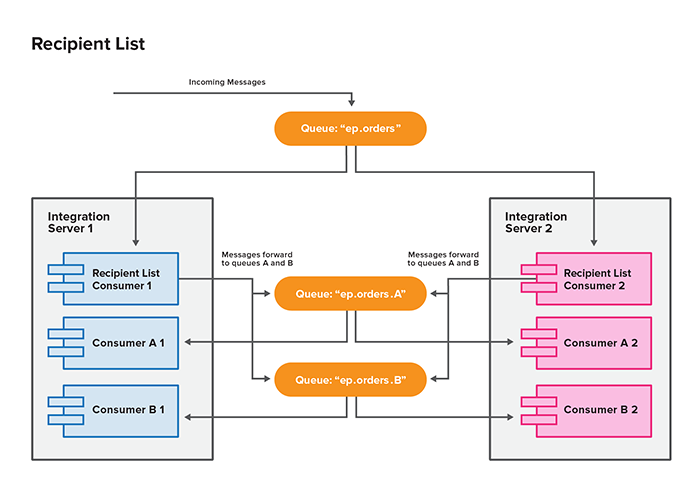
If the JMS broker doesn’t support virtual destinations, you can implement a recipient list consumer to replicate the functionality of virtual destinations. You must configure the recipient list with a list of the output JMS queue endpoints and publish all messages on the incoming queue to each of the required queues.
In the following example, each recipient list consumer forwards every incoming message on the ep.orders queue to ep.orders.A and ep.orders.B queues.
Configuration of Recipient List
For the recipient list consumer, follow the same configuration settings of virtual destinations section except for the producer URI by defining it as queues instead of topics. You can also remove the VirtualTopic and Consumer prefixes, because Elastic Path does not follow naming convention to define this functionality.
Recipient List Consumer Sample Implementation
The following example describes a sample recipient list message forwarding route builder and its Spring XML configuration:
public class SampleRecipientListMessageForwardingRouteBuilder extends RouteBuilder {

	private Endpoint incomingEndpoint;
	private Collection<Endpoint> outgoingEndpoints;

	@Override
	public void configure() throws Exception {
		from(incomingEndpoint)
			.transacted()
			.to(outgoingEndpoints);
	}

	// getters and setters

}
<beans
        xmlns="http://www.springframework.org/schema/beans"
        xmlns:xsi="http://www.w3.org/2001/XMLSchema-instance"
        xmlns:camel="http://camel.apache.org/schema/spring"
		xmlns:util="http://www.springframework.org/schema/util"
        xsi:schemaLocation="
                http://www.springframework.org/schema/beans http://www.springframework.org/schema/beans/spring-beans-4.0.xsd
				http://www.springframework.org/schema/util http://www.springframework.org/schema/util/spring-util-3.0.xsd
                http://camel.apache.org/schema/spring http://camel.apache.org/schema/spring/camel-spring.xsd
        ">

    <camel:camelContext id="sample-recipient-list-forwarder" xmlns="http://camel.apache.org/schema/spring">
		<routeBuilder ref="sampleRecipientListMessageForwardingRouteBuilder"/>
    </camel:camelContext>

	<bean id="sampleRecipientListMessageForwardingRouteBuilder" class="com.example.SampleRecipientListMessageForwardingRouteBuilder">
		<property name="incomingEndpoint">
			<bean class="org.apache.camel.spring.CamelEndpointFactoryBean">
				<property name="camelContextId" value="sample-recipient-list-forwarder" />
				<property name="uri" value="jms:ep.eventmessagetype"/>
			</bean>
		</property>
		<property name="outgoingEndpoints">
			<util:list>
				<bean class="org.apache.camel.spring.CamelEndpointFactoryBean">
					<property name="camelContextId" value="sample-recipient-list-forwarder" />
					<property name="uri" value="jms:ep.eventmessagetype.Queue1"/>
				</bean>
				<bean class="org.apache.camel.spring.CamelEndpointFactoryBean">
					<property name="camelContextId" value="sample-recipient-list-forwarder" />
					<property name="uri" value="jms:ep.eventmessagetype.Queue2"/>
				</bean>
				<bean class="org.apache.camel.spring.CamelEndpointFactoryBean">
					<property name="camelContextId" value="sample-recipient-list-forwarder" />
					<property name="uri" value="jms:ep.eventmessagetype.Queue3"/>
				</bean>
				<!-- etc. -->
			</util:list>
		</property>
	</bean>
</beans>
The outgoing queues for each Commerce Engine event message channel are listed in the virtual destination configuration.