Remove an Item from Cart
There are two ways to remove an item from a cart:
DELETEthe cart’slineitem: deletes all the items in a lineitemPUTto the cart’slineitem: change the number of items in the lineitem
DELETE the lineItem
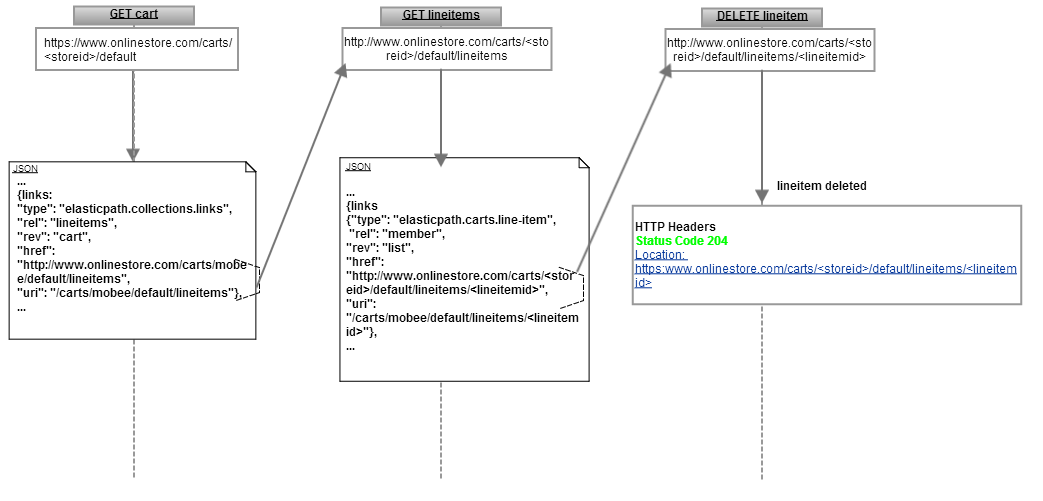
Deleting a cart’s lineitem deletes the lineitem, thereby removing all the items in the lineitem. Once the lineitem is deleted, Cortex returns status code 204 No Content and a link to the lineitem that was deleted.
GETthe cartGETthe cart’slineitems- Call
DELETEthelineitem
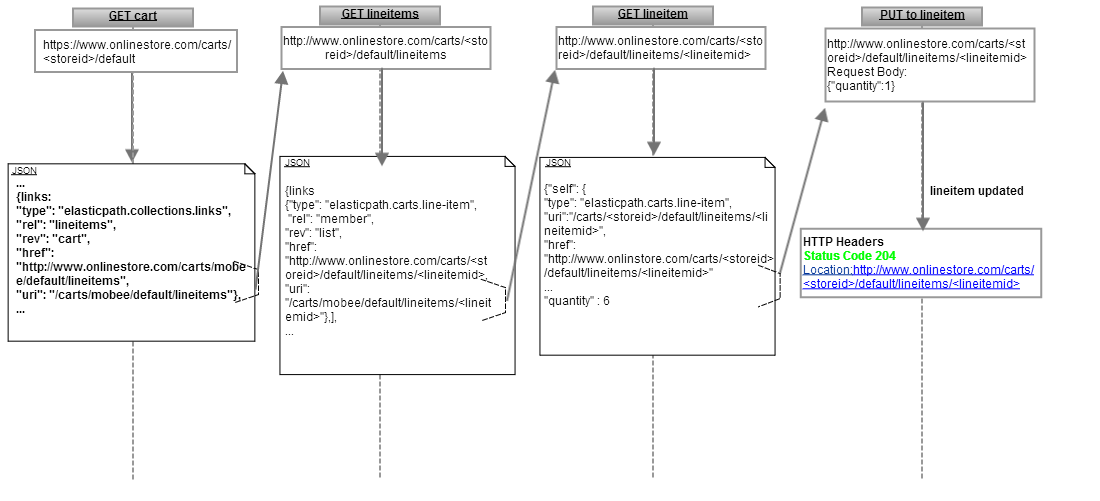
PUT (Update) the cart
This URI updates the number of items in a lineitem. For example, if you have 4 Rockstar T-Shirts in a lineitem, you can use this method to remove 3 of the t-shirts, which leaves 1 T-shirt in the cart. The request body sets the number of items in the lineitem. If you have 4 items and you specify {"quantity":1}, then you will have one item in the lineitem. Another example is if you have 4 items and you specify {"quantity":10}, then you will have ten items in the lineitem.
GETthe cartGETthe cart’s lineitemsGETa cart’s lineitemPUTto the lineitem to update it (shown below)