Payments
B2B and B2C store owners want to be able to offer customers a variety of payment options. For example, some customers prefer to use a credit card through a traditional payment provider, while other customers might prefer to use a digital wallet through a mobile payment provider. B2B customers might prefer to use purchase orders and offline payments. With Self-Managed Commerce you can implement the payment options you need by using the Payments framework and payment plug-ins.
You can offer the following types of payment options:
- Online payment providers, such as Authorize.net, WorldPay, or Stripe
- Online or offline payments and methods, such as purchase orders
- Digital wallet and online payment providers, such as Apple Pay, Google Pay, or AliPay
The following diagram shows the Payments framework for supporting custom payment plug-ins:
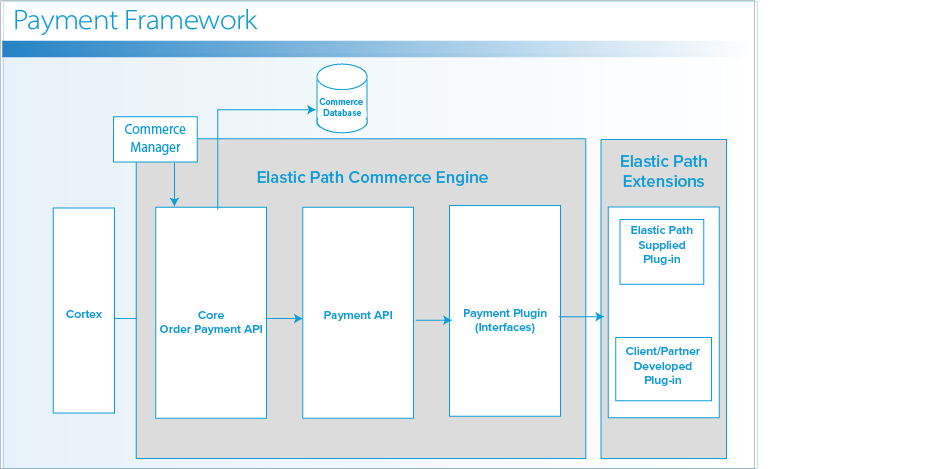
The Payments framework consists of the following items:
-
Order Payment API: Evaluates the order state and delegates the payment specific actions to the Payment API. For example, when an order is submitted, the Payment API calls the
Reserveto reserve the order amount on the attached payment instrument. -
Payment API: Core payment logic and calculations are done by the Payment API. After the calculations are complete, the Payment API delegates further actions to the payment plug-in for the selected payment instrument.
-
Payment plug-in: Specific to a payment provider and method, back-end developers create and implement payment plug-ins by using the interfaces provided by the Payments framework. A payment plug-in is responsible for performing actions (also known as capabilities) such as the
Reserve,Charge, andCreditactions.
After you create a payment plug-in, you can configure it and associate it with one or more stores. For example, if you are using AliPay, you can associate AliPay with all of your stores in China. Front-end developers, using the REST APIs, make the payment options available to shoppers.
Payment Plug-in Implementation
The Payments framework provides interfaces for all the capabilities required to process a payment:
- Reserve
- Modify Reservation
- Cancel Reservation
- Charge
- Reverse Charge
- Credit / Refund
The mechanism for implementing the capabilities is through the capability-based plug-in model.
A payment method is the type of payment that you can use, such as a type of credit card. To use a payment method, a payment instrument is also required. A payment instrument is a token that represents the customer’s account number, such as their credit card number. A payment instrument is used during the Payment Instrument Creation (PIC).
Implement a payment plug-in by creating a class that extends AbstractPaymentProviderPlugin, You can also implement the following PaymentProviderPlugin capabilities:
-
ReserveCapabilityProvides the ability to perform a reservation operation for a payment instrument. A reservation is also referred to as an authorization, pre-authorization, or a hold.
-
ModifyCapabilityProvides the ability to modify the amount of a reservation.
-
CancelCapabilityProvides the ability to cancel a reservation.
-
ChargeCapabilityReserve funds on the payment instrument to cover the cost of an order. A reservation is also known as an authorization, pre-authorization, or a hold.
-
ModifyCapabilityModifies the amount of a reservation.
-
ReverseChargeCapabilityAn interface that returns a reverse charge response from the payment provider.
-
CreditCapabilityAn interface for the credit capability.
-
PICClientInteractionRequestCapabilityReturns an object that encapsulates payment instructions request fields. Use the values of the request fields as parameters when you request a payment instrument from a payment provider. For more information, see the Payment Instrument Creation (PIC) Workflow section.
Workflows
The following sections detail the end-to-end process for processing payments.
Payment Instrument Creation (PIC)
For a shopper to use a payment method, such as a credit card, the Payments framework must create a representation of the payment method. This representation is called a payment instrument. A payment instrument, such as the token for a specific credit card is created through the Payment Instrument Creation (PIC) workflow.
In the Payments framework, payment instruments are sent to the payment provider. The payment provider processes the payment.
The following diagram illustrates the workflow for creating a payment instrument:
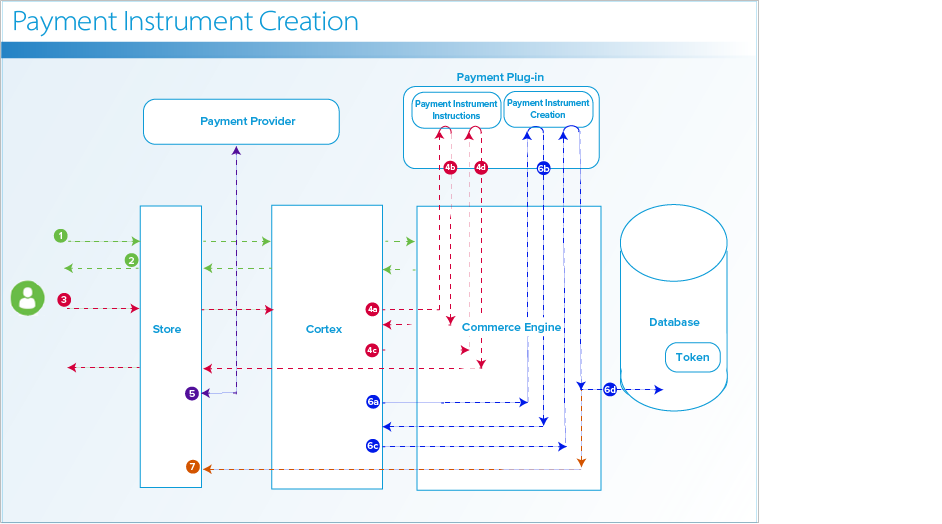
PIC Creation workflow
-
User requests the payment options and starts the payment instrument creation process.
-
Store returns the supported payment methods to the user.
-
User selects the payment method.
-
Cortex requests the PIC Instructions from the payment provider plug-in.
-
Cortex requests the payment instrument creation instruction fields.
-
Payment plug-in returns the creation fields for the payment instrument.
-
Cortex fills the PIC creation fields and requests the PIC instructions.
-
Payment provider plug-in returns the PIC instructions.
-
-
Store redirects to the payment provider using this information and creates a token from the user provided information.
-
Cortex creates a payment instrument.
-
Cortex requests the PIC form from the payment plug-in.
-
Payment plug-in returns the PIC form.
-
Cortex populates the form with the information from Step 5 and submits to the payment provider plug-in.
-
The payment instrument is created and persisted to the database.
-
-
Cortex receives the Payment information and the user receives a usable payment instrument.
The cart must have at least the payment instrument and a cart total greater than zero. With this information present, if there is an error, PaymentInstrumentCreationFailedException is thrown.
Reserve
A Reserve action is an authorization for funds. Self-Managed Commerce uses the shopper’s selected payment instrument and calls the associated payment plug-in to request the reservation of funds.
During the reservation call, the CartContext request can pass the following data to the plug-in:
- SKU code
- Product code
- Product display name
- Product attributes
- SKU attributes
- Quantity
- Unit price
- Tax amount
- Subtotal
The following diagram illustrates the Reserve action workflow:
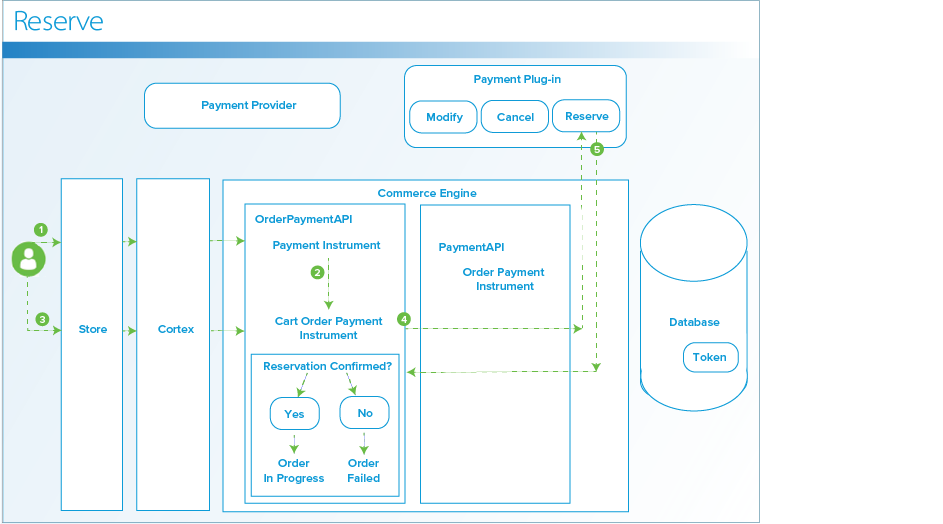
Reserve workflow
-
Shopper selects the payment instrument.
-
Commerce Engine creates
CartOrderPaymentInstrumentfrom thePaymentInstrument. -
Shopper submits order for processing. Self-Managed Commerce converts
CartOrderPaymentInstrumenttoOrderPaymentInstrument. -
Self-Managed Commerce calls the associated payment plug-in to reserve the funds.
-
The status of the order is based on the type of confirmation:
- If the provider confirms the reservation, Self-Managed Commerce persists the confirmation as an
OrderPaymentsobject and the order is in theIn Progressstate. - If the provider does not confirm the reservation, Self-Managed Commerce records the transaction as failed in the database and the order is in the
Failedstate.
- If the provider confirms the reservation, Self-Managed Commerce persists the confirmation as an
Modify Reservation
The modifyReservation Capability is called as items are added or removed from an order, by the Customer Service Representative (CSR). The CSR carries out these order amendments in Commerce Manager, before the shipment is complete.
If the CSR modifies an order by adding a physical item on pre-order or the item is on back order, the item is reserved for the full amount when the shopper makes the purchase. When the item becomes available, the shipment becomes shippable and the order is charged the full amount. For more information about modifying an order in Commerce Manager, see Customers in Self-Managed Commerce.
The following diagram illustrates the Modify Reservation workflow:
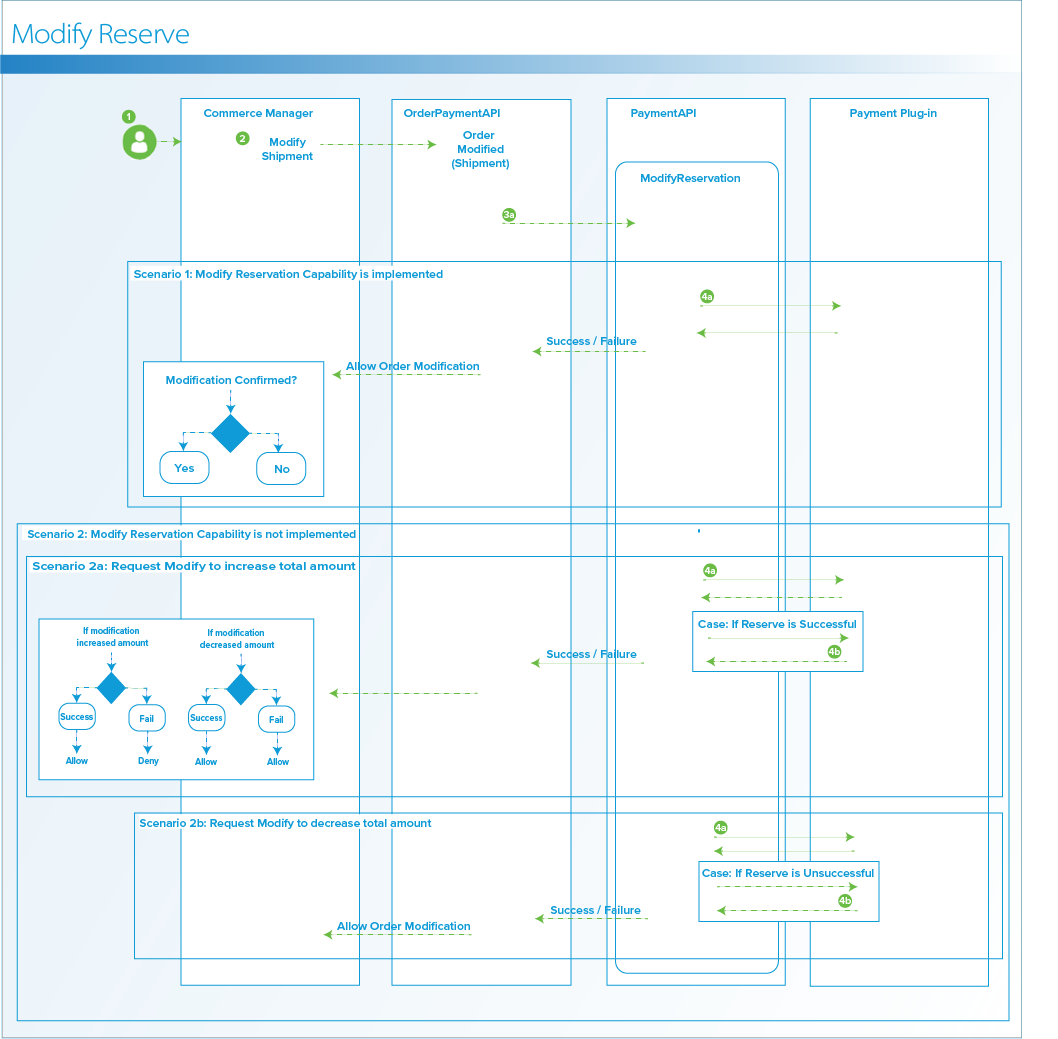
Modify Reservation workflow
-
Shopper calls CSR to modify the order.
-
CSR modifies the unshipped shipment. Commerce Manager calls
OrderPaymentAPI. -
OrderPaymentAPIcalculates the new required amount and callsPaymentAPIto request the modification.
Scenario 1: Modify Reservation Capability is implemented
-
If the payment plug-in has the Elastic Path payments
Modifycapability implemented, Commerce Engine calls themodifyReservationcapability.modifyReservationincreases or decreases the amount of the reservation as required. (4a.) -
If
modifyReservationis successful, the Payment API allows the order modification in Commerce Manager. If themodifyReservationfails, Payment API does not allow the order modification and the order is left unchanged. (4b.)
Scenario 2: Modify Reservation Capability is not implemented
When a payment provider does not support reservation modification, the Payment API simulates the modifications of reservations. The Payment API cancels the existing reservation and creates a new reservation with the new amount. The payment plug-in performs one of the following actions:
Scenario 2a: Increase If the modification request is to increase the reservation.
-
The Payment API attempts to make the new reservation with the new amount. (4a.)
-
If successful, the Payment API goes ahead and cancels the original reservation and allows the order modification. (4b.)
-
If not successful, Payment API does not cancel the original reservation and does not allow the order modification. (4c.)
Scenario 2a: Decrease If the modification request is to decrease the reservation:
-
The Payment API attempts to make the new reservation. (4a.)
-
If successful, the Payment API goes ahead and cancels the original reservation and allows the order modification. (4b.)
-
If not successful, the Payment API does not cancel the original reservation, but still allows the order modification. (4c.)
Note: If the reservation is of the higher amount, the charge is for the reduced order amount.
Cancel Reservation
The capability to cancel a reservation on a payment instrument.
The following diagram illustrates the Cancel Reservation workflow:
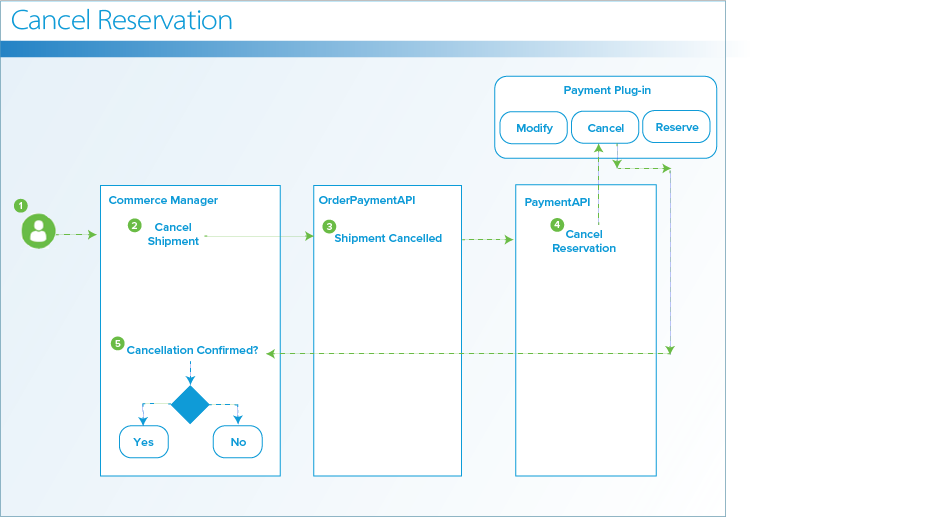
Cancel Reservation workflow
-
Shopper calls a CSR to cancel the order.
-
CSR cancels the unshipped shipment. Commerce Manager calls
OrderPaymentAPIto cancel the shipment. -
OrderPaymentAPIrequests the cancellation of reservation. -
PaymentAPIcalls thecancelReservationcapability. -
Payment plug-in performs one of the following actions:
-
If the cancel reservation is successful, Commerce Engine records the successful cancel reservation transaction and cancels the shipment.
-
If the cancel reservation is not successful, Commerce Engine records the cancel reservation transaction failure and cancels the shipment.
noteIf the cancellation is either the only shipment or the last shipment to be canceled, the order is completely canceled. If the order is divided into more than one shipment, and the cancellation is for the last shippable item in the order, the order is completely canceled.
-
Charge
Before a shipment is released to the shopper, the shipment amount is charged to the payment instrument.
The following diagram illustrates the Charge workflow:
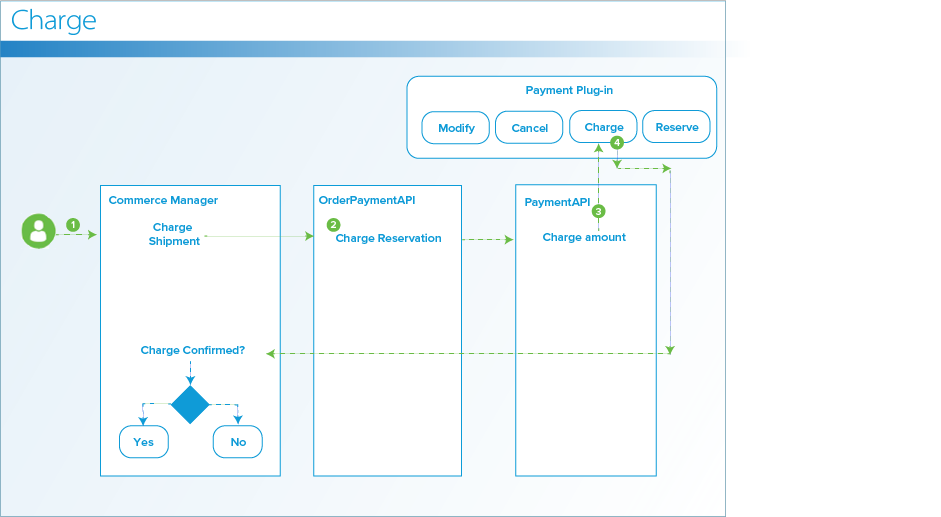
Charge workflow
-
CSR releases the shipment. Commerce Manager calls
OrderPaymentAPIto charge the shipment. -
OrderPaymentAPIrequests to charge the reservation with the shipment total. -
PaymentAPIcalls the payment plug-in to charge the amount. -
Payment plug-in sends one of the following confirmations:
- If the provider confirms the charge, the shipment is marked as completed, and Self-Managed Commerce persists the confirmation as an
orderPaymentsobject - If the provider does not confirm the charge, Self-Managed Commerce records the transaction as failed.
Note: If the requested shipment is not the last shippable shipment in the order, Payment API requests a new reservation for the leftover amount.
- If the provider confirms the charge, the shipment is marked as completed, and Self-Managed Commerce persists the confirmation as an
Credit
A CSR can use the Credit Capability to return an amount of an order to a shopper. By using Commerce Manager, a CSR can refund the whole or a partial amount of the order. For more information about refunds, see Creating a Refund.
The following diagram illustrates the Credit workflow:
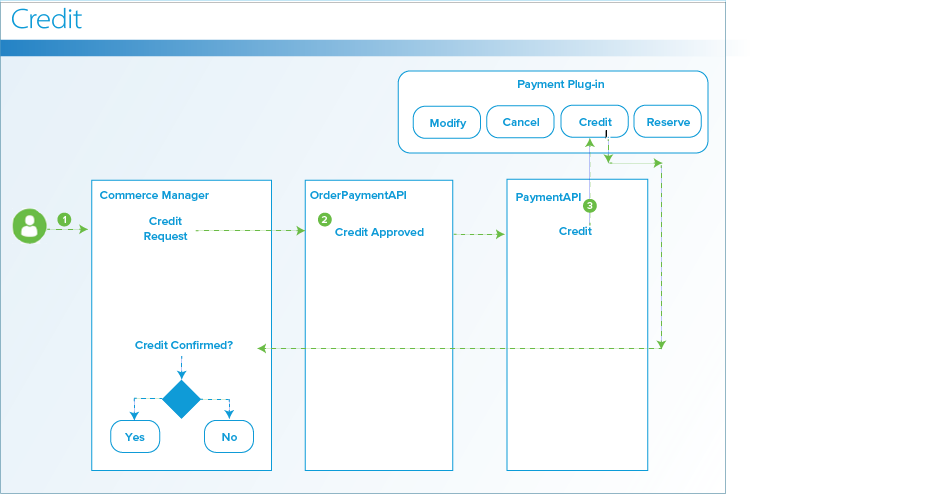
Credit workflow
-
Shopper calls CSR to request a refund.
-
CSR credits the order. Commerce Manager calls
OrderPaymentAPIto credit the order. -
PaymentAPIcalls the payment plug-in to credit the amount andPaymentInstrumentis credited the refund amount. -
Credit transaction is recorded as
orderPaymentwith the credit amount.
If the shopper attempts to create a credit with the amount larger than the charged amount, the credit is declined.
Additional Data Available to Plug-in
The following orderContext is available to all of the Capabilities:
-
MoneyDTO orderTotal
-
String orderNumber
-
String customerEmail
-
AddressDTO billingAddress
-
Order SKU code
String displayName;int quantity;BigDecimal price;BigDecimal taxAmount;BigDecimal total;String skuCode;
Using Payment Instruments
After you create a payment instrument, it can be used for multiple pre-authorization requests which replaces the need to pass sensitive cardholder data.
A registered shopper has an option to select a default payment instrument and save it to their profile. When a default payment instrument exists, Cortex uses the default-on-profile payment instrument as the selected payment method. If a shopper adds another payment instrument as the default, the new payment instrument replaces the previous default payment method.
You can also create a single-use token to use once for a reservation. Regardless of the number of shipments or modifications to the order, the Payments framework ensures that the single-use token only processes a single reservation and capture for the order. For more information about single-use, see Additional Plug-in Behaviors.
Payment Database Tables
The following tables are the database tables processed through PaymentAPI.
TPaymentInstrument
Represents the payment instrument in each table row.
Unique Identifier Primary Key int pk
GUID varchar
Name varchar
PAYMENT_CONFIGURATION_UID int
TPaymentInstrumentData
Represents additional data associated with the payment instrument as key value pairs.
Unique Identifier Primary Key int pk
GUID varchar
Key varchar
Value varchar
TPaymentProviderConfig
Represents an association to the payment provider configuration by GUID and name.
Unique Identifier Primary Key int
GUID varchar
PAYMENT_PROVIDER_UID int
Name varchar
TPaymentProviderConfigData
Represents additional data associated with the payment provider configuration.
Unique Identifier Primary Key int pk
PAYMENT_PROVIDER_CONFIG_UID int
CONFIG_KEY varchar
CONFIG_DATA varchar
TCustomerPaymentInstrument
Represents the payment instrument saved in profile for a customer.
Unique Identifier Primary Key BIGINT
PAYMENT_INSTRUMENT_GUID VARCHAR(64)
CUSTOMER_UID int
GUID VARCHAR(255)
TCustomerDefaultPaymentInstrument
Represents the default profile payment instrument for a customer.
Unique Identifier Primary Key BIGINT
CUSTOMER_UID BIGINT
CUSTOMER_PAYMENT_INSTRUMENT_UID int
TCartOrderPaymentInstrument
Represents the relationship between the selected payment instrument and the cart order.
Unique Identifier Primary Key BIGINT
PAYMENT_INSTRUMENT_GUID VARCHAR(64)
CART_ORDER_UID BIGINT
Limit DECIMAL(19,2)
GUID VARCHAR(255)
TOrderPaymentInstrument
Represents a payment instrument used for an order.
Unique Identifier Primary Key BIGINT
PAYMENT_INSTRUMENT_GUID VARCHAR(64)
ORDER_NUMBER VARCHAR(64)
LIMIT_AMOUNT DECIMAL(19,2)
GUID VARCHAR(255)
CURRENCY_CODE VARCHAR(64)
TOrderPayments
Represents a payment transaction on a payment instrument.
Unique Identifier Primary Key BIGINT
CREATED_DATE TIMESTAMP
Type VARCHAR(64)
Status VARCHAR(64)
ORDER_NUMBER VARCHAR(64)
Amount DECIMAL(19,2)
CURRENCY_CODE VARCHAR(64)
PAYMENT_INSTRUMENT_GUID VARCHAR(64)
GUID VARCHAR(255)
PARENT_ORDER_PAYMENT_GUID VARCHAR(255)
IS_ORIGINAL_PI BIT(1)
TPaymentLocalizedProperties
Represents a localized name for a payment provider configuration.
Unique Identifier Primary Key BIGINT
OBJECT_UID BIGINT
LOCALIZED_PROPERTY_KEY VARCHAR(255)
Value VARCHAR(255)
Type VARCHAR(31)
TStorePaymentProviderConfig
Represents the relationship between the store and the payment provider configuration.
Unique Identifier Primary Key BIGINT
PAYMENT_PROVIDER_CONFIG_GUID VARCHAR(64)
STORECODE VARCHAR(64)
GUID VARCHAR(255)