Promotions
This section contains information on how promotions are applied. List prices and sale prices for products are stored in the Pricing and support multiple price tiers so that higher quantities can be purchased at a discount. These prices can be discounted dynamically using rules defined for the promotion rules engine.
Promotion rule domain model
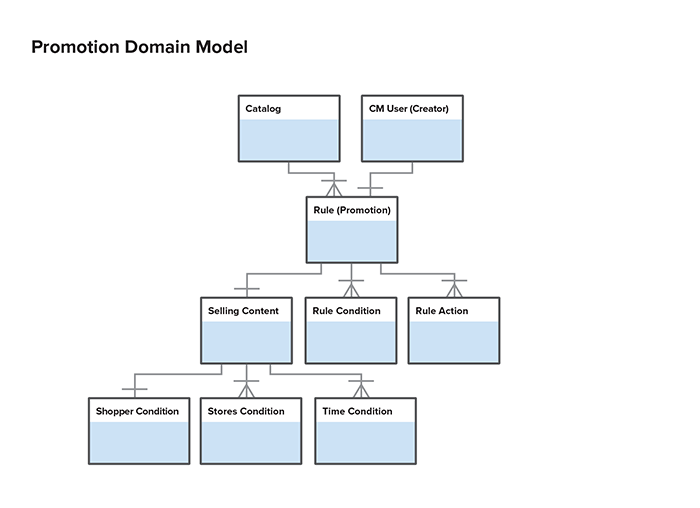
Promotion rule engine
The promotion rule engine allows marketers to create promotions that apply discounts and free items to products and shopping carts.
Drools
The promotion rule engine is built on the open source Drools framework. Drools is an open source rules engine that uses a fast algorithm to evaluate rule conditions and execute their actions. The input to the Drools engine is a set of objects used in the condition evaluation and action execution as well as the set of rules, which are expressed in the proprietary Drools language.
The representation of a rule in Self-Managed Commerce is an object model of the components of a rule such as conditions, actions, and parameters used by various rule elements. The object model is persisted in the database directly with one table corresponding to one class in the rule object model. This allows the graph of rule objects to be easily stored, retrieved and modified, and stored again. The objects in the rule object model are responsible for generating the language code that is passed to Drools. The generated code is not persisted and it is not possible to re-create the object model representation of a rule given the Drools code.
Drools supports basic evaluation of objects’ properties within the engine itself. However, more complex operations are not supported. In Self-Managed Commerce, nearly all conditions are evaluated in Java and the actions are also executed in Java. This allows the condition and action code to be easily debugged and unit tested. The PromotionRuleDelegate is the class that is responsible for computing conditions and executing actions as required by Drools.
Components of a promotion
A promotion is defined as a rule in Drools. A rule consists of rule elements. There are two types of rule elements:
-
Condition: Describes the set of conditions that must be true for the action to be executed.
Conditions are optional. If no condition is specified, then the action will execute whenever the customer is eligible. When multiple conditions are specified, the user can again choose whether all or any of them must be satisfied.
-
Action: Describes the action that will be taken if the customer is eligible and all conditions are met.
If multiple actions are present, all actions will be executed if the conditions are met.
Promotion editor
The Commerce Manager promotion editor allows the user to compose rules from rule elements and then save those rules in the database. The system then retrieves the rules from the database as object graphs, requests the corresponding Drools code from the rule objects, and passes the rule code to the Drools engine. Drools will then determine which rules’ actions should be executed on the Java objects that are passed to it.
Using the promotion rule editor in the Commerce Manager, users mix and match promotion rule elements to create rules. Therefore, all rule elements are independent of each other. It is not possible for an action to use information determined by a condition.
Promotion types (scenarios)
There are two types of promotions:
- Catalog Promotions
- Shopping Cart Promotions
Catalog Promotions
These promotions are applied when looking up product prices, for example, while the shopper is browsing the product catalog or viewing product details. This promotion type supports relatively simple rules, such as x% off a product or category.
Shopping Cart Promotions
These promotions are only applied when the shopper is viewing items in their shopping cart. This promotion type supports more complex rules, usually requiring awareness of the combinations of items in the cart.
Promotion Stacking
When multiple promotions apply discounts for the same product, shopping cart, or shopping cart line item, Self-Managed Commerce uses stacking rules to determine how they should interact.
The following diagram illustrates how different promotion discount types are applied:
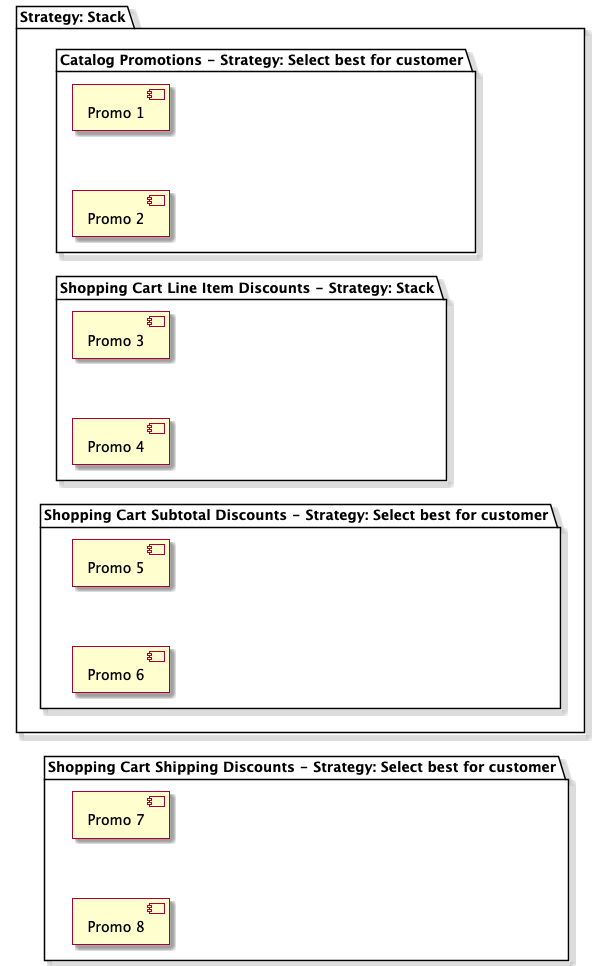
Put simply, these rules apply:
- Catalog promotion discounts choose the best discount for the customer.
- Shopping cart line item promotion discounts stack with each other.
- Shopping cart promotion discounts choose the best discount for the customer.
- Shopping cart line item discounts stack on top of catalog promotion discounts.
- Shopping cart promotion discounts stack on top of shopping cart line item promotions.
- Shipping discounts chose the best discount for the customer.
Additionally, when discounts stack, each promotion is calculated based on the discounted price from any previously calculated promotions. This means that the order of promotions is very important. Self-Managed Commerce applies percentage off discounts before amount off discounts.
To illustrate how this works, consider the examples described below.
Stacking Example 1
Scenario facts:
- The shopping cart contains a product with a sale price of $1.99.
- Promotion A is a catalog promotion that applies a $1 discount.
- Promotion B is a Shopping Cart Promotion that applies $0.10 off the line item.
- Promotion C is a Shopping Cart Promotion that applies 50% off the line item.
- Promotion D is a Shopping Cart Promotion that applies 25% off the shopping cart subtotal.
Evaluation:
The catalog promotion (Promotion A) is applied first, which evaluates as follows:
$1.99 - $1.00 = $0.99
The Shopping Cart Promotions that apply line item discounts are applied next. Since there are two, they stack with the percentage-off discount applying before the dollar-off promotion.
Therefore, Promotion C evaluates as follows:
$0.99 – 50% = $0.49
Then Promotion B evaluates as follows;
$0.49 – $0.10 = $0.39
Finally, when calculating the total price of the shopping cart, the Shopping Cart Promotion that applies a cart subtotal discount is applied. If the cart contained multiple line items, their subtotals would be added together before applying the discount. In this scenario, there is only one line item, so Promotion D evaluates as follows:
$0.39 - 25% = $0.29
So the final price (before taxes and shipping) that the customer pays for the shopping cart is $0.29.
Stacking Example 2
Scenario facts:
- The shopping cart contains a product with a sale price of $10.00.
- Promotion A is a catalog promotion that applies a 25% discount.
- Promotion B is a Shopping Cart Promotion that applies $5 off the shopping cart subtotal.
- Promotion C is a Shopping Cart Promotion that applies 25% off the shopping cart subtotal.
Evaluation:
The catalog promotion (Promotion A) is applied first, which evaluates as follows:
$10.00 - 25% = $7.50
Next, when calculating the total price of the shopping cart, the Shopping Cart Promotions that apply a cart subtotal discount are applied. Since Promotion B gives a $5 and Promotion C gives a 25% discount, which evaluates to $2.50, Promotion B is considered the better promotion for the customer, and Promotion C is ignored. Promotion B evaluates as follows:
$7.50 - $5.00 = $2.50
So the final price (before taxes and shipping) that the customer pays for the shopping cart is $2.50.
Key Classes
The key classes that represent rules in the domain model are:
Rule- A promotion. Each rule contains a collection of rule elements (conditions and actions).RuleSet- A set of rules valid for each promotion type.Condition- A condition that must be true for a promotion to be available.Action- The action to perform if a rule’s conditions are met.RuleParameter- Actions and conditions typically require parameters held by aRuleParameterobject.
These domain objects generate the Drools code that is executed by the rule engine. The rule domain objects are also responsible for self validation. The validation and code generation is invoked by clients at the top level (Rule Set) and propagated down to the child objects.
Other key classes include:
EpRuleEngine- Retrieves rules from persistent storage, compiles them into Drools language, and evaluates them against domain objects when requested by clientsPromotionRuleDelegateImpl- Evaluates rule conditions and executes rule actions
Drools code
The rules objects generate Drools code such as the example below:
//Objects used in the evaluation or action must be imported
import com.elasticpath.domain.rules.PromotionRuleExceptions;
import com.elasticpath.domain.shoppingcart.CartItem;
import com.elasticpath.domain.catalog.ProductSku;
import com.elasticpath.domain.shoppingcart.ShoppingCart;
import com.elasticpath.domain.rules.PromotionRuleDelegate;
import com.elasticpath.domain.catalog.Product;

//Each rule must have a name, defined here
rule "First Time Buyer"

  //Salience determines the order of evaluation,
  // higher salience means higher priority
 salience -1

  //Agenda groups are evaluated and executed together
 agenda-group "SubtotalDependent"

    //Start of the "Conditions" Block
    when

         //Declare objects used in the rule
         delegate: PromotionRuleDelegate ( )
         cart: ShoppingCart ( )
         eval ( delegate.checkDateRange("0","0") )

         //Ask the delegate to evaluate whether conditions are true
         eval ( delegate.isFirstTimeBuyer(cart) )


    //The "then" block defines what will happen when the conditions in
    //the "when" block are all true
    then

         //Ask the delegate to execute an action
         delegate.applyOrderDiscountAmount(cart, 4489216, "75");
end
Adding a new rule element
Rules are composed of rule elements, which can be conditions or actions. To add a new rule element:
-
Add a new value to the
RuleElementTypeextensible enum for the new condition or action.- The "name" parameter of the new enum will be used as the discriminator value for the domain object in the next step.
-
Create an extension class named
ExtPromotionRuleDelegateImplthat extendsPromotionRuleDelegateImplinext-coreand define a method that will execute the action or condition of your rule element. -
Create a rule element domain class for the condition or action implementation.
-
Add the class to the
com.elasticpath.extensions.domain.rules.implpackage of theext-coremodule. -
If you are creating an action, your class should extend
AbstractRuleActionImpl, otherwise extendAbstractRuleElementImpl. -
The class should have the following annotations:
@Entity@DiscriminatorValue("myCustomCondition")@DataCache(enabled = false) -
Set the discriminator value annotation parameter to the name you specified in the
RuleElementTypeenum you added in step 1. -
Implement
getElementTypeto return theRuleElementTypeenum you added in step 1. -
Implement
getElementKindto returnCONDITION_KINDorACTION_KINDdepending on whether you are implementing a condition or action. -
Implement
appliesInScenarioto returnscenarioId == RuleScenarios.CART_SCENARIOorscenarioId == RuleScenarios.CATALOG_BROWSE_SCENARIOdepending on whether you are implementing a shopping cart promotion rule element or a catalog promotion rule element. -
Implement
getDiscountTypeto return aDiscountTypeobject to indicate the classification of the action or condition, such as cart item discount, cart subtotal discount, shipping discount, etc. -
Implement
getParameterKeysto return an array ofRuleParametervalues indicating the type of parameters that the user should be able to specify. -
Implement
getAllowedExceptionsto return an array ofRuleExceptionTypevalues indicating the type of exceptions that the user should be able to specify. -
Implement
getRuleCodeto define the Drools logic for the condition or action. This rule should invoke the method you created inExtPromotionRuleDelegateImpl.
-
-
Define a prototype bean for the rule element class in
ext-prototypes.xml, similar to the following:<bean id="myCustomCondition" scope="prototype" class="com.elasticpath.extensions.domain.rules.impl.MyCustomConditionImpl"/> -
Add the rule element bean name to the list in the
allConditionsorallActionsproperty of theruleServiceLocalbean. -
Add the rule element class name to the
commerce-persistence-unitdefined inextensions/core/ext-core/src/main/resources/META-INF/jpa-persistence.xml, similar to the following:<class>com.elasticpath.extensions.domain.rules.impl.MyCustomConditionImpl</class> -
Define the language to appear to the business user when configuring the condition or action by adding a new property to
commerce-manager/cm-modules/cm-plugins/com.elasticpath.cmclient.store/src/main/java/com/elasticpath/cmclient/store/promotions/PromotionsResources.properties, similar to the following:MyCustomCondition=[{0}] [{1}] items of product with attribute [{2}] having value [{3}] are in the shopping cart -
Associate the property to the rule element in
commerce-manager/cm-modules/cm-plugins/com.elasticpath.cmclient.store/src/main/java/com/elasticpath/cmclient/store/promotions/PromotionsMessages.java.- Add a new public
Stringfield to the class with the same name as the property. - Modify the
instantiateEnumsmethod to link the rule element type to the field name, similar to the following:
putLocalizedName(RuleElementType.MY_CUSTOM_CONDITION, MyCustomCondition); - Add a new public
Testing rules
Rules are extensively tested by JUnit at several levels. The following kinds of JUnit tests are most frequently added or extended when extending the rules system:
-
Rule Element Tests
Each RuleElement should have a unit test. Tests for conditions should extend
AbstractTestRuleElementImpl. Tests for actions should extendAbstractRuleElementImplTest. -
PromotionRuleDelegateImplTest
Add test cases to this class to test the execution of rule actions by the
PromotionRuleDelegateImpl. Tests should also be added for each condition and eligibility decision that is delegated to thePromotionRuleDelegate. -
EpRuleEngineImplTest
This test suite is used to test the highest level of integration in the core rules system and actually runs the Drools engine to test that it executes generated rule code.
When testing a new rule, add the rule element to the rule set in
createShoppingCartRuleSetorcreateCatalogRuleSetdepending on the scenario in which the rule element is valid. The rule delegate method that should be invoked by the rule engine must then be mocked intestFireShoppingCartRules()ortestFireCatalogRules()
Once the rule system has successfully executed the unit tests, rules can be tested in the Commerce Manager and Cortex Studio. For information on setting up the system for easier rule testing, see the Configuration section.
To assist with troubleshooting rules engine failures, the Drools code generated by the rules domain objects can be logged in the log or console.
Rules caching
The set of rules to be passed to Drools is loaded at start time and cached by the EpRuleEngineImpl. EpRuleEngine.compileRuleBase() is invoked periodically by a Quartz scheduled job to reload rules from the database.
Configuration
The promotion rulebase can be configured to rebuild periodically. Scheduling and configuration can be found under the search server’s Scheduled Jobs (Search Server). This means that rules will be reloaded from the database and compiled into the input format for Drools. This rule compilation operation is expensive and should not be performed more frequently than every 5-10 seconds.
For rules to take effect immediately after rulebase compilation, it is necessary to disable caching (Both the second-level cache and the product retrieval strategy defined in service.xml). This is useful for testing but disabling caching is not recommended for production environments.
Promotion rule parameters
The promotion rule editor can be extended to support additional rule elements such as conditions and actions.
Conditions and actions typically require parameters such as product ids and discount amounts to fully specify the rule element. New elements can be added by following the steps in the promotion rule engine. Those steps are sufficient for adding new rule elements that use the existing set of parameters. However, if a new parameter type is required by a new rule element, modifications must be made to the Commerce Manager promotion rule editor. Developers who extend the rules engine subsystem should be familiar with the promotion rule engine.
Standard rule parameters
The following rule parameters are available out-of-the-box. The constant key names of the rule parameters are listed.
categoryId- The UidPk of a categoryproductId- The UidPk of a productdiscountAmount- The amount to be discounteddiscountPercent- A percentage amount to be discountedcurrency- The currency selected by the shoppercustomerGroupId- The UidPk of a customer groupsubtotalAmount- The shopping cart subtotalnumItems- Represents a quantity of items, typically products or SKUsskuCode- The SKU code of a Product SKUshippingServiceLevelId- The UidPk of a shipping service levelbooleanCondition-Represents a true or false valuebrandCode- The code value for a brand associated with a product
Key files
NewPromotionWizardRulesPage- UI for adding a new rulePromotionRulesDefinitionPart- UI for editing a rulePromotionRulesWidgetUtil- utility methods for creating UI elements and performing rule element parameter data bindingPromotionsMessages- defines localized text for the rule elementPromotionsResources.properties- localized text for the rule element
How to add a new rule parameter
There are many ways that new rule parameters can be specified by the user. For example, some rule parameters may be well supported by free-form input while for other parameters the user should be prompted with a pre-set list of values. In other cases, it is desirable to open a dialog box to allow the user to select a parameter.
Because of the diversity of rule parameter input techniques, there is no simple list of steps to follow when creating new parameters in the Commerce Manager promotion rule editor. However, the following points provide some items to consider when creating new rule parameters.
-
Define a new constant in
RuleParameter.java. -
Add a new
else ifcase for your rule parameter inNewPromotionWizardRulesPageandPromotionRulesDefinitionPart.if (RuleParameter.CATEGORY_ID_KEY.equals(paramKey)) {util.addCategoryFinderLink(ruleParameter, ruleComposite, null, EpState.EDITABLE);} else if (RuleParameter.PRODUCT_ID_KEY.equals(paramKey)) {util.addProductFinderLink(ruleParameter, ruleComposite, null, EpState.EDITABLE);...} else if (RuleParameter.BRAND_CODE_KEY.equals(paramKey)) {util.addBrandCombo(ruleParameter, ruleComposite, this, getDataBindingContext(), EpState.EDITABLE);} -
If you need a custom UI component for entering the rule parameter value then add a method in
PromotionRulesWidgetUtil.public void addBrandCombo(final RuleParameter ruleParameter, final IEpLayoutComposite ruleComposite,final DisposeListener disposeListener, final DataBindingContext dataBindingContext, final EpState epState) {// create the combo boxfinal CCombo brandCombo = ruleComposite.addComboBox(epState, null);brandCombo.pack();final BrandService brandService = ServiceLocator.getService(ContextIdNames.BRAND_SERVICE);final List<Brand> brands;if (scenario == RuleScenarios.CATALOG_BROWSE_SCENARIO) {brands = brandService.findAllBrandsFromCatalog(catalog.getUidPk());} else {brands = brandService.findAllBrandsFromCatalog(store.getCatalog().getUidPk());}// populate the combo boxint selectedIndex = 0;int currBrandIndex = 0;for (final Brand currBrand : brands) {brandCombo.add(currBrand.getDisplayName(CorePlugin.getDefault().getDefaultLocale(), true));...brandCombo.setData(binding);brandCombo.addDisposeListener(disposeListener);}} -
Add a new entry and mapping in
PromotionsMessages.public static String BrandCondition;...localizedPromotionEnums.put(RuleElementType.BRAND_CONDITION, BrandCondition); -
Add the rule element text in
PromotionsResources.propertiesBrandCondition=Brand is [{0}]