Implementing Pricing and Promotions
This guide is an overview of the resources related to pricing and promotions and describes how you can use these resources to implement common e-commerce features in a client application.
Promotions are incentives offered to shoppers to promote the purchase of items in a store. A store’s marketer creates promotions and defines a set of conditions that must be met by the shopper before the promotion is applied. When promotions are applied, discounts for the following can be generated:
- Item Prices
- Cart Totals
- Cart Line Item Prices and Cart Line Item Totals
- Shipping Option Costs
When a promotion is applied, the corresponding price or totals resource updates to reflect the discount. You don’t need to compute the changes yourself as Cortex handles this for you.
Item Pricing and Promotions
An item resource is a purchasable good or service. An item has a price and a list of applied promotions. The pricing and promotion resources are linked to an item as follows:
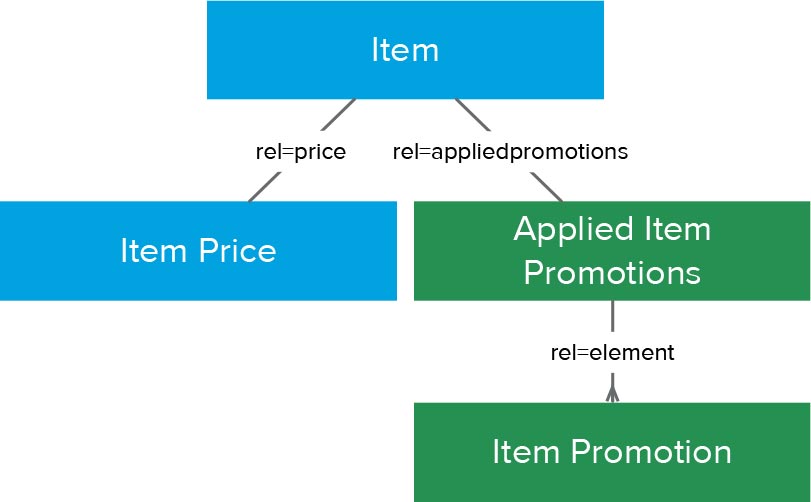
Item Price
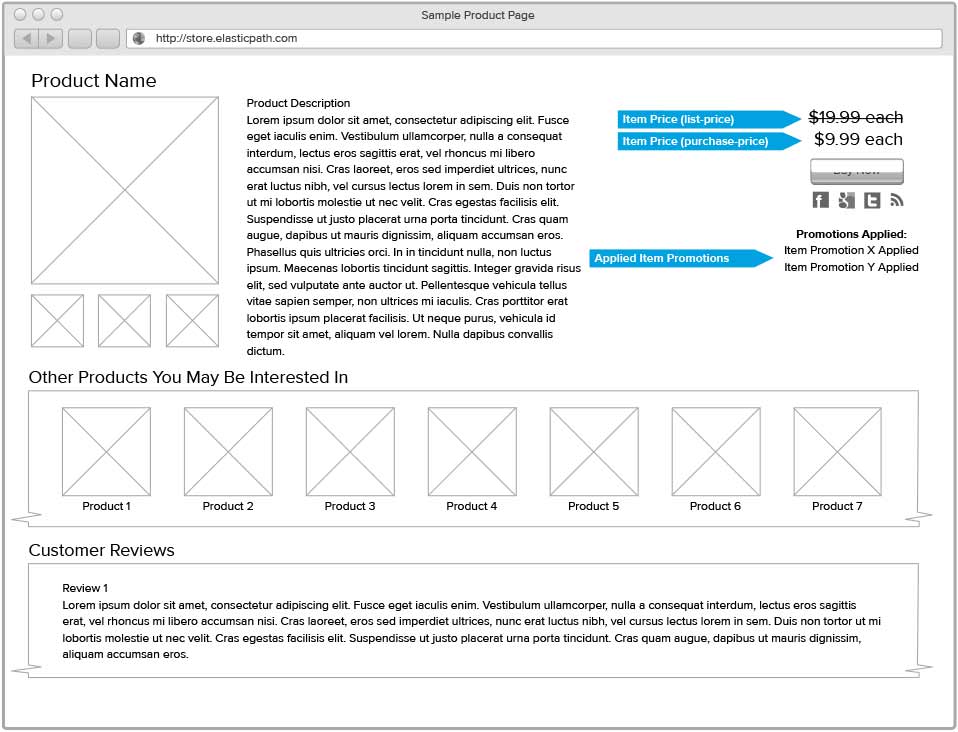
The item price resource is the unit price of an item in the store’s catalog. The unit price of an item is the price for one unit (quantity = 1). An item price is composed of two fields, a list-price and purchase-price. The list-price is the unit price of an item before catalog discounts are applied, whereas the purchase-price is the unit price of an item after catalog discounts are applied.
Zoom usage example: ?zoom=price
Applied Item Promotions
The applied item promotions list resource shows the catalog promotions that have been applied to this item.
Zoom usage example: ?zoom=appliedpromotions:element
Example
The following is an example of a product page that demonstrates how these resources can be used in a client application:
Cart and Order Pricing and Promotions
A cart is a basket of items that the shopper is interested in purchasing. Items added to the cart are called cart line items and each cart line item has a corresponding quantity that represents the number of units of the item being purchased. Additionally, every cart has an associated order that tracks and communicates the information required to complete a purchase.
Promotions can be automatically applied to the cart using rules defined by the store marketer. When promotions are applied to the cart, they can generate discounts for the following resources:
- Cart Total
- Cart Line Item Prices and Totals
- Shipping Option Costs
The shopper can also trigger promotions manually by applying coupons to their order. Applying a coupon may trigger a promotion depending on the content’s of the shopper’s cart and the rules defined by the store marketer.
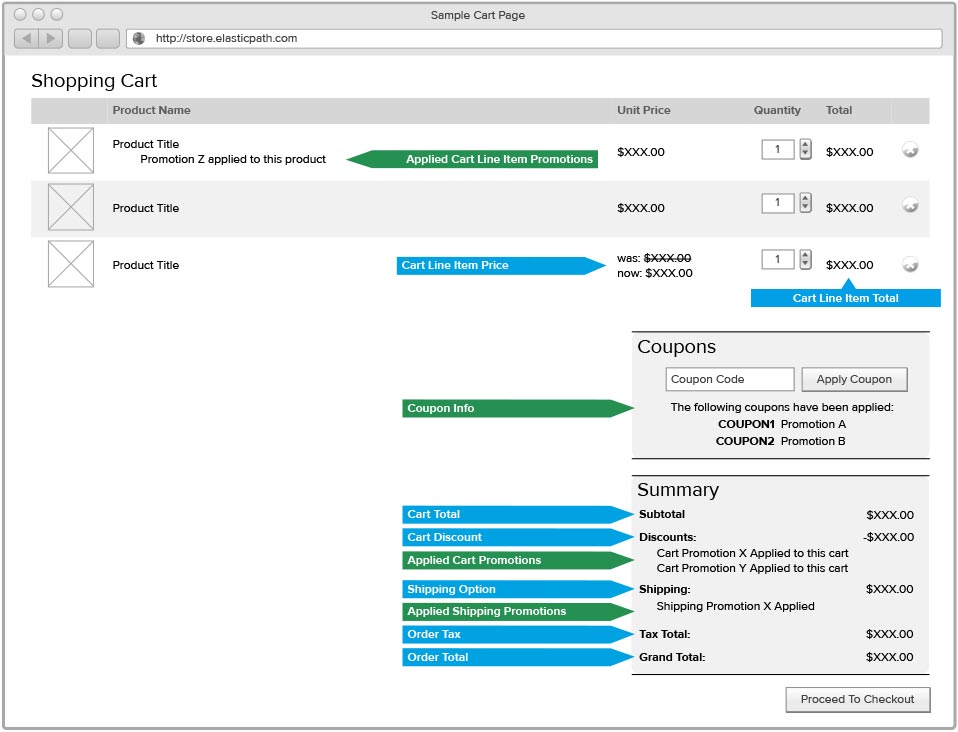
The pricing and promotion resources are linked to a cart and order as follows:
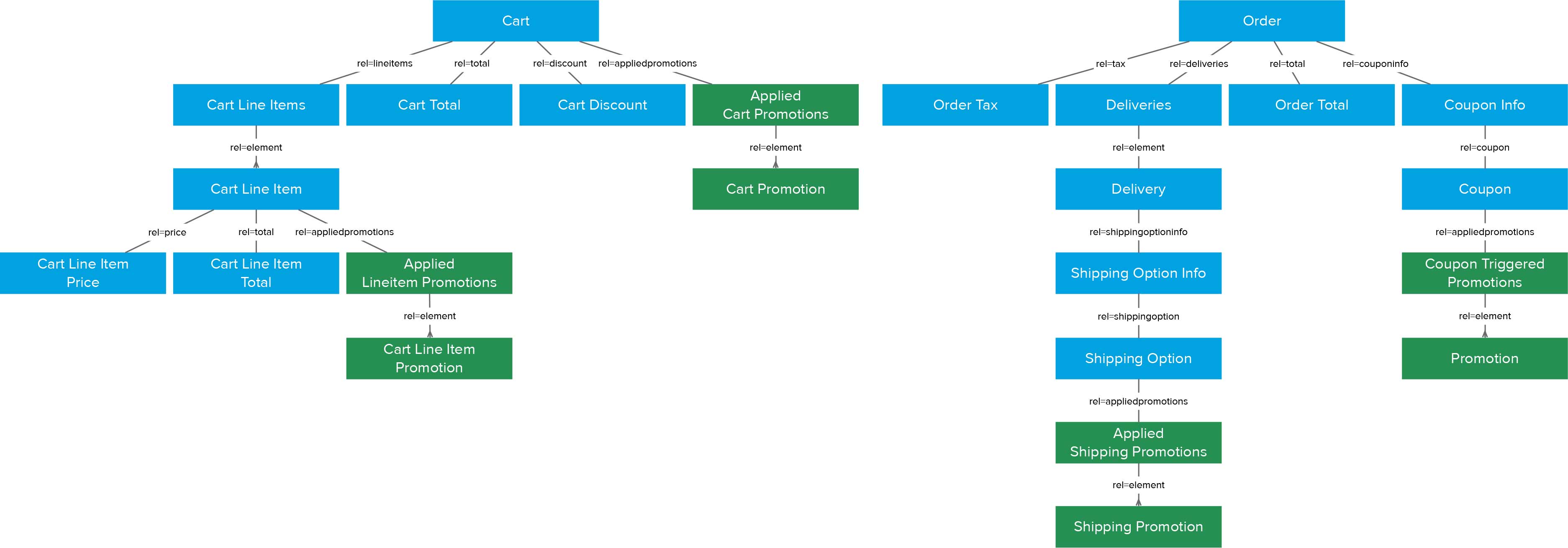
Cart and Order Pricing Resources
Cart Total
The total cost of all cart line items before cart total discounts are applied.
Zoom usage example: GET /carts/{scope}/default?zoom=total
Cart Discount
The discount applied to the cart total. This does not include discounts applied directly to a cart line item.
Zoom usage example: GET /carts/{scope}/default?zoom=discount
Cart Line Item Price
The unit price of the item in the cart. The unit price of a cart line item is the price for one unit when a given quantity is purchased (the line item quantity). This can be different to the unit price of an item as the quantity purchased may influence the price paid per unit.
Zoom usage example: GET /carts/{scope}/default?zoom=lineitems:element:price
Cart Line Item Total
The cart line item total for the requested quantity. This total includes any cart line item discounts that have been applied.
Zoom usage example: GET /carts/{scope}/default?zoom=lineitems:element:total
Order Tax
The total taxes for an order.
Zoom usage example: GET /carts/{scope}/default?zoom=order:tax
Order Total
The grand total due now for the order.
Zoom usage example: GET /carts/{scope}/default?zoom=order:total
Shipping Option
The shipping carrier’s cost for an order.
GET /carts/{scope}/default?zoom=order:deliveries:element:shippingoptioninfo:shippingoption
Cart and Order Promotion Resources
Applied Cart Promotions
The promotions applied to the cart total.
Zoom usage example: GET /carts/{scope}/default?zoom=appliedpromotions
Applied Cart Lineitem Promotions
The promotions applied to a cart lineitem total or price, or free items that were added.
Zoom usage example: GET /carts/{scope}/default?zoom=lineitems:element:appliedpromotions
Applied Shipping Promotions
The promotions applied to the shipping option cost.
Zoom usage example: GET /carts/{scope}/default?zoom=order:deliveries:element: shippingoptioninfo:shippingoption:appliedpromotions:element
Promotions Triggered By Coupons
The promotions triggered when a coupon was applied to the order.
Zoom usage example: GET /carts/{scope}/default?zoom=order:couponinfo:coupon:appliedpromotions:element
Example
The following is an example of a product page that demonstrates how these resources can be used in a client application:
Purchase Pricing and Promotions
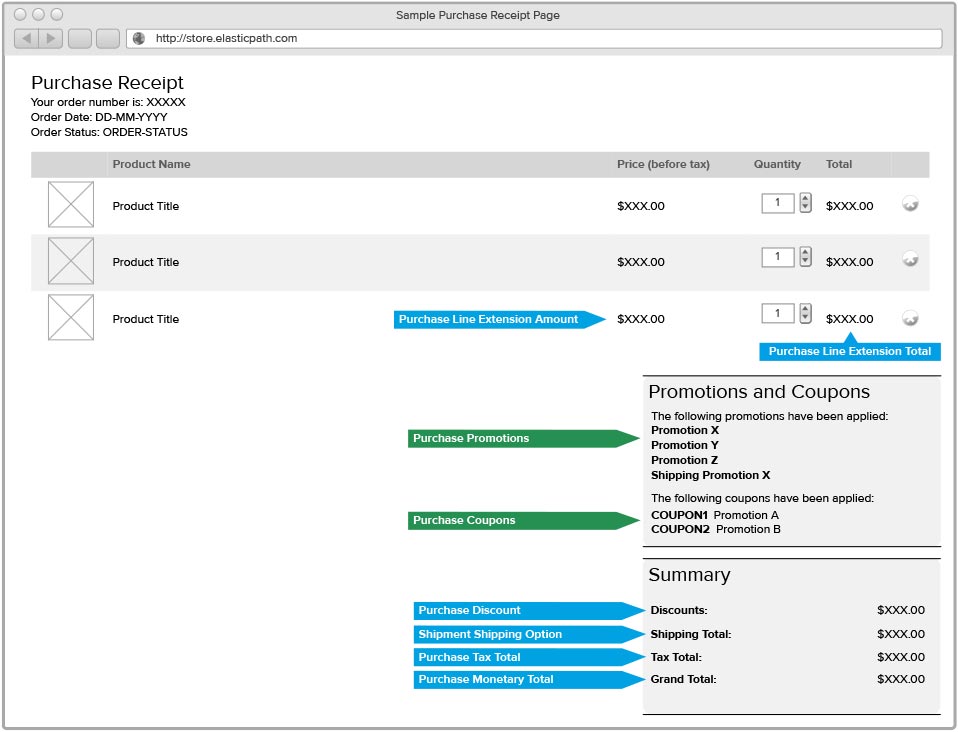
A purchase is a receipt of a submitted order. This means prices and promotions shown in a purchase are not affected by changes made by the store marketer. For example, if a store marketer changes the price of an item, the purchase prices will show the price and totals the shopper actually paid for the item and not the updated price.
The pricing and promotion resources are linked to a purchase as follows:
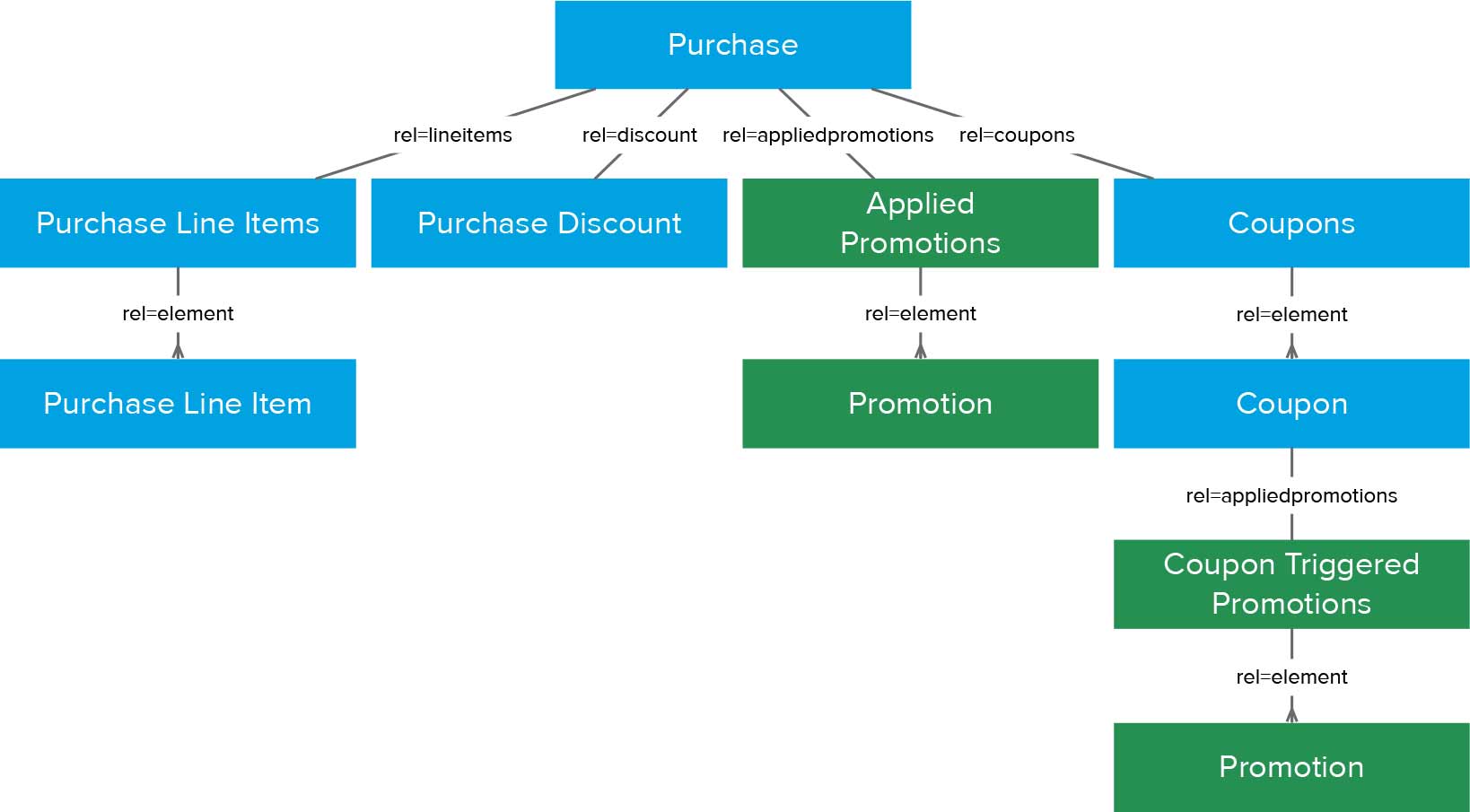
Purchase Pricing Resources
Purchase
The purchase resource has the following fields related to pricing:
montary-total: The grand total for the purchasetax-total: The total tax for the purchase
Zoom usage example: GET /purchases/{scope}/{id}
Purchase Discount
The discount applied to the purchase subtotal. This does not include discounts applied directly to a purchase line item.
Zoom usage example: GET /purchases/{scope}/{id}?zoom=discount
Purchase Line Item
The purchase lineitem resource has the following fields related to pricing:
line-extension-amount: The total price of the lineitem, excluding taxesline-extension-total: The total price of the lineitem including taxes
Zoom usage example: GET /purchases/{scope}/{id}?zoom=lineitems:element
Shipping Option
The shipping carrier’s cost for a purchase.
Zoom usage example: GET /purchases/{scope}/{id}?zoom=shipments:element:shippingoption
Purchase Promotion Resources
Promotions applied to purchase
The promotions applied to the purchase.
Zoom usage example:: GET /purchases/{scope}/{id}?zoom=appliedpromotions
Coupons applied to purchase
The coupons applied to the purchase.
Zoom usage example: GET /purchases/{scope}/{id}?zoom=coupons:element
Promotions Triggered By Coupons
The promotions triggered by coupons applied to the order when the purchase was made.
Zoom usage example: GET /purchases/{scope}/{id}?zoom=coupons:element:appliedpromotions:element
Example
The following is an example of a purchase receipt page that demonstrates how these resources could be used in a client application: