Maven Repository Manager
Overview
This section provides details on the Maven Repository Manager. The Maven Repository Manager is an essential component for team development of Maven based projects. The Maven Project site explains why and provides a list of available Repository Managers.
The release package does not contain all of the Maven artifacts that Elastic Path products depend on. The additional artifacts are available in Elastic Path Maven Repository.
Your Maven Repository Manager must be installed and running before you can complete the following steps.
Recommended Repository Structure
This section provides information on the repository structure for Elastic Path projects. Repositories are collections of the artifacts you reuse to build your software. The image below shows the repository structure for Elastic Path projects.
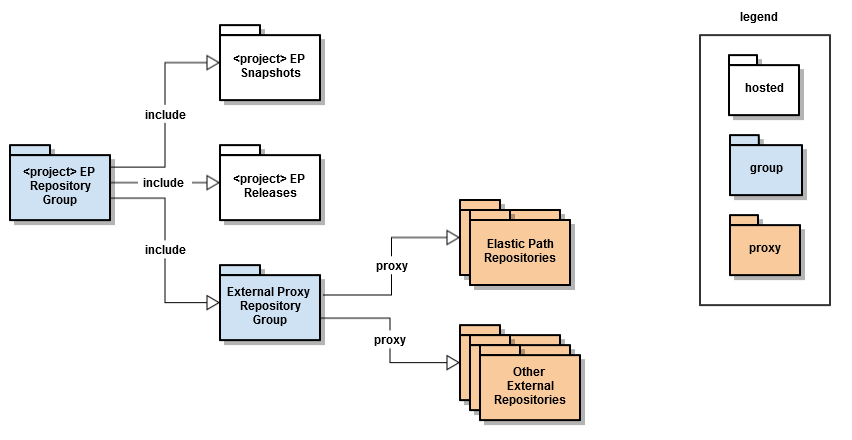
In the above image, the main repository group is the <project> EP Repository Group. You can get all of the dependencies to build Elastic Path from this group. Continuous integration builds deploy generated artifacts to either the <project> EP Snapshots or the <project> EP Releases repository, depending on whether the artifacts have SNAPSHOT or Release versions.
Proxy External Repositories
This section provides the proxy information for external Maven repositories.
Maven credentials are required to access the Elastic Path Maven repositories. To learn how to request Maven credentials, see https://community.elasticpath.com/product-support/p/nexus-maven-repo-access.
Maven Central
- Repository Format:
Maven2 - Repository Policy:
Release - Repository URL:
https://repo1.maven.org/maven2/ - Authentication: None
Elastic Path Public
- Repository Format:
Maven2 - Repository Policy:
Release - Repository URL:
https://repository.elasticpath.com/nexus/content/repositories/public/ - Authentication: Yes - Elastic Path Maven Repository Credentials
Elastic Path Cortex
- Repository Format:
Maven2 - Repository Policy:
Release - Repository URL:
https://repository.elasticpath.com/nexus/content/repositories/cortex/ - Authentication: Yes - Elastic Path Maven Repository Credentials
Self-Managed Commerce Engine
- Repository Format:
Maven2 - Repository Policy:
Release - Repository URL:
https://repository.elasticpath.com/nexus/content/repositories/commerce-engine/ - Authentication: Yes - Elastic Path Maven Repository Credentials
Elastic Path Accelerators
- Repository Format:
Maven2 - Repository Policy:
Release - Repository URL:
https://repository.elasticpath.com/nexus/content/repositories/accelerators/ - Authentication: Yes - Elastic Path Maven Repository Credentials
Java Net Repository For Maven
- Repository Format:
Maven2 - Repository Policy:
Release - Repository URL:
https://maven.java.net/content/repositories/releases/ - Authentication: None
Sonatype
- Repository Format:
Maven2 - Repository Policy:
Release - Repository URL:
https://repository.sonatype.org/content/groups/forge - Authentication: None
Springsource Bundles
- Repository Format:
Maven2 - Repository Policy:
Release - Repository URL:
https://repository.springsource.com/maven/bundles/external - Authentication: None
Springsource Milestone
- Repository Format:
Maven2 - Repository Policy:
Release - Repository URL:
https://maven.springframework.org/milestone/ - Authentication: None
Configuring Local Repositories and Groups
This section provides instructions to create local repositories and groups and build the repository hierarchy, after you configure all external proxies.
-
Create a hosted repository with a
snapshotpolicy as in the following example:<project> EP Snapshots -
Create a hosted repository with a
releasepolicy as in the following example:<project> EP Releases. -
Create a Proxy Repository Group.
-
Add all external proxies repositories to it in the order defined in the Proxy external repositories section.
-
Create a
<project> EP Repository Group. -
Add the hosted repositories and the Proxy Repository Group created in step 3 to the group created in step 5.
Setting Elastic Path Maven Repository Credentials
Access to the Elastic Path repositories require a valid username and password from Elastic Path.
When Nexus starts, click Repositories. The Elastic Path repositories have a status of In Service - Remote Automatically Blocked and Unavailable.
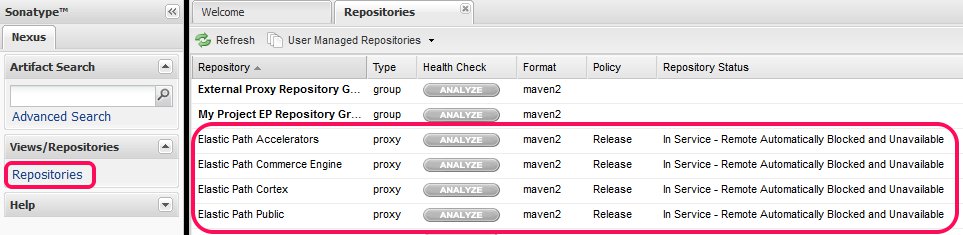
You must manually enter the username and password for each repository:
-
Select the repository from the Repositories list.
-
Click the Configuration tab.
-
Click the Authentication (optional) box.
The username and password panel appears.
-
Enter the Elastic Path username and password.
-
Click Save.
-
Click Refresh.
If the credentials are valid, the repository status changes to
In Service.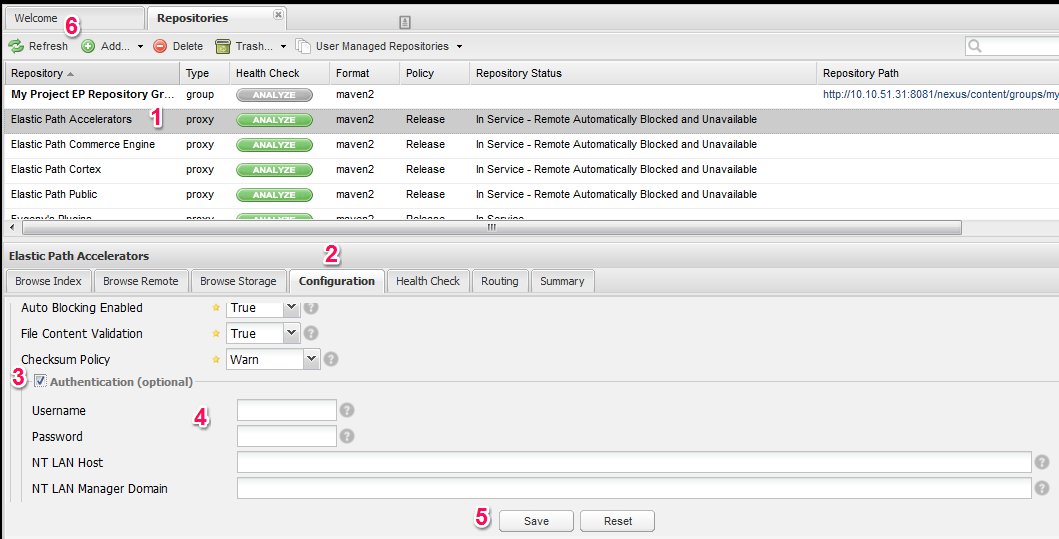
-
Make a note of the repository path for the
<project> EP Repository Group. You will need this URL when you update thesettings.xmlfile.
User Accounts
A user account with Maven artifact deployment privileges must be created for use by the continuous integration server to deploy build artifacts.