Data Population For Maven Environment
Architecture
The following diagram provides the high-level processes that are executed when the DataPopulationCore.runActionExecutor() command is run:
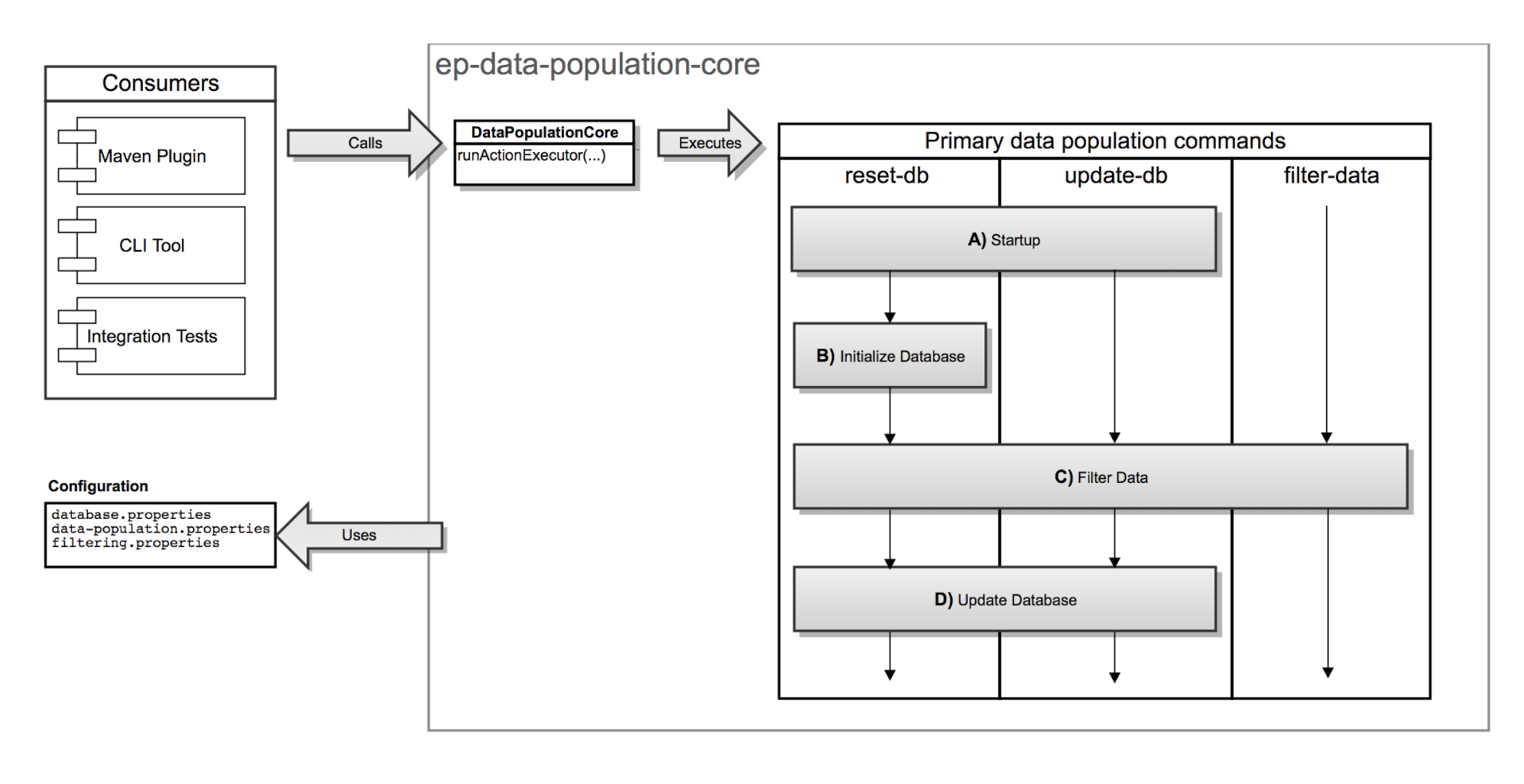
The following high-level actions implement the following functionality:
-
Starting up
- Creates a temporary working directory
- Identifies the type of database used and create a filtered copy of the
importexporttool.configfile, which is used to run the import/export tool during the database update action in the pipeline
-
Initializing the database
Executes the SQL (Structured Query Language) script or stored procedure that deletes and recreates the database.
-
Filtering data:
- Loads placeholder values from
filtering.propertiesfile and uses them to replace placeholders in all files contained in the<dataDirectory>/datadirectory - The filtered results are stored in the
workingDirectory. This step does not interact with the database
- Loads placeholder values from
-
Updating database:
Starts Liquibase to update the schema and populate the database. The following Liquibase change log files are filtered and copied to the
workingDirectoryand before processing them:<dataDirectory>/schema/schema-initializer-changelog.xml: Creates the schema for the Elastic Path database and processes any custom schema change set for the project<dataDirectory>/data/liquibase-changelog.xml: Stores all data related change logs for the project
The data-population-core-config.xml file specifies the sequence of running commands for data population.
Configuring Maven Settings
The configurations in the Settings.xml file in your local .m2 Maven repository manages the database connection properties for the development environment.
-
Open the
.m2/Settings.xmlfile. -
Update the appropriate database profile in the
<profiles>section with the schema name and credentials of the database. -
Ensure that this database profile is the only uncommented database profile in the
<activeProfiles>section.
MySQL
<profile>
    <id>mysql-dev-db</id>
    <properties>
        <data.population.environment>local</data.population.environment>
        <epdb.schemaname>epschema</epdb.schemaname>
        <epdb.username>epuser</epdb.username>
        <epdb.password>password</epdb.password>
        <epdb.reset_user>admin_user</epdb.reset_user>
        <epdb.reset_password>admin_password</epdb.reset_password>
    </properties>
</profile>
...
<activeProfiles>
        <!-- Uncomment one DB profile -->
        <activeProfile>mysql-dev-db</activeProfile>
        <!-- <activeProfile>oracle-dev-db</activeProfile> -->
        <!-- <activeProfile>h2-dev-db</activeProfile> -->
        ...
Oracle XE
<profile>
    <id>oracle-dev-db</id>
    <properties>
        <data.population.environment>local</data.population.environment>
        <epdb.schemaname>epschema</epdb.schemaname>
        <epdb.databasename>XE</epdb.databasename>
        <epdb.username>${epdb.schemaname}</epdb.username>
        <epdb.password>password</epdb.password>
        <epdb.reset_user>sys as sysdba</epdb.reset_user>
        <epdb.reset_password>sys_password</epdb.reset_password>
        <epdb.default.tablespace>users</epdb.default.tablespace>
        <epdb.temporary.tablespace>temp</epdb.temporary.tablespace>
     </properties>
</profile>
...
<activeProfiles>
        <!-- Uncomment one DB profile -->
        <!-- <activeProfile>mysql-dev-db</activeProfile> -->
        <activeProfile>oracle-dev-db</activeProfile>
        <!-- <activeProfile>h2-dev-db</activeProfile> -->
        ...
H2
<profile>
    <id>h2-dev-db</id>
    <properties>
        <data.population.environment>local</data.population.environment>
        <epdb.reset_user>sa</epdb.reset_user>
        <epdb.reset_password></epdb.reset_password>
    </properties>
</profile>
...
<activeProfiles>
        <!-- Uncomment one DB profile -->
        <!-- <activeProfile>mysql-dev-db</activeProfile> -->
        <!-- <activeProfile>oracle-dev-db</activeProfile> -->
        <activeProfile>h2-dev-db</activeProfile>
        ...
Configuring Local Environment Properties
When you set the data.population.environment property to local in the .m2/settings.xml, file, the Data Population Tool uses the properties in the extensions/database/ext-data/src/main/resources/environments/local directory.
Navigate to the extensions/database/ext-data/src/main/resources/environments/local folder and update the filtering.properties file with the default developer environment values.
The first time you use Data Population tool, you need not change the database.properties file or data-population.properties file.
You can override the values defined in the local/database.properties with the values defined in the settings.xml file.