Domain Layer
Overview
The domain layer contains an object model of the ecommerce domain. This object model consists of classes that model real-world entities such as customers and products. The behavior and relationships of these classes should be a reflection of the real-world entities. For example, customers have collections of addresses and products have references to price objects. As much as possible, domain objects should encapsulate their behavior so that the objects who collaborate with them are unaware of internal implementation details. Furthermore, domain objects should be kept relatively free from the constraints of frameworks, persistence, etc. so that they are a relatively pure expression of the domain.
The following sections cover key topics and design considerations in domain model development.
Key domain model interfaces
The following interfaces help define domain objects:
-
GloballyIdentifiableIdentifies an object that has a global identity field (GUID).
-
InitializableImplemented by domain objects that need to be able to init values for new instances separate from the default constructor.
-
PersistableRepresents objects that can be persisted.
-
EntityCombines
GloballyIdentifable,InitializableandPersistable. The majority of stored domain objects in Elastic Path are Entity objects. -
EpDomainDefines a non-stored domain object - combines
SerializableandInitializable
To create a new domain object, choose one of the abstract classes that implement the key domain classes.
AbstractEntityImpl: For uniquely identified objects that are stored in a databaseAbstractPersistableImpl: For objects to be stored in the database that don’t require a unique identifier. These objects are the leaf nodes in a domain object graph rather than root objects.AbstractEpDomainImpl: For transient domain objects that require internal access the to the bean factory.AbstractLegacyEntityImplandAbstractLegacyPersitenceImpl: For access to the bean factory for persistable objects.
How to create new instances of domain objects
In Elastic Path, domain objects can be instantiated by calling the BeanFactory’s getBean() method. (See the coreBeanFactory bean definition in conf/spring/models/domainModel.xml.) Many of the bean names that can be used in the bean name parameter are constants defined in ContextIdNames.java.
// Create a new instance of Customer
Customer myCustomer = (Customer) coreBeanFactory.getBean(ContextIdNames.CUSTOMER);
If you are adding a new domain object to the system, create a standard Spring bean definition and make sure it is defined with scope="prototype". Most prototype bean definitions can be found in conf/spring/prototypes/prototypes.xml
In some cases, you will need to declare multiple domain objects that are initialized with different property values. In this case, add the bean definition to domainModel.xml. Note that this way of declaring instances is used for all singleton service objects.
Domain object identity - UIDPK vs GUID
Domain objects in Elastic Path have two kinds of identifiers, a UIDPK and a GUID.
The UIDPK is a surrogate key which is generated by the OpenJPA table strategy automatically when a record is added to a table. After it is created, its value cannot be changed. In database tables, UID_PK is a unique primary key.
GUID is the acronym for Globally Unique IDentifier. In Elastic Path it is used as the general name for the identifier of an entity object. In most cases, the GUID is the natural key of an entity object. For example, the natural key of ProductSku is its SKU code, so the SKU code is the GUID for ProductSku objects. In other words, you can think of GUID as a generic name for identifier of entity object. However, some specific entities may have their own name for the same identifier, such as "SKU code."
The following table provides more comparison between the UIDPK and the GUID.
UIDPK | GUID | Comments | |
|---|---|---|---|
| Type | Integer | String | |
| Length | 32 bit or 64 bit | 255 byte (maximum) | |
| Scope | One system | Multiple systems | The same product might have differenct UIDPK in the staging and production database, but they will always have the same GUID. |
| Usage | Entity object or value object | Entity object | UIDPK is used to identify an entity or a value object in one system. It’s also used in associations(foreign key, etc.) between entities and value objects. GUID is only used to identify an entity. It can be used from in CRUD(Create Retrieve Update Delete) operations on an entity from other systems (e.g. web services and the import manager). |
| Generation | Automatically | Hybrid | You can call the setGuid() method to manually set a GUID. If you don’t manually set one, the GUID is assigned when you create a new entity. The default behavior is to allow the GUID to be automatically assigned. Unlike the UIDPK, a GUID can be changed after creation. |
| Aliases | N/A | Can have aliases for different entity objects | Examples: ORDER GUID is also called ORDER NUMBER. SKU GUID is also called SKU CODE. PRODUCT GUID is also called PRODUCT CODE. CATEGORY GUID is also called CATEGORY CODE. ATTRIUBTE GUID is also called ATTRIBUTE KEY. |
Bi-Directional Relationships
Avoid creating bi-directional relationships between parent objects and the child objects that they aggregate using a collection class. By avoiding bi-directional relationships we eliminate the complexity of maintaining the parent link when a child is added or removed from the collection.
In some cases the bi-directional relationship cannot be avoided. For example, ProductSku references Product because it must fall back to the product’s price when a client requests a price from the SKU but no price has been defined at the SKU level.
Domain Object Serialization
Generally, domain objects should be made serializable because they might be replicated from one application server to another in a clustered application server environment. To make a domain object serializable, it must implement the "Serializable" interface and all of its aggregated fields must be serializable.
public class FrequencyAndRecurringPrice implements Serializable {
    /**
     * Serial version id.
     */
    public static final long serialVersionUID = 5000000001L;

    private final Quantity frequency;
    private Money amount;
    private final String name;
  ...
}
The Persistable, Entity and EpDomain interfaces already extend Serializable.
Setting default field values for domain objects
There are three ways to set default values for domain object fields.
-
Set values in the domain object constructor
This technique is seldom used because the field initialization can no longer be controlled.
-
Field initializer declaration
This may be used for fields whose default values are cheap to create.
-
Make sure the object implements Initializable and set the values in the initialize() method
This is the preferred technique. Spring will call the initialize method during bean instantiation (thanks to
InitializableBeanPostProcessor)
Using initialize() is preferred because it can be used to control when default values are initialized. In production, it is wasteful to set expensive default values when creating new domain objects because they will typically be overwritten by the persistence layer immediately.
For example, Maps consume a lot of memory while computing fields like GUIDs and dates are CPU intensive. When running JUnit tests, however, we will need to set the default values so that the functionality can be tested without throwing NullPointerExceptions.
When setting default values in initialize(), check that the value has not yet been set before initializing fields.
@Override
public void initialize() {
  super.initialize();
  if (this.startDate == null) {
    this.startDate = new Date();
  }
  if (productCategories == null) {
    productCategories = new HashSet();
  }
  if (productPrices == null) {
    productPrices = new HashSet();
  }
  if (promotionPrices == null) {
    promotionPrices = new HashMap();
  }
  if (localeDependantFieldsMap == null) {
    localeDependantFieldsMap = new HashMap();
  }
  if (productSkus == null) {
    productSkus = new HashMap();
  }
}
Attributes
Attributes enable store administrators to customize product, category, or customer profile properties without having to change the code or database schema. For example, a store administrator can add a "Megapixels" attribute to digital cameras or a "Genre" attribute to movies.
Attributes support multiple languages, so you can give language-specific values to an attribute such as product description.
Key Classes
-
AttributeRepresents an attribute. For example, "Megapixels" or "Genre".
-
AttributeTypeRepresents an attribute type. For example, a "Product Description" attribute is a "Long Text" type.
-
AttributeGroupRepresents a group of attributes. For example, a movie SKU has a "Genre", and a "Product Description".
-
AttributeGroupAttributeWrapper for an Attribute in an AttributeGroup. Adds additional information, such as the ordering of the attributes in the attribute group.
-
AttributeUsageDefines the domain object the attribute is applied to. For example, a "Genre" is a "PRODUCT" attribute.
-
AttributeValueRepresents an attribute value. For example, "Action", "Comedy", "Horror".
-
AttributeValueGroupRepresents a group of AttributeValues. For example, a movie SKU has the AttributeValues "Action" and "This is a movie description."
-
CategoryTypeContains an AttributeGroup that applies to categories of this CategoryType.
-
ProductTypeContains two AttributeGroups that apply to products and SKUs of this ProductType. For example, a movie’s "Genre" attribute applies at the product level while the "Blu-ray" attribute applies at the SKU level.
-
AttributeMultiValueTypeSpecifies the encoding format of the attribute. See AttributeMultiValueType section
AttributeType
AttributeType declares the type of the attribute values that can be assigned to the attribute. The database uses AttributeType to determine how values are persisted.
Elastic Path supports 9 attribute types for Categories, Products, Product SKUs, and Customer Profiles:
| Attribute Type | Possible Values |
|---|---|
| Short Text | Up to 255 chars, supports multiple languages |
| Long Text | Up to 65535 chars, supports multiple languages |
Integer | Positive or negative integers |
Decimal | Positive or negative decimals |
Date | A date |
DateTime | A date and time |
| Image | An image file, such as BMP, JPEG, PNG, TIFF |
| File | A resource file |
Boolean | true or false |
AttributeMultiValueType
Certain attributes may have more than one value associated. For example, the attribute "colors" may contain "Red, Blue, Yellow". The attribute value is encoded as text and can be parsed back to its elements.
AttributeMultiValueType specifies the type of encoding used if the attribute is multi-valued.
The entire encoded text cannot be longer than 65535 characters.
There are three supported types:
AttributeMultiValueType | Database value | Import Export Data value | Effect |
|---|---|---|---|
| Single Value | 0 | false | Attribute is not a multi-value and does not need to be decoded |
| Legacy | 1 | true | Attribute is multi-valued where every value is separated by a comma. Values cannot contain commas. For example: 'Red, Blue, Yellow' decodes to { Red, Blue, Yellow } (list of 3 elements) |
| RFC-4180 (CSV, Comma Separated Values, Encoding) | 2 | rfc4180 | Attribute is multi-valued. Unlike Legacy encoding, values can contain commas. The value with the comma needs to be surrounded with escape quotations. For example 'Cengage, "Bar Publishing, Inc."' decodes to { Cengage, "Bar Publishing, Inc" } (list of 2 elements) |
By default, new multi-valued attributes will be in RFC-4180 compliant encoding.
Geography
When you need an internationalized list of countries and their corresponding sub-countries (states/provinces), you can use the com.elasticpath.domain.misc.Geography class.
Key classes and files
-
GeographyImplFor retrieving locale specific list of countries and sub-countries.
-
ApplicationThe bootstrapping class in
cmclient. -
ResourceRetrievalServiceImplService used by the cmclient rcp application to retrieve resources from the server remotely.
-
PropertiesDaoImplProvides loading mechanism of the properties files.
-
country.propertiesThis file lists the
ISO 3166-2country codes and their string values. -
subcountry.XX.propertiesThis file lists the
ISO 3166-2subregion codes and their string values.XXis theISO 3166-2country code for the subregions country
How the Geography Class works
The Geography class requires that the properties files containing geography information is loaded up into its properties map before use. This is done in the domainModel.xml using the com.elasticpath.persistence.dao.impl.GeographyPropertiesDaoLoaderFactoryImpl. This class reads the list of country and subcountry property files.
- On startup of the Commerce Manager application, the Spring context is loaded and set to
ServiceLocatorclass - The Geography singleton can be obtained using
ServiceLocator.getService(ContextIdNames.GEOGRAPHY)and can be used anywhere in CM to retrieve a map of countries with internationalized names.
geography.getCountryDisplayName(tax.getRegionCode(), Locale.getDefault());
Configuration
Properties files are stored under com.elasticpath.core/WEB-INF/conf/resources.
How Country Files Work
Country names and subregions are stored in two country properties files:
-
country.propertiesStores
ISO 3166-2country codes and the country string values. -
subcountry.XX.propertiesStores the subregions of the country defined in the country.properties file.
XXis theISO 3166-2country code for the for the subregion’s parent country
For example, Canada would be defined as CA=Canada in the country.properties and Canada’s subregions would be defined in the country.CA.properties file.
Country and Subregion Formats
country.properties follow this format: XX=COUNTRY. The first two letters XX is the ISO 3166-2 country code and COUNTRY is the value shown in Cortex and Commerce Manager. Example:
CA=Canada
BE=Belgium
subcountry.XX.properties follow this format: XX=SUBREGION. The first two letters XX is the ISO 3166-2 subregion code and SUBREGION is the value shown in Cortex and Commerce Manager. Example:
AB=Alberta
BC=British Columbia
Customizing the Display Order for Countries and Subregions
Countries and subregions are, by default, sorted and displayed alphabetically. You can customize the display order. To customize the Country order, define an index value for the country code.
As an example, if you wanted Canada to display first and Belgium to display second, you would write the following in country.properties:
1=CA
2=BE
CA=Canada
BE=Belgium
To customize the subregion order, define and index value for the subregion. For example, if you wanted Yukon to display first and then Saskatchewan to display second, you would write the following in country.CA.properties:
1=YT
2=SK
SK=Saskatchewan
YT=Yukon
Unexpected results may occur if the countries and subregions are not defined in the proper format.
Notes
-
To retrieve sub countries for a given country, you need to pass in the country code
-
Sub Countries are keyed by country code
Here’s a helper method to convert a country code from a country’s name if you already have the map of countries.
private String getCountryCode(final String country) {String code = "";if (countryMap \!= null) {Map.Entry<String, String> entry = null;for (final Iterator< ? > itr = countryMap.entrySet().iterator(); itr.hasNext();-) {entry = (Map.Entry) itr.next();if (entry.getValue().equalsIgnoreCase(country)){ code = entry.getKey();}}return code;}
Product
A Product domain object describes a purchasable item in the store, such as "Name: Canon PowerShot A80, Product Type: Camera, Brand: Canon, Release Date: March. 1 2012".
Products have SKUs (Stock Keeping Units), which represents a particular product configuration. For example, a silver Canon PowerShot A80. Products can have multiple SKUs that a customer can select. For information on the SKU selection process, see Guided Product Selection.
Product Properties
Product objects have the following properties:
startDate
Type: Date
The date the product becomes purchasable in the store.
endDate
Type: Date
The date the products is no longer purchasable in the store.
lastModifiedDate
Type: Date
The date when the product was last modified.
productType
Type: ProductType
The product’s collection of configurable SkuOptions.
productSkus
Type: Map<String, ProductSku>
The purchasable variations (SKUs) of a product.
productCategories
Type: Set<ProductCategory>
The categories the product belongs to.
localeDependentFieldsMap
Type: Map<Locale, LocaleDependantFields>
The map of localeDependentFields. Used for SEO (Search Engine Optimization).
brand
Type: Brand
The product’s brand.
defaultSku
Type: ProductSku
The product’s default SKU.
image
Type: String
The filename of the product’s main image.
hidden
Type: boolean
The indicator for whether a product is viewable in the store.
notSoldSeparately
Type: boolean
The indicator for whether a product cannot be sold outside of bundles.
salesCount
Type: int
The products total number of sales.
minOrderQty
Type: int
The minimum quantity of the product that is purchasable.
attributeValueGroup
Type: AttributeValueGroup
The wrapper for the attributeValueMap.
code
Type: String
The user defined product code that uniquely identifies the product.
taxCode
Type: TaxCode
The taxes to apply to the product.
attributeValueMap
Type: Map<String, AttributeValue>
The map of product AttributeValues.
uidPk
Type: long
The product’s UID generated by OpenJPA.
expectedReleaseDate
Type: Date
The date the product expects to be released.
availabilityCriteria
Type: AvailabilityCriteria
The property for whether a product could be on sale depending on stock quantity.
preOrBackOrderLimit
Type: int
The product’s limit on pre orders and back orders.
Performance-sensitive, locale-dependent data
Products are performance-sensitive since they are the central object accessed when a customer browses the catalog. For this reason, product data that is specific to a particular locale is stored in a special object called LocaleDependantFields.
LocaleDependentFields objects contain the following data:
URL
Type: String
The product’s search engine optimized URL.
displayName
Type: String
The product’s name.
keywords
Type: String
The product’s search keywords.
description
Type: String
The product’s description.
title
Type: String
The product’s title.
locale
Type: Locale
The LocaleDependentFields object’s locale.
To access the product’s LocaleDependentFields object for a particular locale, use the getLocaleDependantFields() method on product.
Attributes
Business users can extend a product by using attributes. For example, you may have a megapixels attribute for digital cameras. For more information on Attributes, see Attributes.
Accessing product attributes
An attribute is accessible from a product by using the attribute key, as shown in the following examples:
String myStringAttribute = (String) product.getAttributeValueGroup().getAttributeValue("myStringAttributeValueKey", Locale).getValue();
Date myDateAttribute = (Date) product.getAttributeValueGroup().getAttributeValue("myDateAttributeValueKey", Locale).getValue();
The AttributeValueGroup interface defines a convenience method for automatically returning String attribute values:
String myStringAttribute = product.getAttributeValueGroup().getStringAttributeValue("attributeValueKey", Locale);
Shopper
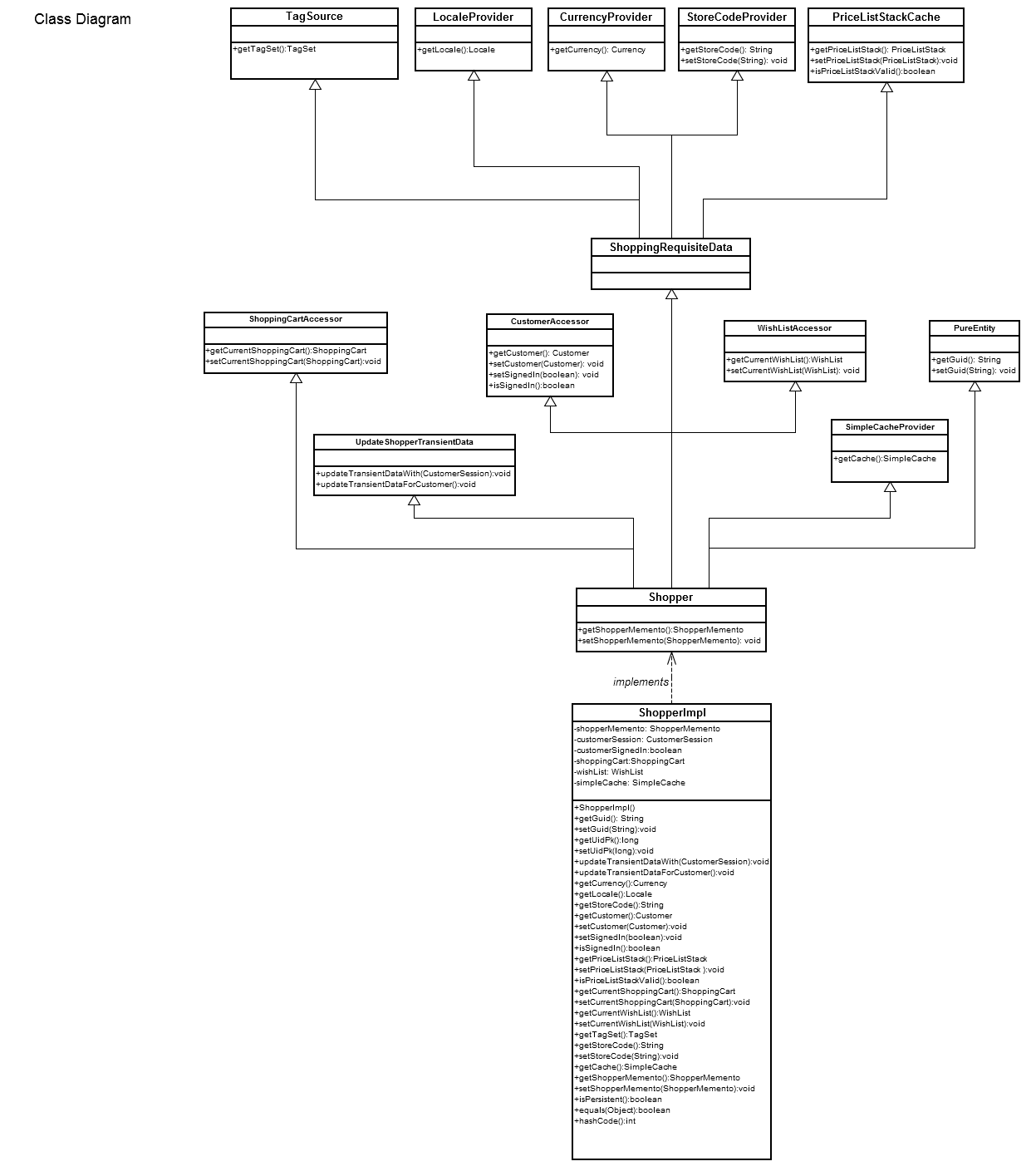
The Shopper class is the central hub for Customer Sessions, Customer profiles, Shopping cart, and Wish list. The shopper class is designed to reduce dependencies between customer sessions, customers, shopping carts, and wish lists. The following diagram shows a high-level view of the Shopper class’s relationships to other domain objects:

Shopper domain model:
Shopper Key Classes
The majority of Shopper-related classes are located in the core package (com.elasticpath.core) within the Shopper packages (com.elasticpath.service.shopper, com.elasticpath.domain.shopper)
Domain Classes
-
ShopperA shopper in the system; this is the key object for finding items related to the shopper such as shopping carts and wish lists. Aggregates the following interfaces:
-
ShoppingRequisiteDataConsolidates interfaces providing data required for
ShoppingCartoperations, including:PriceListStackCache- Provides access to a cached instance of aPriceListStackTagSource- Provides access toTagSetsLocaleProvider- Provides aLocaleCurrencyProvider- Provides aCurrencyStoreCodeProvider- Sets and returns thestoreCodefor a particularStore
-
CustomerAccessorProvides access to the
Customerattached to theShopper. -
ShoppingCartAccessorProvides access to the Shopping Cart attached to the
Shopper. -
WishListAccessorProvides access to the Wish List attached to the
Shopper. -
SimpleCacheProviderProvides access to an attribute cache; currently used for RuleIds (related to Promotion rules used in Shopping Cart.)
-
UpdateShopperTransientDataAn interface to update any of the transient Shopper data related to a
CustomerSessionorCustomer. -
PureEntityGUID setter and getter interface for domain entities
-
-
ShopperMementoPersistent data for the
Shopper. -
ShopperImplImplementation of the
Shopperinterface. -
ShopperKeySets and returns the
ShopperUIDfor aCustomerSession. -
ShopperRefrenceSets and returns the
Shopperfor aCustomerSession
Service Classes
-
ShopperDaoData Access Object interface for the
ShopperMemento -
ShopperDaoImplImplementation of the Shopper DAO.
-
ShopperServiceProvides methods for finding or storing the Shopper.
-
ShopperServiceImplImplementation of
ShopperServiceinterface. -
ShopperCleanupServiceSupports cleanup activities around Shopper.
-
ShopperCleanupServiceImplImplements the
ShopperCleanupServiceinterface. -
ShopperDependencyCleanupServiceCleans up Shopper dependents.
-
ShoppingCartCustomerSessionUpdaterUpdates the shopping cart with the customer session.
-
CustomerSessionShopperUpdateHandlerInterface implemented by classes that perform operations required when the Shopper is changed on the Customer Session. Includes:
-
PromotionCodeInvalidatorForShopperUpdatesClears promotions and coupons tied to the previous Shopper, and copies any public coupons.
-
ShoppingCartMergerForShopperUpdatesMerges Shopping Carts during Shopper changes.
-
WishListMergerForShopperUpdatesCombines Wish Lists during shopper changes.
-
CustomerConsentMergerForShopperUpdatesCombines customer consents when a shopper changes from anonymous user to shopper profile during the same session
-
Shopping Cart
The shopping cart domain object contains items a customer wants to buy and functions as an order form. The order form contains or calculates order information during the shopping and checkout.
Key classes and files
Classes related to shopping cart are found in the com.elasticpath.service.shoppingcart package in the /commerce-engine/ep-core module.
-
ShoppingCartRepresents the customer’s shopping cart.
-
CartDirectorResponsible for adding and updating items in and persisting the shopping cart.
-
ShoppingItemRepresents a quantity of an item (SKU) in a shopping cart, wish list, order, etc.
-
CartItemSubclass of
ShoppingItemrepresenting a quantity of a SKU in a shopping cart
Cart items
The products a customer wants to buy are kept in the ShoppingCart as a collection of CartItem objects. A CartItem represents a quantity of a specific product SKU that is to be purchased. A CartItem can also be thought of as a single row or line item on an order form.
A CartItem can have "child" cart items that are dependent on it. In this case, the items are to be displayed together and the child cart item cannot exist in the cart independently of its parent. Therefore, child cart items must be removed when the parent cart item is removed.
The ShoppingCart contains methods for adding and removing CartItem objects. Dependent cart items typically arise from the targets of ProductAssociation objects, and the cart contains a convenience method for adding a cart item from a product association.
Calculations
A major responsibility of the ShoppingCart is to compute values derived from the set of CartItem objects. Examples include the subtotal, total, taxes, and shipping costs.
Cart persistence
All shopping carts are persisted. After an item is added or removed, clients should request that the ShoppingCartService update the record of the shopping cart. However, only the cart items are saved. Upon retrieval from storage, several values may be recalculated, but selections such as the shipping method and billing address are no longer available. Therefore, a customer can continue shopping with a newly retrieved saved cart, but the checkout process must be restarted during each session.
Wish list
Wish list items are stored in the user’s WishList as a collection of ShoppingItem objects. A wish list item’s quantity is always equal to one. Wish list items are added to the wish list via the addSkuToWishList() method of in theCartDirector.
The WishListService is responsible for sending the wish list to others via the EmailService. When a shopper views a WishList, the system uses the viweWishList.vm file to render it.
Validation
Shopping cart and add-to-cart functionality are validated by classes in the com.elasticpath.service.shoppingcart.validation package. These validators all extend the Validator interface and return a collection of StructuredErrorMessage objects.
For more information on what validations are performed, see Add-to-cart and purchase validation.